
NextGate PONA Auth — EndPoint Doc (ACTIVE)
For more details on the full flow design: PONA Auth v3 Design Doc
What is PONA Auth?
Progressive · Onboarding · Native · Access
PONA Auth is NextGate's unified, phone-first authentication system. It replaces all legacy auth flows with a single coherent pipeline. Here is the coreCore philosophy:
- Phone is the primary identifier — always. Every account starts with a verified phone number. No exceptions.
- Passwordless by default — users authenticate via OTP. Password and OAuth are optional enhancements added post-registration.
- Progressive onboarding — only the bare minimum is collected upfront (phone + name + birthdate). Everything else (username, email, bio, interests, profile pic) is collected lazily when the feature needs it.
- One flow, two outcomes — the same endpoints serve both new and returning users. The server decides what happens based on
theaccount state.
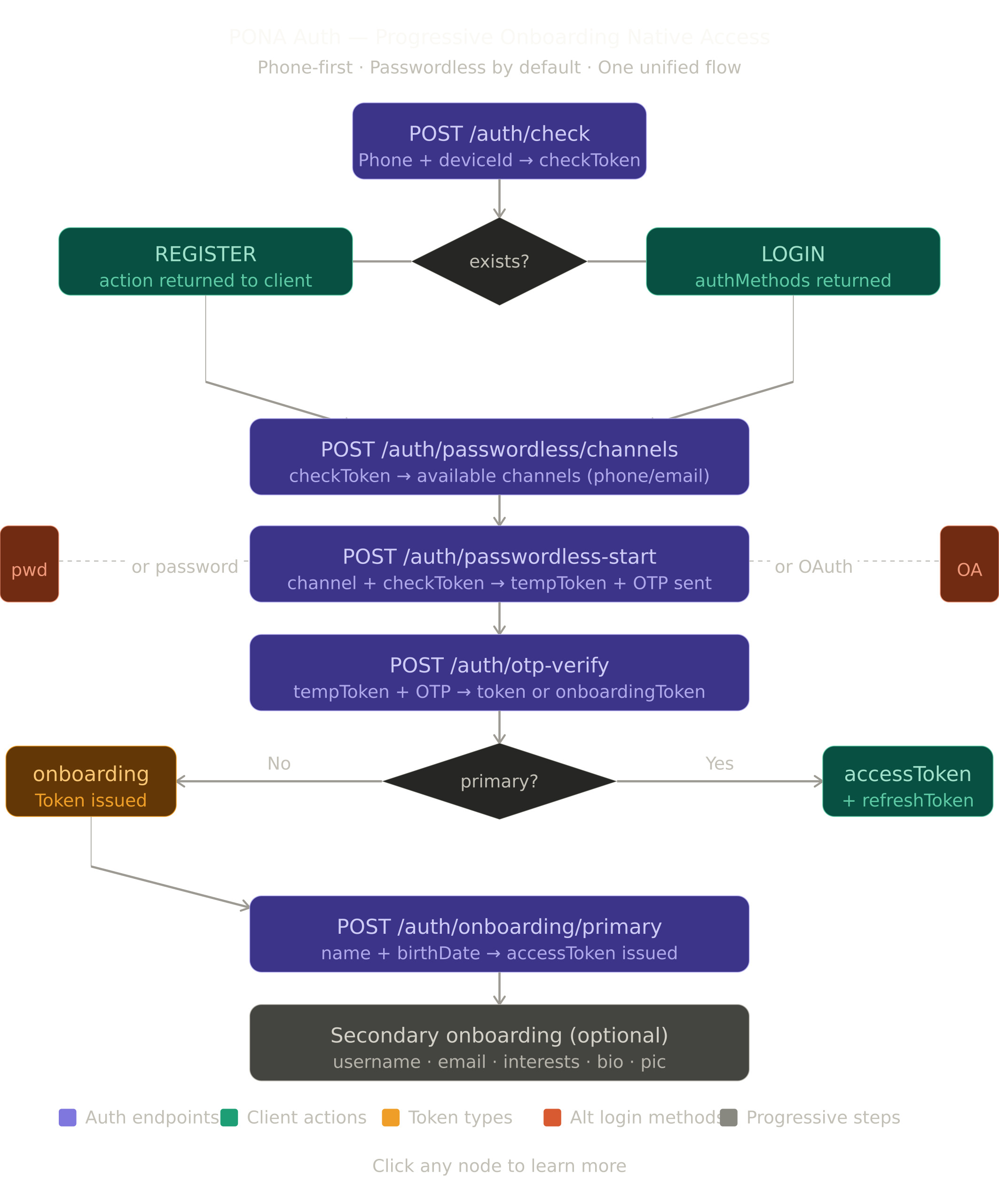
Token types at a glance
| Token | Expiry | Purpose |
|---|---|---|
checkToken |
10 min | Proves a phone check was made. Single-use. |
tempToken |
15 min | Carries the OTP session. Single-use after verify. |
onboardingToken |
1 hour | Issued after OTP verify for new users. Unlocks primary onboarding. |
accessToken |
1 hour | Standard bearer token. Attached to every protected request. |
refreshToken |
30 days | Rotates on use. Used to get a new accessToken silently. |
Secure storage — frontend requirements
This is critical.Store tokens incorrectly and the whole auth system is compromised.
| Token | Where to store | Why |
|---|---|---|
accessToken |
In-memory only (React state, Zustand, etc.) | Never localStorage — XSS can steal it |
refreshToken |
HttpOnly cookie (web) / Secure Keychain (mobile) | Never localStorage or AsyncStorage directly |
onboardingToken |
In-memory only | Short-lived, no need to persist |
checkToken |
In-memory only | Single-use, discard after consuming |
tempToken |
In-memory only | Single-use, discard after OTP verify |
Standard Response Format
Success response
{
  "success": true,
  "httpStatus": "OK",
  "message": "Human-readable message",
  "action": "ACTION_CODE",
  "action_time": "2026-04-03T10:30:45",
  "data": {}
}
Error response
{
  "success": false,
  "httpStatus": "BAD_REQUEST",
  "message": "Error description",
  "action_time": "2026-04-03T10:30:45",
  "data": "Error description"
}
Action codes — what the frontend should do next
| Code | Meaning | Next step |
|---|---|---|
REGISTER |
Phone not found — new user | Show registration UI, proceed to channels |
LOGIN |
Phone found — existing user | Show login UI, proceed to channels |
CONTINUE_ONBOARDING |
Phone found but primary incomplete | Proceed to channels → onboarding |
PROCEED_TO_OTP |
Only one channel available | Skip channel picker, send OTP automatically |
SELECT_CHANNEL |
Multiple channels available | Show channel picker to user |
COLLECT_PRIMARY |
OTP verified, primary data needed | Show name + birthdate form |
ACCOUNT_BLOCKED |
User is underage or blocked | Show blocked message with unblock date |
VERIFY_DEVICE |
Unknown device on password login | Show device OTP verification |
OTP Channels
OTP can be delivered via the following channels. Not all channels are available in every situation — the server enforces the rules.
Available channel values
| Value | Description | User selectable |
|---|---|---|
SMS |
OTP delivered via SMS | ✅ |
WHATSAPP |
OTP delivered via WhatsApp | ✅ |
SMS_AND_WHATSAPP |
OTP sent to both SMS and WhatsApp simultaneously | ✅ |
EMAIL |
OTP delivered via email | ✅ |
SMS_AND_WHATSAPPfires both sends in parallel on the server. The user gets the OTP on both channels at the same time. If one channel fails, the other still delivers.
EMAIL_AND_WHATSAPP,EMAIL_AND_SMS,ALL_CHANNELSare internal server-side values. Never send these from the client — they will be rejected.
Channel rules by purpose
| Channel | New user (registration) | Existing user (login) |
|---|---|---|
SMS |
✅ | ✅ |
WHATSAPP |
✅ | ✅ |
SMS_AND_WHATSAPP |
✅ | ✅ |
EMAIL |
❌ not allowed | ✅ only if account has a verified email |
Channel request examples
Send via SMS only:
{ "channel": "SMS" }
Send via WhatsApp only:
{ "channel": "WHATSAPP" }
Send via both SMS and WhatsApp at the same time:
{ "channel": "SMS_AND_WHATSAPP" }
Send via email (login only, verified email required):
{ "channel": "EMAIL" }
HTTP Method Badges
- GET — Read only
- POST — Create / action
- DELETE — Remove
Endpoints
1. Check Phone
Purpose: The entryEntry point for every auth flow. Checks if a phone number is registered and returns a checkToken plus the available auth methods.
Endpoint: POST {base_url}/auth/check
Access Level: 🌐 Public
Authentication: None
Request JSON Sample:
{
  "identifier": "+255745051250",
  "deviceId": "android-uuid-abc123"
}
Request Body Parameters:
| Parameter | Type | Required | Description | Validation |
|---|---|---|---|---|
identifier |
string | Yes | Phone number in international format | Must match ^\+[1-9]\d{6,14}$ |
deviceId |
string | Yes | Unique device identifier from the client | Non-empty |
Success Response — New User (REGISTER):
{
  "success": true,
  "httpStatus": "OK",
  "message": "Phone number not registered",
  "action": "REGISTER",
  "action_time": "2026-04-03T10:30:45",
  "data": {
    "exists": false,
    "checkToken": "eyJhbGciOiJIUzI1NiJ9...",
    "primaryComplete": false,
    "maskedPhone": null,
    "authMethods": null
  }
}
Success Response — Existing User (LOGIN):
{
  "success": true,
  "httpStatus": "OK",
  "message": "Welcome back",
  "action": "LOGIN",
  "action_time": "2026-04-03T10:30:45",
  "data": {
    "exists": true,
    "checkToken": "eyJhbGciOiJIUzI1NiJ9...",
    "primaryComplete": true,
    "maskedPhone": "••• ••• ••50",
    "authMethods": {
      "passwordless": true,
      "password": false,
      "google": true,
      "apple": false
    }
  }
}
Success Response — Existing User, Primary Incomplete:
{
  "success": true,
  "httpStatus": "OK",
  "message": "Continue setting up your account",
  "action": "CONTINUE_ONBOARDING",
  "action_time": "2026-04-03T10:30:45",
  "data": {
    "exists": true,
    "checkToken": "eyJhbGciOiJIUzI1NiJ9...",
    "primaryComplete": false,
    "maskedPhone": "••• ••• ••50",
    "authMethods": {
      "passwordless": true,
      "password": false,
      "google": false,
      "apple": false
    }
  }
}
Response Fields:
| Field | Description |
|---|---|
exists |
Whether the phone is registered |
checkToken |
Short-lived token to proceed. Always |
primaryComplete |
Whether the user has completed name + birthdate setup |
maskedPhone |
Masked phone for |
authMethods.passwordless |
Always true |
authMethods.password |
True if user has set a password |
authMethods.google |
True if Google is linked |
authMethods.apple |
True if Apple is linked |
Frontend handling:
action = REGISTER
  → store checkToken in memory
  show "Continue" or proceed directly to channels→ do NOT show a password field
  → do NOT show GoogleGoogle/Apple buttonbuttons
  → proceed to channel picker

action = LOGIN
  → store checkToken in memory
  show auth method buttons based on authMethods→ show Google button ONLY if authMethods.google = true
  → show Password button ONLY if authMethods.password = true
  → always show OTP button
  → proceed to channel picker

action = CONTINUE_ONBOARDING
  → same as LOGIN
  → user will be redirected to primary onboarding after OTP verify
Standard Error TypesErrors:
422 UNPROCESSABLE_ENTITY— invalid phone format or missing deviceId
2. Get Passwordless Channels
Purpose: Returns the available OTP delivery channels for the user. Always returns SMS and WHATSAPP for any phone account.WHATSAPP. EMAIL is returned only if the user has a verified email. Used to let the user choose how they want to receive their OTP.
Endpoint: POST {base_url}/auth/passwordless/channels
Access Level: 🌐 Public
Authentication: None
This endpoint does NOT consume the checkToken.
Request JSON Sample:
{
  "checkToken": "eyJhbGciOiJIUzI1NiJ9...",
  "deviceId": "android-uuid-abc123"
}
Request Body Parameters:
| Parameter | Type | Required | Description | |
|---|---|---|---|---|
checkToken |
string | Yes | Token from /auth/check | |
deviceId |
string | Yes | Must match the deviceId used in /auth/check |
Success Response — Phone only (SMS + WHATSAPP):
{
  "success": true,
  "httpStatus": "OK",
  "message": "Choose where to receive your code",
  "action": "SELECT_CHANNEL",
  "action_time": "2026-04-16T10:30:45",
  "data": {
    "channels": [
      { "channel": "SMS",      "masked": "••• ••• ••50", "isPrimary": true  },
      { "channel": "WHATSAPP", "masked": "••• ••• ••50", "isPrimary": false }
    ]
  }
}
Success Response — Phone + verified email (SMS + WHATSAPP + EMAIL):
{
  "success": true,
  "httpStatus": "OK",
  "message": "Choose where to receive your code",
  "action": "SELECT_CHANNEL",
  "action_time": "2026-04-16T10:30:45",
  "data": {
    "channels": [
      { "channel": "SMS",      "masked": "••• ••• ••50",      "isPrimary": true  },
      { "channel": "WHATSAPP", "masked": "••• ••• ••50",      "isPrimary": false },
      { "channel": "EMAIL",    "masked": "j••••••@g••••.com", "isPrimary": false }
    ]
  }
}
returns
ChannelThisfieldendpointvalues:individual primitive
channels only ValueDescription( SMSOTP delivered via SMS (SomaTech)OTP delivered via WhatsApp messageOTP delivered via email. Only present if user has a verified email.
SMSand,bothdeliverThetoSMS_AND_WHATSAPPthecompoundsamevaluephoneisnumbernot returned here — thedifferencefrontendisconstructs it when thedeliveryuserpipe. Themaskedvalue will be identical forwants both.Frontend handling:
Always showchannel picker — there will always beat least SMS and WHATSAPP.DisplayIftheEMAILchannelisnamepresent,andshowmaskeditdestination clearly. User taps their preferred channel. Then call /auth/passwordless-start with the selected channel value.too. SuggestedUI labels:UI: SMS → "Text message to ••• ••• ••50" WHATSAPP → "WhatsApp to ••• ••• ••50" EMAIL → "Email to j••••••@g••••.com" You can also show a "Send to both SMS and WhatsApp" option — send SMS_AND_WHATSAPP as the channel value in /auth/passwordless-start. User taps their choice, then call /auth/passwordless-start with that channel value.
Standard Error TypesErrors:
403 FORBIDDEN— invalid, expired, or already-used checkToken403 FORBIDDEN— deviceId mismatch
Note: This endpoint does NOT consume the checkToken. The checkToken stays valid for use in/auth/passwordless-start.
3. Start Passwordless OTP
Purpose: Sends an OTP to the chosen channel and returns a
tempTokenfor the verify step. Consumes thecheckToken.Endpoint: POST
{base_url}/auth/passwordless-startAccess Level: 🌐 Public
Authentication: None
Request
JSON—SampleSMS only:{ "checkToken": "eyJhbGciOiJIUzI1NiJ9...", "channel": "SMS", "deviceId": "android-uuid-abc123" }Request — WhatsApp only:
{
  "checkToken": "eyJhbGciOiJIUzI1NiJ9...",
  "channel": "WHATSAPP",
  "deviceId": "android-uuid-abc123"
}
Request
Body— Both SMS and WhatsApp simultaneously:{ "checkToken": "eyJhbGciOiJIUzI1NiJ9...", "channel": "SMS_AND_WHATSAPP", "deviceId": "android-uuid-abc123" }Request — Email (login only, verified email required):
{
  "checkToken": "eyJhbGciOiJIUzI1NiJ9...",
  "channel": "EMAIL",
  "deviceId": "android-uuid-abc123"
}
Request Parameters:
Parameter Type Required Description Validation checkTokenstring Yes Token from /auth/checkNon-empty channelenum Yes Where to send OTP SMS,orSMS_AND_WHATSAPP,deviceIdstring Yes Must match deviceId used infrom/auth/checkNon-empty
channelmust be one of the values returned by/auth/passwordless/channels. Do not hardcode — always use what the server returned.Channel rules
enforced server-side:
Channel New user ( REGISTRATION_OTP)registration)Existing user ( LOGIN_OTP)login)SMS✅ ✅ ✅ ✅ SMS_AND_WHATSAPP✅ ✅ ❌ not allowed✅ only if verified email exists
SuccessResponse:{ "success": true, "httpStatus": "OK", "message": "Verification code sent", "action_time": "2026-04-16T10:30:45", "data": { "tempToken": "eyJhbGciOiJIUzI1NiJ9...", "maskedDestination": "••• ••• ••50", "channel": "WHATSAPP"SMS_AND_WHATSAPP", "expiresInSeconds": 120, "resendAvailableAfterSeconds": 60 } }Response Fields:
Field Description tempTokenCarry this to /auth/. Store in memory only.otp-verifyverify-otpmaskedDestinationShow thisto the user so they know where OTP was sentchannelThe channel used — display appropriate message e.g. "Check your WhatsApp"expiresInSecondsOTP isvalid for this many seconds(120 = 2 min)resendAvailableAfterSecondsTell user to waitWait this long beforehittingenabling resendFrontend handling:
On success: → store tempToken in memory → show OTP input screen → display message based on channel: SMS → "Code sent to ••• ••• ••50 via SMS" WHATSAPP → "Code sent to ••• ••• ••50 via WhatsApp" SMS_AND_WHATSAPP → "Code sent to ••• ••• ••50 via SMS and WhatsApp" EMAIL → "Code sent to j••••••@g••••.com" → start countdown timer using resendAvailableAfterSeconds → enable resend button when timer hits0, enable resend button0 On resend: → channel is locked to the original choice → resend always goes to the samechannelchannel(s) → to switch channel, go back to the channel picker and restart the flow
Standard Error TypesErrors:
403 FORBIDDEN— checkToken invalid, expired, or already consumed400 BAD_REQUEST— EMAILchannelchosen but account has no verified email400 BAD_REQUEST—WHATSAPP orEMAIL chosen foraregistrationpurpose400thatBAD_REQUESTdoes—notnon-user-selectablesupportchannelitsent (e.g. ALL_CHANNELS)422 UNPROCESSABLE_ENTITY— invalid channel value
4. Verify OTP
Purpose: Validates the OTP and returns either an
accessToken(returninguser withuser, primary complete) or anonboardingToken(new or incomplete user).Endpoint: POST
{base_url}/auth/verify-otpAccess Level: 🌐 Public
Authentication: None
Request
JSON Sample:{ "tempToken": "eyJhbGciOiJIUzI1NiJ9...", "otp": "482910", "deviceName": "Josh's Pixel 4a", "platform": "ANDROID" }Request
BodyParameters:
Parameter Type Required Description Validation tempTokenstring Yes Token from /auth/passwordless-startNon-empty otpstring Yes 6-digit code from SMS, WhatsApp, or emailExactly 6 numeric digits deviceNamestring No Human-readable device name Optional, for device registryOptionalplatformstring No Client platform enum:ANDROID,IOS,WEB
SuccessResponse — Primary Complete(Login):{ "success": true, "httpStatus": "OK", "message": "Welcome back", "action": null, "action_time": "2026-04-03T10:30:45", "data": { "accessToken": "eyJhbGciOiJIUzI1NiJ9...", "refreshToken": "eyJhbGciOiJIUzI1NiJ9...", "onboardingToken": null, "primaryComplete": true, "onboarding": { "primaryComplete": true, "username": true, "email": false, "profilePic": false, "interests": false, "bio": false } } }
SuccessResponse — Primary Incomplete(New User or Returning, Incomplete):{ "success": true, "httpStatus": "OK", "message": "Phone verified. Let us set up your account.", "action": "COLLECT_PRIMARY", "action_time": "2026-04-03T10:30:45", "data": { "accessToken": null, "refreshToken": null, "onboardingToken": "eyJhbGciOiJIUzI1NiJ9...", "primaryComplete": false, "onboarding": { "primaryComplete": false, "username": false, "email": false, "profilePic": false, "interests": false, "bio": false } } }Frontend handling:
primaryComplete = true: → store accessToken in memory → store refreshToken in HttpOnly cookie (web) or Keychain (mobile) → discard tempToken → navigate to home/ main app→ check onboarding flags for secondary prompts primaryComplete = false: → store onboardingToken in memory → discard tempToken → navigate to primary onboarding screen→ do NOT store onboardingToken in localStorage
Standard Error TypesErrors:
403 FORBIDDEN— wrong OTP403 FORBIDDEN— OTP expired403 FORBIDDEN— max attempts exceeded (3 wrong OTPs)403 FORBIDDEN— tempToken already used
5. Resend OTP
Purpose: Resends the OTP to the same channel and destination as the original send. Channel cannot be changed on
resend — to switch channel, restart the flow from the channel picker.resend. Rate limited to 5 attempts per session with a 60-second cooldown.Endpoint: POST
{base_url}/auth/resend-otpAccess Level: 🌐 Public
Authentication: None
Request
JSON Sample:{ "tempToken": "eyJhbGciOiJIUzI1NiJ9..." }
Request Body Parameters:
ParameterTypeRequiredDescriptionValidationtempTokenstringYesCurrent tempToken from the OTP sessionNon-empty
SuccessResponse:{ "success": true, "httpStatus": "OK", "message": "OTP resent successfully", "action_time": "2026-04-03T10:30:45", "data": { "tempToken": "eyJhbGciOiJIUzI1NiJ9...", "maskedIdentifier": "••• ••• ••50", "remainingAttempts": 4, "expiresIn": 900 } }Frontend handling:
On success: → replace tempToken in memory with the new one from response → show "Code resent" confirmation → reset the countdown timer to resendAvailableAfterSeconds → disable resend button again On 400 — cooldown active: → show "Please wait X seconds" → do not clear the OTP input On 400 — max attempts: → show "Too many attempts. Please start over." → clear tempToken from memory → navigate back to channel picker→ to switch channel, user selects from the picker againChannel switching: → NOT possible via resend → user must go back to channel picker and call /auth/passwordless-start again→ this starts a fresh OTP session with the new channel
Standard Error TypesErrors:
400 BAD_REQUEST— cooldown period not yet elapsed400 BAD_REQUEST— max resend attempts (5) reached400 BAD_REQUEST— tempToken expired or invalid
6. Primary Onboarding
Purpose: Collects
the user'sname and date of birth.This completesCompletes primary onboarding and issues the firstaccessToken. Must be called with a valid.onboardingTokenEndpoint: POST
{base_url}/auth/onboarding/primaryAccess Level: 🌐 Public
Authentication: None (uses
onboardingTokenin body)Request
JSON Sample:{ "onboardingToken": "eyJhbGciOiJIUzI1NiJ9...", "firstName": "Joshua", "lastName": "Sakweli", "birthDate": "1995-06-15" }Request
BodyParameters:
Parameter Type Required Description Validation onboardingTokenstring Yes Token from /auth/otp-verifyverify-otpNon-empty firstNamestring Yes User's first name 1–50 characters lastNamestring Yes User's last name 1–50 characters birthDatestring Yes Date of birth in ISO formatYYYY-MM-DD, must be in the past
SuccessResponse — Normal User:{ "success": true, "httpStatus": "OK", "message": "Welcome to NextGate!", "action_time": "2026-04-03T10:30:45", "data": { "accessToken": "eyJhbGciOiJIUzI1NiJ9...", "refreshToken": "eyJhbGciOiJIUzI1NiJ9...", "accountTier": "FULL", "onboarding": { "primaryComplete": true, "username": false, "email": false, "profilePic": false, "interests": false, "bio": false }, "blocked": false, "unblockDate": null } }
SuccessResponse — Underage User(blocked):{ "success": true, "httpStatus": "OK", "message": "Account blocked", "action": "ACCOUNT_BLOCKED", "action_time": "2026-04-03T10:30:45", "data": { "accessToken": null, "refreshToken": null, "accountTier": null, "onboarding": null, "blocked": true, "unblockDate": "2026-09-15" } }Response Fields:
Field Description accessTokenBearer token. Store in memory. Null if blocked. refreshTokenRotation token. Store in HttpOnly cookie or Keychain.securely. Null if blocked.accountTierFULL(18+),RESTRICTED(13–17),MINOR(under 13 — blocked)onboarding.primaryCompleteAlways true after this endpoint succeedsonboarding.*Flags for secondary onboarding stepsblockedTrue if user is underage unblockDateDate when user turns 13. Show to user. Frontend handling:
blocked = false: → store accessToken in memory → store refreshToken securely → discard onboardingToken → navigate to home/ main app→ check onboardingflags: if username = false → promptflags forusernamesecondary(can be skipped) if interests = false → prompt for interests (can be skipped) etc.prompts blocked = true: → do NOT store any tokens → show age restriction screen→ displaywith unblockDateclearly→ do NOT allow navigationtointo the app accountTier = RESTRICTED: → user is 13–17 →somerestrict featuresmay be restricted inper yourUItier→ check your feature flags per tierconfig
Standard Error TypesErrors:
403 FORBIDDEN— onboardingToken invalid or expired(1 hour limit)403 FORBIDDEN— primary onboarding already completed422 UNPROCESSABLE_ENTITY— validation errors on name or birthDate
7. Password Login
Purpose: Authenticates a user with
theirphone +password combination.password. May require device verification if the device is unknown or risk is high.Endpoint: POST
{base_url}/auth/login/passwordAccess Level: 🌐 Public
Authentication: None
Request
JSON Sample:{ "checkToken": "eyJhbGciOiJIUzI1NiJ9...", "password": "MySecurePassword123", "deviceId": "android-uuid-abc123", "deviceName": "Josh's Pixel 4a", "platform": "ANDROID" }Request
BodyParameters:
Parameter Type Required Description Validation checkTokenstring Yes Token from /auth/checkNon-empty passwordstring Yes User's password Non-empty deviceIdstring Yes Device identifier Non-empty deviceNamestring No Human-readable device name Optional platformstring No Client platform enum:ANDROID,IOS,WEB
SuccessResponse — Known Device:{ "success": true, "httpStatus": "OK", "message": "Login successful", "action_time": "2026-04-03T10:30:45", "data": { "accessToken": "eyJhbGciOiJIUzI1NiJ9...", "refreshToken": "eyJhbGciOiJIUzI1NiJ9...", "onboarding": { "primaryComplete": true, "username": true, "email": false, "profilePic": false, "interests": true, "bio": false }, "requiresDeviceVerification": false, "deviceVerificationToken": null, "maskedDestination": null } }
SuccessResponse — Unknown / High Risk Device:{ "success": true, "httpStatus": "OK", "message": "Device verification required", "action": "VERIFY_DEVICE", "action_time": "2026-04-03T10:30:45", "data": { "accessToken": null, "refreshToken": null, "requiresDeviceVerification": true, "deviceVerificationToken": "eyJhbGciOiJIUzI1NiJ9...", "maskedDestination": "••• ••• ••50" } }Frontend handling:
requiresDeviceVerification = false:
  → store accessToken in memory
  → store refreshToken securely
  → navigate to home

requiresDeviceVerification = true:
  → store deviceVerificationToken in memory
  → show OTP input with maskedDestination
  → call POST /api/v1/account/device/verify with the OTP
  → on success you get accessToken + refreshToken
Standard Error TypesErrors:
403 FORBIDDEN— wrong password403 FORBIDDEN— checkToken invalid or expired403 FORBIDDEN— too many failed attempts— account temporarily locked403 FORBIDDEN— password not set on this account
8. OAuth Login
Purpose: Authenticates a user via Google or Apple. Only available if the
userproviderhaswas previously linkedthe providertotheir account. The client sendstheidTokendirectly — no server-side code exchange.account.Endpoint: POST
{base_url}/auth/login/oauthAccess Level: 🌐 Public
Authentication: None
Request
JSON Sample:{ "checkToken": "eyJhbGciOiJIUzI1NiJ9...", "provider": "GOOGLE", "idToken": "google-id-token-from-client-sdk", "deviceId": "android-uuid-abc123", "deviceName": "Josh's Pixel 4a", "platform": "ANDROID", "state": "optional-state-string" }Request
BodyParameters:
Parameter Type Required Description Validation checkTokenstring Yes Token from /auth/checkNon-empty providerstring Yes OAuth provider enum:APPLEidTokenstring Yes ID token from Google/Apple client SDK Non-empty deviceIdstring Yes Device identifier Non-empty deviceNamestring No Human-readable device name Optional platformstring No Client platform enum:ANDROID,IOS,WEBstatestring No Opaque state value passed back in response Optional
SuccessResponse:{ "success": true, "httpStatus": "OK", "message": "Login successful", "action_time": "2026-04-03T10:30:45", "data": { "accessToken": "eyJhbGciOiJIUzI1NiJ9...", "refreshToken": "eyJhbGciOiJIUzI1NiJ9...", "onboarding": { "primaryComplete": true, "username": true, "email": true, "profilePic": false, "interests": true, "bio": false }, "state": "optional-state-string" } }Frontend handling:
Before calling this endpoint: → check authMethods.google from /auth/check response → ONLY show Google button if google = true → ONLY show Apple button iffalse — do NOT show Google button at all → this prevents users from hitting the OAUTH_NOT_LINKED errortrue On success: → store accessToken in memory → store refreshToken securely → navigate to home
Standard Error TypesErrors:
403 FORBIDDEN—Google/Appleprovider not linkedto this account(OAUTH_NOT_LINKED)403 FORBIDDEN— idToken invalid or expired403 FORBIDDEN— idToken email does not match linked provider403 FORBIDDEN— checkToken invalid or expired
9. Forgot Password — Initiate
Purpose: Starts the forgot password flow. Sends an OTP to the user's phone via SMS.
Requires a validcheckTokenbut doesDoes NOT consumeit.the checkToken.Endpoint: POST
{base_url}/auth/password/forgot/initiateAccess Level: 🌐 Public
Authentication: None
Request
JSON Sample:{ "checkToken": "eyJhbGciOiJIUzI1NiJ9...", "deviceId": "android-uuid-abc123" }
Request Body Parameters:
ParameterTypeRequiredDescriptionValidationcheckTokenstringYesToken from/auth/checkNon-emptydeviceIdstringYesMust match deviceId from checkNon-empty
SuccessResponse:{ "success": true, "httpStatus": "OK", "message": "Password reset code sent to your phone", "action_time": "2026-04-03T10:30:45", "data": { "tempToken": "eyJhbGciOiJIUzI1NiJ9...", "resetToken": null, "maskedPhone": "••• ••• ••50", "accessToken": null, "expiresInSeconds": 120 } }Frontend handling:
→ store tempToken in memory → show OTP input screen → display maskedPhoneso user knows where OTP was sent→ proceed to /auth/password/forgot/verify-otp
Standard Error TypesErrors:
403 FORBIDDEN— checkToken invalid or expired403 FORBIDDEN— account has no password set— nothing to reset404 NOT_FOUND— account not found
10. Forgot Password — Verify OTP
Purpose: Verifies the OTP
from the forgot password flowand issues a short-livedresetToken.Endpoint: POST
{base_url}/auth/password/forgot/verify-otpAccess Level: 🌐 Public
Authentication: None
Request
JSON Sample:{ "tempToken": "eyJhbGciOiJIUzI1NiJ9...", "otp": "482910" }
Request Body Parameters:
ParameterTypeRequiredDescriptionValidationtempTokenstringYesToken from forgot password initiateNon-emptyotpstringYes6-digit code from SMSExactly 6 numeric digits
SuccessResponse:{ "success": true, "httpStatus": "OK", "message": "Identity confirmed. Set your new password.", "action_time": "2026-04-03T10:30:45", "data": { "tempToken": null, "resetToken": "eyJhbGciOiJIUzI1NiJ9...", "maskedPhone": null, "accessToken": null, "expiresInSeconds": 0 } }Frontend handling:
→ discard tempToken from memory → store resetToken in memory → navigate to new password input screen→ proceed to /auth/password/forgot/reset
Standard Error TypesErrors:
403 FORBIDDEN— wrong OTP403 FORBIDDEN— OTP expired403 FORBIDDEN— max OTP attempts exceeded
11. Forgot Password — Reset
Purpose: Sets the new password. Revokes all existing sessions and issues a fresh
accessToken.Endpoint: POST
{base_url}/auth/password/forgot/resetAccess Level: 🌐 Public
Authentication: None
Request
JSON Sample:{ "resetToken": "eyJhbGciOiJIUzI1NiJ9...", "newPassword": "MyNewSecurePassword456", "confirmPassword": "MyNewSecurePassword456" }Request
BodyParameters:
Parameter Type Required Description Validation resetTokenstring Yes Token from verify OTP step Non-empty newPasswordstring Yes New password Min 8 characters confirmPasswordstring Yes Must match newPassword Non-empty
SuccessResponse:{ "success": true, "httpStatus": "OK", "message": "Password updated. All other sessions signed out.", "action_time": "2026-04-03T10:30:45", "data": { "accessToken": "eyJhbGciOiJIUzI1NiJ9...", "resetToken": null, "maskedPhone": null, "expiresInSeconds": 0 } }Frontend handling:
→ discard resetToken from memory → store accessToken in memory → clear any existing refreshToken from storage → navigate to home → show "Password updated successfully"confirmation
Standard Error TypesErrors:
400 BAD_REQUEST— passwords do not match403 FORBIDDEN— resetToken invalid or expired422 UNPROCESSABLE_ENTITY— password too short
12. Refresh Token
Purpose: Exchanges a refresh token for a new access
token+ refresh token pair.Implements token rotation — the oldOld refresh token is invalidatedimmediately.immediately (rotation).Endpoint: POST
{base_url}/auth/token/refreshAccess Level: 🌐 Public
Authentication: None
Request
JSON Sample:{ "refreshToken": "eyJhbGciOiJIUzI1NiJ9..." }
Request Body Parameters:
ParameterTypeRequiredDescriptionValidationrefreshTokenstringYesCurrent refresh tokenNon-empty
SuccessResponse:{ "success": true, "httpStatus": "OK", "message": "Token refreshed", "action_time": "2026-04-03T10:30:45", "data": { "accessToken": "eyJhbGciOiJIUzI1NiJ9...", "refreshToken": "eyJhbGciOiJIUzI1NiJ9...", "expiresIn": 3600 } }Frontend handling:
Call thisendpointwhen: → accessToken is expired (you get401 onanya protected request) → proactively before expiry (check exp claim in JWT) On success: → replace accessToken in memorywith new one→ replace refreshToken in secure storagewith new one→ retry the original failed request On401 — refresh token invalid/revoked:401: → clear all tokensfrom memory and storage→ redirect to loginscreen
Standard Error TypesErrors:
13. Revoke Token
Purpose: Logs out the user by revoking their refresh token.
Endpoint: POST
{base_url}/auth/token/revokeAccess Level: 🌐 Public
Authentication: None
Request
JSON Sample:{ "refreshToken": "eyJhbGciOiJIUzI1NiJ9..." }
Request Body Parameters:
ParameterTypeRequiredDescriptionValidationrefreshTokenstringYesThe refresh token to revokeNon-empty
SuccessResponse:{ "success": true, "httpStatus": "OK", "message": "Token revoked successfully", "action_time": "2026-04-03T10:30:45", "data": null }Frontend handling:
On logout: → call this endpoint with the stored refreshToken → clear accessToken from memory → clear refreshToken from secure storage → redirect to loginscreenIf call fails (network error): → still clear tokens locally → user is effectively logged out on the client
Quick Reference — Full Auth Flow
1. POST /auth/check → phone + deviceId → checkToken + action 2. POST /auth/passwordless/channels (use checkToken,does not consumeit)checkToken) → returns available channels: SMS, WHATSAPP, and optionally EMAIL 3. POST /auth/passwordless-start (consumes checkToken) → channel (SMS | WHATSAPP | SMS_AND_WHATSAPP | EMAIL) → tempToken + OTP sent 4. POST /auth/verify-otp (consumes tempToken) → otp → accessToken (returning)returning user) or onboardingToken (new)new user) 5. POST /auth/onboarding/primary (if onboardingToken received) → name + birthDate → accessToken issued ─── User is now logged in ─── 6. Secondary onboarding (optional, progressive) → username, email, interests, bio, profile pic → each step returns new accessToken with updated onboarding flags ─── Token management ─── 7. POST /auth/token/refresh → rotate tokens silently 8. POST /auth/token/revoke → logout
Error Handling Summary
HTTP Status When it happens What to do 400 BAD_REQUESTInvalid input, item exists, rate limit Show error message to user 401 UNAUTHORIZEDToken expired or invalid Refresh token or redirect to login 403 FORBIDDENWrong OTP, wrong password, token mismatch Show specific error, let user retry 404 NOT_FOUNDAccount not found Show "Account not found" 422 UNPROCESSABLE_ENTITYValidation failed Show field-level errors 500 INTERNAL_SERVER_ERRORServer error Show generic error, retry