NexGate Platfom (Entry)
Social Commerce Platform (Intro)
Nexgate is a unified social commerce platform that combines eCommerce, event management, and social networking into a single ecosystem. Built for the East African market, Nexgate enables users to buy, sell, connect, and experience — all in one place.
The Concept
Nexgate reimagines how commerce happens online. Instead of separating shopping, events, and social media into different apps, Nexgate brings them together.
User creates → Product or Event → Posts to Social → Followers see in feed → Purchase or Book
A product isn't just listed in a shop — it's shared, liked, and commented on. An event isn't just a ticket page — it's a post that spreads organically through your network.
Platform Architecture
Nexgate follows a microservices architecture with nine independent services communicating via RabbitMQ message broker and backed by PostgreSQL databases.
Core Services
- Authentication — User registration, login, JWT tokens, OAuth, device management
- User Profile — Profiles, followers/following, privacy settings, trust scores
- File Manager — Media uploads, image processing, BlurHash, video transcoding via FFmpeg
- Payment — Payment methods, M-Pesa/Selcom/Tembo Plus integration, escrow, transactions
- Direct Message — Real-time private messaging, conversations, media sharing
Business Services
- E-Commerce — Shops, products, orders, cart, checkout, reviews, seller verification
- E-Events — Event creation, ticketing, RSA-signed tickets, check-ins, organizer ratings
- E-Social — Posts, feeds, likes, comments, reposts, polls, mentions, hashtags
External Service
- Notification — Push notifications, in-app alerts, email, SMS (async via RabbitMQ)
Architecture Diagram
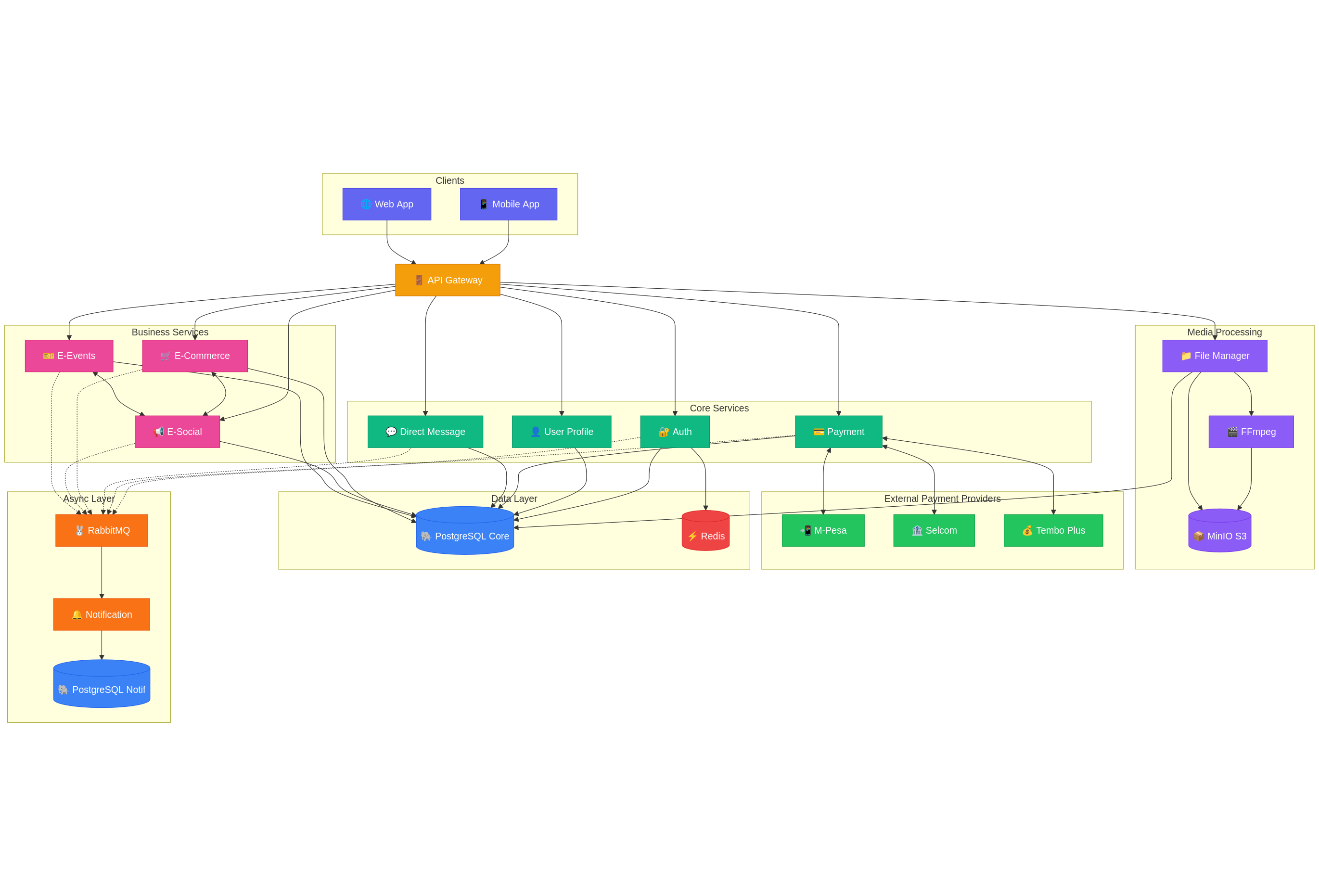
Service Relationships
| Service | Role | Connects To |
|---|---|---|
| Authentication | Identity, tokens, sessions | Redis, PostgreSQL Core, RabbitMQ |
| User Profile | Profiles, follows, trust scores | PostgreSQL Core, RabbitMQ |
| File Manager | Media uploads, processing | FFmpeg, MinIO, PostgreSQL Core |
| Payment | Transactions, escrow | M-Pesa, Selcom, Tembo Plus, PostgreSQL Core, RabbitMQ |
| Direct Message | Private conversations | PostgreSQL Core, RabbitMQ |
| E-Commerce | Shops, products, orders | E-Social (embed products in posts), PostgreSQL Core, RabbitMQ |
| E-Events | Events, tickets, check-ins | E-Social (embed events in posts), PostgreSQL Core, RabbitMQ |
| E-Social | Posts, feeds, interactions | E-Commerce, E-Events (receives embeds), PostgreSQL Core, RabbitMQ |
| Notification | Push, email, SMS | RabbitMQ (consumes events), PostgreSQL Notif |
Data Flow Summary
| Flow | Path |
|---|---|
| User creates product | E-Commerce → Post to E-Social → Followers see in feed |
| User creates event | E-Events → Post to E-Social → Followers see in feed |
| User uploads media | File Manager → FFmpeg (if video) → MinIO → BlurHash generated |
| User makes payment | Payment → External Provider (M-Pesa/Selcom/Tembo) → Callback → Update order |
| Any action triggers notification | Service → RabbitMQ → Notification Service → Push/Email/SMS |
Infrastructure Components
| Component | Purpose |
|---|---|
| PostgreSQL (Core) | Shared DB for Auth, User, File, Payment, DM, E-Commerce, E-Events, E-Social |
| PostgreSQL (Notif) | Separate DB for Notification service |
| Redis | Session storage, caching, rate limiting |
| RabbitMQ | Async messaging, triggers notifications |
| MinIO | S3-compatible object storage for all media |
| FFmpeg | Video transcoding, thumbnails, compression |
Tech Stack
| Layer | Technology |
|---|---|
| Backend | Java 21, Spring Boot 3.x |
| Database | PostgreSQL (Core + Notification) |
| Cache | Redis |
| Messaging | RabbitMQ |
| Storage | MinIO (S3-compatible) |
| Media Processing | FFmpeg |
| Payments | M-Pesa, Selcom, Tembo Plus |
| Security | JWT, RSA signatures, device fingerprinting |
Services Requrements
Core Services
1. Authentication Service
Handles all identity and access management for the platform.
What it does:
- User registration (email, phone, social OAuth)
- Login/logout with JWT token generation
- Access token & refresh token management
- Password reset and email verification
- Device management and tracking
- Session management via Redis
- Multi-factor authentication support
Key concepts:
- Tokens are short-lived (access) + long-lived (refresh)
- Each device is fingerprinted and tracked
- Failed login attempts trigger rate limiting
- OAuth supports Google, Apple, Facebook
2. User Profile Service
Manages user identity, relationships, and platform reputation.
What it does:
- Profile creation and editing (bio, avatar, cover photo)
- Username and display name management
- Follow/unfollow functionality
- Followers and following lists
- Block and mute users
- Privacy settings (public/private account)
- Trust score calculation for sellers and organizers
- Account verification status
Key concepts:
- Private accounts require follow approval
- Trust scores build over time based on transactions and feedback
- Blocking hides all content bidirectionally
- Profiles link to shops (E-Commerce) and organizer pages (E-Events)
3. File Manager Service
Central media handling for the entire platform.
What it does:
- Image uploads with compression and resizing
- Video uploads with FFmpeg transcoding
- BlurHash generation for image placeholders
- Multiple format support (JPEG, PNG, WebP, MP4, MOV)
- Thumbnail generation for videos
- File validation (size limits, type checking)
- CDN-ready URL generation via MinIO
- Parallel upload processing for multiple files
Key concepts:
- All media goes through this service regardless of source (posts, products, events, messages)
- Videos are transcoded to web-optimized formats
- BlurHash provides instant low-res preview while full image loads
- Files are stored in MinIO with organized bucket structure
4. Payment Service
Handles all money movement on the platform.
What it does:
- Payment method management (add/remove cards, mobile money)
- M-Pesa, Selcom, Tembo Plus integration
- Payment initiation and callback processing
- Escrow system for marketplace transactions
- Escrow release upon delivery confirmation or event completion
- Refund processing
- Transaction history and receipts
- Payout to sellers and organizers
Key concepts:
- Escrow protects buyers — money is held until satisfaction
- Event payments release after event completes with good feedback
- Product payments release after delivery confirmation
- All transactions are logged for audit and dispute resolution
5. Direct Message Service
Private real-time communication between users.
What it does:
- One-on-one conversations
- Group conversations
- Text messages
- Media sharing (images, videos via File Manager)
- Read receipts and typing indicators
- Message reactions
- Conversation muting
- Message search
Key concepts:
- Messages are stored persistently
- Blocked users cannot send messages
- Media in DMs goes through File Manager
- Supports future WebSocket integration for real-time delivery
Business Services
6. E-Commerce Service
Full marketplace functionality for buying and selling products.
What it does:
- Shop creation and management
- Product listing with variants (size, color, etc.)
- Inventory tracking
- Shopping cart management
- Multiple checkout options (see below)
- Order management and status tracking
- Delivery address management
- Product reviews and ratings
- Seller verification and trust badges
- Wishlist/saved items
Purchase Options:
| Type | Description |
|---|---|
| Individual | Buy single item, standard checkout |
| Quantity-based | Buy multiple units, bulk pricing available |
| Group Buy | Multiple buyers join to unlock discount, minimum participants required |
| Buy Together | Friends pool money for shared purchase (gifts, shared items) |
| Installment | Pay in scheduled parts, product released after full payment or based on seller terms |
Key concepts:
- Group buy has deadline and minimum participant threshold
- Installment plans are configured per product by seller
- Buy together splits payment among participants
- All payments go through escrow until delivery confirmed
- Sellers build trust score through successful transactions
7. E-Events Service
Complete event management from creation to check-in.
What it does:
- Event creation with draft system (step-by-step)
- Ticket type management (free, paid, VIP, early bird)
- Ticket quantity and availability tracking
- RSA-signed secure tickets (QR code)
- Check-in system with multiple methods
- Attendee management
- Event analytics (views, sales, check-ins)
- Organizer ratings and reviews
- Refund handling for cancelled events
Event Types:
| Type | Description |
|---|---|
| In-Person | Physical location, requires venue details and check-in |
| Online | Virtual event, streaming link provided to ticket holders |
| One-Time | Single date/time event |
| Multi-Day | Spans multiple days (festivals, conferences), each day can have separate check-in |
Check-in System:
| Method | Use Case |
|---|---|
| Mobile App Scan | Organizer uses Nexgate app to scan attendee QR |
| Ticket Scanner Machine | Hardware scanner integration via API |
| Manual Entry | Enter ticket code manually for backup |
| Self Check-in Kiosk | Attendee scans own ticket at kiosk |
Key concepts:
- One draft at a time per user (prevents abandoned drafts piling up)
- Tickets are RSA-signed to prevent forgery
- Multi-day events track check-in per day
- Online events auto-deliver streaming link after purchase
- Escrow holds payment until event completes successfully
- Bad events (cancellation, poor feedback) affect organizer trust score
8. E-Social Service
What it does:
- Post creation (text, images, videos)
- Product embeds in posts (from E-Commerce)
- Event embeds in posts (from E-Events)
- Feed generation (following, trending, discover)
- Like, comment, repost interactions
- Bookmarks/save posts
- Polls with voting
- Mentions: @users, $shops
- Hashtags (#topics)
- Collaborative posts (multiple authors)
- Scheduled posting
- Post visibility controls (public, followers only)
Post Types:
| Type | Description |
|---|---|
| Standard | Text + optional media |
| Product Post | Embedded product card, click to buy |
| Event Post | Embedded event card, click to book |
| Poll | Question with voting options, timed or open |
| Collaborative | Multiple users co-author, shared credit |
| Repost | Share another post with optional comment |
Key concepts:
External Service
9. Notification Service
Async notification delivery across all channels.
What it does:
- Push notifications (mobile/web)
- In-app notification center
- Email notifications
- SMS notifications
- Notification preferences management
- Read/unread status tracking
- Notification grouping (batch similar notifications)
- Scheduled notifications
- Delivery status tracking
How it works:
Any Service → Event → RabbitMQ → Notification Service → Deliver
Notification service is fully decoupled. It only listens to RabbitMQ events and decides how to notify based on user preferences.
Notification Triggers:
| Source | Events |
|---|---|
| Auth | Welcome, password reset, new device login, suspicious activity |
| User Profile | New follower, follow request (private account), mention |
| Direct Message | New message, message reaction |
| E-Commerce | Order placed, order shipped, order delivered, payment received (seller), review received, group buy progress, installment reminder |
| E-Events | Ticket purchased, event reminder, event cancelled, check-in confirmation, event starting soon |
| E-Social | Like, comment, repost, mention (@user), shop mention ($shop), poll ended, collaborative post invite |
| Payment | Payment successful, payment failed, escrow released, refund processed, payout sent |
User Preferences:
| Setting | Options |
|---|---|
| Push | All, important only, none |
| All, digest (daily/weekly), none | |
| SMS | Critical only (payments, security), none |
| Quiet hours | Disable notifications during set hours |
| Per-type toggle | Enable/disable specific notification types |
Key concepts:
- User controls what they receive and how
- Critical notifications (security, payments) bypass quiet hours
- Similar notifications are grouped (e.g., "5 people liked your post")
- Failed deliveries are retried with exponential backoff
- Separate database to not impact core service performance