# NextGate PONA Auth — EndPoint Doc (ACTIVE)
**Author**: Josh S. Sakweli, Backend Lead — QBIT SPARK CO LIMITED
**Last Updated**: 2026-04-19
**Version**: v1.2
**Base URL**: `https://your-api-domain.com/api/v1`
**For more details on the full flow design**: [PONA Auth v3 Design Doc](https://doc-hub.qbitspark.com/books/authentication-nexgate-service1/page/nextgate-pona-auth-flow-v3-progressive-onboarding-native-access#bkmrk-%2Fauth%2Fcheck-%E2%80%94-existi)
---
## What is PONA Auth?
**P**rogressive · **O**nboarding · **N**ative · **A**ccess
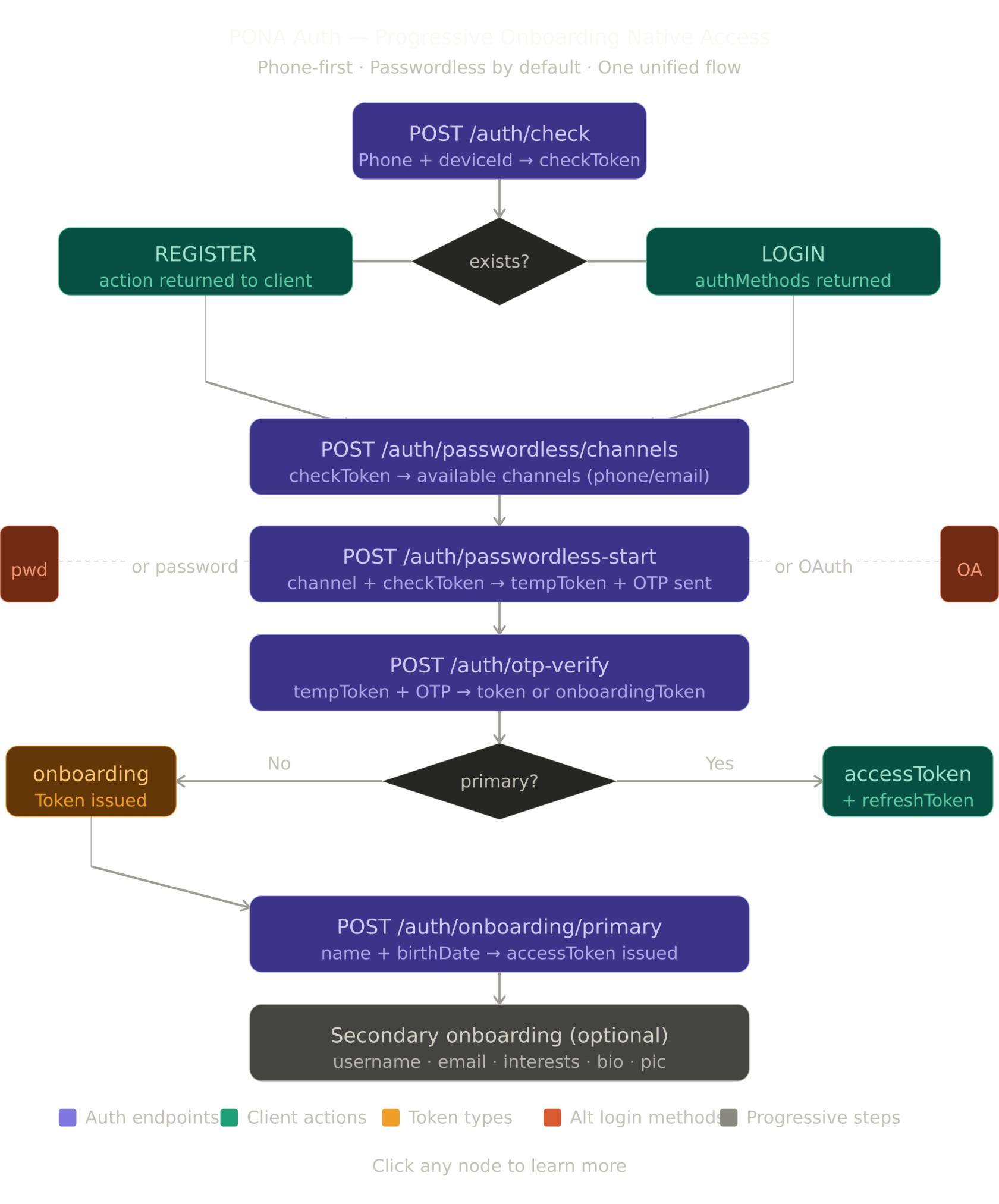
PONA Auth is NextGate's unified, phone-first authentication system. It replaces all legacy auth flows with a single coherent pipeline. Core philosophy:
- **Phone is the primary identifier** — always. Every account starts with a verified phone number. No exceptions.
- **Passwordless by default** — users authenticate via OTP. Password and OAuth are optional enhancements added post-registration.
- **Progressive onboarding** — only the bare minimum is collected upfront (phone + name + birthdate). Everything else (username, email, bio, interests, profile pic) is collected lazily when the feature needs it.
- **One flow, two outcomes** — the same endpoints serve both new and returning users. The server decides what happens based on account state.
[](https://doc-hub.qbitspark.com/uploads/images/gallery/2026-04/pona-auth-flow-diagram.jpg)
### Token types at a glance
| Token | Expiry | Purpose |
|-------|--------|---------|
| `checkToken` | 10 min | Proves a phone check was made. Single-use. |
| `tempToken` | 15 min | Carries the OTP session. Single-use after verify. |
| `onboardingToken` | 1 hour | Issued after OTP verify for new users. Unlocks primary onboarding. |
| `accessToken` | 1 hour | Standard bearer token. Attached to every protected request. |
| `refreshToken` | 30 days | Rotates on use. Used to get a new accessToken silently. |
### Secure storage — frontend requirements
> Store tokens incorrectly and the whole auth system is compromised.
| Token | Where to store | Why |
|-------|---------------|-----|
| `accessToken` | In-memory only (React state, Zustand, etc.) | Never localStorage — XSS can steal it |
| `refreshToken` | HttpOnly cookie (web) / Secure Keychain (mobile) | Never localStorage or AsyncStorage directly |
| `onboardingToken` | In-memory only | Short-lived, no need to persist |
| `checkToken` | In-memory only | Single-use, discard after consuming |
| `tempToken` | In-memory only | Single-use, discard after OTP verify |
---
## Standard Response Format
### Success response
```json
{
"success": true,
"httpStatus": "OK",
"message": "Human-readable message",
"action": "ACTION_CODE",
"action_time": "2026-04-03T10:30:45",
"data": {}
}
```
### Error response
```json
{
"success": false,
"httpStatus": "BAD_REQUEST",
"message": "Error description",
"action_time": "2026-04-03T10:30:45",
"data": "Error description"
}
```
### Action codes
| Code | Meaning | Next step |
|------|---------|-----------|
| `REGISTER` | Phone not found — new user | Show registration UI, proceed to channels |
| `LOGIN` | Phone found — existing user | Show login UI, proceed to channels |
| `CONTINUE_ONBOARDING` | Phone found but primary incomplete | Proceed to channels → onboarding |
| `PROCEED_TO_OTP` | Only one channel available | Skip channel picker, send OTP automatically |
| `SELECT_CHANNEL` | Multiple channels available | Show channel picker to user |
| `COLLECT_PRIMARY` | OTP verified, primary data needed | Show name + birthdate form |
| `ACCOUNT_BLOCKED` | User is underage or blocked | Show blocked message with unblock date |
| `VERIFY_DEVICE` | Unknown device on password login | Show device OTP verification |
---
## OTP Channels
OTP can be delivered via the following channels. Not all channels are available in every situation — the server enforces the rules.
### Available channel values
| Value | Description | User selectable |
|-------|-------------|-----------------|
| `SMS` | OTP delivered via SMS | ✅ |
| `WHATSAPP` | OTP delivered via WhatsApp | ✅ |
| `SMS_AND_WHATSAPP` | OTP sent to both SMS and WhatsApp simultaneously | ✅ |
| `EMAIL` | OTP delivered via email | ✅ |
> `SMS_AND_WHATSAPP` fires both sends in parallel on the server. The user gets the OTP on both channels at the same time. If one channel fails, the other still delivers.
> `EMAIL_AND_WHATSAPP`, `EMAIL_AND_SMS`, `ALL_CHANNELS` are internal server-side values. Never send these from the client — they will be rejected.
### Channel rules by purpose
| Channel | New user (registration) | Existing user (login) |
|---------|------------------------|-----------------------|
| `SMS` | ✅ | ✅ |
| `WHATSAPP` | ✅ | ✅ |
| `SMS_AND_WHATSAPP` | ✅ | ✅ |
| `EMAIL` | ❌ not allowed | ✅ only if account has a verified email |
### Channel request examples
Send via SMS only:
```json
{ "channel": "SMS" }
```
Send via WhatsApp only:
```json
{ "channel": "WHATSAPP" }
```
Send via both SMS and WhatsApp at the same time:
```json
{ "channel": "SMS_AND_WHATSAPP" }
```
Send via email (login only, verified email required):
```json
{ "channel": "EMAIL" }
```
---
## Shared Objects
### UserInfo
Returned by `/auth/verify-otp` and `/auth/onboarding/primary` once the user is identified. Frontend devs should persist this in local storage for display use (profile header, greetings, etc.).
```json
{
"displayName": "Joshua Sakweli",
"phone": "+255745051250",
"maskedPhone": "••• ••• ••50",
"avatarUrl": "https://cdn.example.com/avatars/uuid.jpg"
}
```
| Field | Type | Description |
|-------|------|-------------|
| `displayName` | string \| null | First + last name. Null until primary onboarding is complete. |
| `phone` | string | Full unmasked phone in international format. Always present. Safe to store — it is the user's own number, just verified via OTP. |
| `maskedPhone` | string | Masked phone for visible UI display (e.g. "••• ••• ••50"). Always present. |
| `avatarUrl` | string \| null | URL of the user's profile picture. Null until a profile picture is uploaded. |
> **Storage guidance**: `phone`, `maskedPhone`, `displayName`, and `avatarUrl` are display data — localStorage is fine. Do not store tokens in localStorage.
---
## HTTP Method Badges
- GET — Read only
- POST — Create / action
- DELETE — Remove
---
## Endpoints
---
## 1. Check Phone
**Purpose**: Entry point for every auth flow. Checks if a phone number is registered and returns a `checkToken` plus available auth methods.
**Endpoint**: POST `{base_url}/auth/check`
**Access Level**: 🌐 Public
**Authentication**: None
**Request**:
```json
{
"identifier": "+255745051250",
"deviceId": "android-uuid-abc123"
}
```
**Request Parameters**:
| Parameter | Type | Required | Description | Validation |
|-----------|------|----------|-------------|------------|
| `identifier` | string | Yes | Phone number in international format | Must match `^\+[1-9]\d{6,14}$` |
| `deviceId` | string | Yes | Unique device identifier from the client | Non-empty |
**Response — New User**:
```json
{
"success": true,
"httpStatus": "OK",
"message": "Phone number not registered",
"action": "REGISTER",
"action_time": "2026-04-03T10:30:45",
"data": {
"exists": false,
"checkToken": "eyJhbGciOiJIUzI1NiJ9...",
"primaryComplete": false,
"maskedPhone": null,
"authMethods": null
}
}
```
**Response — Existing User**:
```json
{
"success": true,
"httpStatus": "OK",
"message": "Welcome back",
"action": "LOGIN",
"action_time": "2026-04-03T10:30:45",
"data": {
"exists": true,
"checkToken": "eyJhbGciOiJIUzI1NiJ9...",
"primaryComplete": true,
"maskedPhone": "••• ••• ••50",
"authMethods": {
"passwordless": true,
"password": false,
"google": true,
"apple": false
}
}
}
```
**Response — Existing User, Primary Incomplete**:
```json
{
"success": true,
"httpStatus": "OK",
"message": "Continue setting up your account",
"action": "CONTINUE_ONBOARDING",
"action_time": "2026-04-03T10:30:45",
"data": {
"exists": true,
"checkToken": "eyJhbGciOiJIUzI1NiJ9...",
"primaryComplete": false,
"maskedPhone": "••• ••• ••50",
"authMethods": {
"passwordless": true,
"password": false,
"google": false,
"apple": false
}
}
}
```
**Response Fields**:
| Field | Description |
|-------|-------------|
| `exists` | Whether the phone is registered |
| `checkToken` | Short-lived token to proceed. Always present. |
| `primaryComplete` | Whether the user has completed name + birthdate setup |
| `maskedPhone` | Masked phone for display. Null for new users. |
| `authMethods.passwordless` | Always true |
| `authMethods.password` | True if user has set a password |
| `authMethods.google` | True if Google is linked |
| `authMethods.apple` | True if Apple is linked |
**Frontend handling**:
```
action = REGISTER
→ store checkToken in memory
→ do NOT show password field
→ do NOT show Google/Apple buttons
→ proceed to channel picker
action = LOGIN
→ store checkToken in memory
→ show Google button ONLY if authMethods.google = true
→ show Password button ONLY if authMethods.password = true
→ always show OTP button
→ proceed to channel picker
action = CONTINUE_ONBOARDING
→ same as LOGIN
→ user will be redirected to primary onboarding after OTP verify
```
**Errors**:
- `422 UNPROCESSABLE_ENTITY` — invalid phone format or missing deviceId
---
## 2. Get Passwordless Channels
**Purpose**: Returns the available OTP delivery channels for the user. Always returns SMS and WHATSAPP. EMAIL is returned only if the user has a verified email.
**Endpoint**: POST `{base_url}/auth/passwordless/channels`
**Access Level**: 🌐 Public
**Authentication**: None
> This endpoint does NOT consume the checkToken.
**Request**:
```json
{
"checkToken": "eyJhbGciOiJIUzI1NiJ9...",
"deviceId": "android-uuid-abc123"
}
```
**Request Parameters**:
| Parameter | Type | Required | Description |
|-----------|------|----------|-------------|
| `checkToken` | string | Yes | Token from `/auth/check` |
| `deviceId` | string | Yes | Must match the deviceId used in `/auth/check` |
**Response — Phone only**:
```json
{
"success": true,
"httpStatus": "OK",
"message": "Choose where to receive your code",
"action": "SELECT_CHANNEL",
"action_time": "2026-04-16T10:30:45",
"data": {
"channels": [
{ "channel": "SMS", "masked": "••• ••• ••50", "isPrimary": true },
{ "channel": "WHATSAPP", "masked": "••• ••• ••50", "isPrimary": false }
]
}
}
```
**Response — Phone + verified email**:
```json
{
"success": true,
"httpStatus": "OK",
"message": "Choose where to receive your code",
"action": "SELECT_CHANNEL",
"action_time": "2026-04-16T10:30:45",
"data": {
"channels": [
{ "channel": "SMS", "masked": "••• ••• ••50", "isPrimary": true },
{ "channel": "WHATSAPP", "masked": "••• ••• ••50", "isPrimary": false },
{ "channel": "EMAIL", "masked": "j••••••@g••••.com", "isPrimary": false }
]
}
}
```
> This endpoint returns individual primitive channels only (`SMS`, `WHATSAPP`, `EMAIL`). The `SMS_AND_WHATSAPP` compound value is not returned here — the frontend constructs it when the user wants both.
**Frontend handling**:
```
Always show at least SMS and WHATSAPP.
If EMAIL is present, show it too.
Suggested UI:
SMS → "Text message to ••• ••• ••50"
WHATSAPP → "WhatsApp to ••• ••• ••50"
EMAIL → "Email to j••••••@g••••.com"
You can also show a "Send to both SMS and WhatsApp" option —
send SMS_AND_WHATSAPP as the channel value in /auth/passwordless-start.
User taps their choice, then call /auth/passwordless-start with that channel value.
```
**Errors**:
- `403 FORBIDDEN` — invalid, expired, or already-used checkToken
- `403 FORBIDDEN` — deviceId mismatch
---
## 3. Start Passwordless OTP
**Purpose**: Sends an OTP to the chosen channel and returns a `tempToken` for the verify step. Consumes the `checkToken`.
**Endpoint**: POST `{base_url}/auth/passwordless-start`
**Access Level**: 🌐 Public
**Authentication**: None
**Request — SMS only**:
```json
{
"checkToken": "eyJhbGciOiJIUzI1NiJ9...",
"channel": "SMS",
"deviceId": "android-uuid-abc123"
}
```
**Request — WhatsApp only**:
```json
{
"checkToken": "eyJhbGciOiJIUzI1NiJ9...",
"channel": "WHATSAPP",
"deviceId": "android-uuid-abc123"
}
```
**Request — Both SMS and WhatsApp simultaneously**:
```json
{
"checkToken": "eyJhbGciOiJIUzI1NiJ9...",
"channel": "SMS_AND_WHATSAPP",
"deviceId": "android-uuid-abc123"
}
```
**Request — Email (login only, verified email required)**:
```json
{
"checkToken": "eyJhbGciOiJIUzI1NiJ9...",
"channel": "EMAIL",
"deviceId": "android-uuid-abc123"
}
```
**Request Parameters**:
| Parameter | Type | Required | Description | Validation |
|-----------|------|----------|-------------|------------|
| `checkToken` | string | Yes | Token from `/auth/check` | Non-empty |
| `channel` | enum | Yes | Where to send OTP | `SMS`, `WHATSAPP`, `SMS_AND_WHATSAPP`, `EMAIL` |
| `deviceId` | string | Yes | Must match deviceId from `/auth/check` | Non-empty |
**Channel rules**:
| Channel | New user (registration) | Existing user (login) |
|---------|------------------------|-----------------------|
| `SMS` | ✅ | ✅ |
| `WHATSAPP` | ✅ | ✅ |
| `SMS_AND_WHATSAPP` | ✅ | ✅ |
| `EMAIL` | ❌ | ✅ only if verified email exists |
**Response**:
```json
{
"success": true,
"httpStatus": "OK",
"message": "Verification code sent",
"action_time": "2026-04-16T10:30:45",
"data": {
"tempToken": "eyJhbGciOiJIUzI1NiJ9...",
"maskedDestination": "••• ••• ••50",
"channel": "SMS_AND_WHATSAPP",
"expiresInSeconds": 120,
"resendAvailableAfterSeconds": 60
}
}
```
**Response Fields**:
| Field | Description |
|-------|-------------|
| `tempToken` | Carry this to `/auth/verify-otp`. Store in memory only. |
| `maskedDestination` | Show to the user so they know where OTP was sent |
| `channel` | The channel used — display appropriate message |
| `expiresInSeconds` | OTP valid for this many seconds |
| `resendAvailableAfterSeconds` | Wait this long before enabling resend |
**Frontend handling**:
```
On success:
→ store tempToken in memory
→ show OTP input screen
→ display message based on channel:
SMS → "Code sent to ••• ••• ••50 via SMS"
WHATSAPP → "Code sent to ••• ••• ••50 via WhatsApp"
SMS_AND_WHATSAPP → "Code sent to ••• ••• ••50 via SMS and WhatsApp"
EMAIL → "Code sent to j••••••@g••••.com"
→ start countdown timer using resendAvailableAfterSeconds
→ enable resend button when timer hits 0
On resend:
→ channel is locked to the original choice
→ resend always goes to the same channel(s)
→ to switch channel, go back to the channel picker and restart the flow
```
**Errors**:
- `403 FORBIDDEN` — checkToken invalid, expired, or already consumed
- `400 BAD_REQUEST` — EMAIL chosen but account has no verified email
- `400 BAD_REQUEST` — EMAIL chosen for registration
- `400 BAD_REQUEST` — non-user-selectable channel sent (e.g. ALL_CHANNELS)
- `422 UNPROCESSABLE_ENTITY` — invalid channel value
---
## 4. Verify OTP
**Purpose**: Validates the OTP and returns either an `accessToken` (returning user, primary complete) or an `onboardingToken` (new or incomplete user).
**Endpoint**: POST `{base_url}/auth/verify-otp`
**Access Level**: 🌐 Public
**Authentication**: None
**Request**:
```json
{
"tempToken": "eyJhbGciOiJIUzI1NiJ9...",
"otp": "482910",
"deviceName": "Josh's Pixel 4a",
"platform": "ANDROID"
}
```
**Request Parameters**:
| Parameter | Type | Required | Description | Validation |
|-----------|------|----------|-------------|------------|
| `tempToken` | string | Yes | Token from `/auth/passwordless-start` | Non-empty |
| `otp` | string | Yes | 6-digit code | Exactly 6 numeric digits |
| `deviceName` | string | No | Human-readable device name | Optional |
| `platform` | string | No | Client platform | `ANDROID`, `IOS`, `WEB` |
**Response — Primary Complete**:
```json
{
"success": true,
"httpStatus": "OK",
"message": "Welcome back",
"action": null,
"action_time": "2026-04-03T10:30:45",
"data": {
"accessToken": "eyJhbGciOiJIUzI1NiJ9...",
"refreshToken": "eyJhbGciOiJIUzI1NiJ9...",
"onboardingToken": null,
"primaryComplete": true,
"onboarding": {
"primaryComplete": true,
"username": true,
"email": false,
"profilePic": false,
"interests": false,
"bio": false
},
"user": {
"displayName": "Joshua Sakweli",
"phone": "+255745051250",
"maskedPhone": "••• ••• ••50",
"avatarUrl": null
}
}
}
```
**Response — Primary Incomplete**:
```json
{
"success": true,
"httpStatus": "OK",
"message": "Phone verified. Let us set up your account.",
"action": "COLLECT_PRIMARY",
"action_time": "2026-04-03T10:30:45",
"data": {
"accessToken": null,
"refreshToken": null,
"onboardingToken": "eyJhbGciOiJIUzI1NiJ9...",
"primaryComplete": false,
"onboarding": {
"primaryComplete": false,
"username": false,
"email": false,
"profilePic": false,
"interests": false,
"bio": false
},
"user": {
"displayName": null,
"phone": "+255745051250",
"maskedPhone": "••• ••• ••50",
"avatarUrl": null
}
}
}
```
**Frontend handling**:
```
primaryComplete = true:
→ store accessToken in memory
→ store refreshToken in HttpOnly cookie (web) or Keychain (mobile)
→ discard tempToken
→ navigate to home
→ check onboarding flags for secondary prompts
primaryComplete = false:
→ store onboardingToken in memory
→ discard tempToken
→ navigate to primary onboarding screen
```
**Errors**:
- `403 FORBIDDEN` — wrong OTP
- `403 FORBIDDEN` — OTP expired
- `403 FORBIDDEN` — max attempts exceeded (3 wrong OTPs)
- `403 FORBIDDEN` — tempToken already used
---
## 5. Resend OTP
**Purpose**: Resends the OTP to the same channel and destination as the original send. Channel cannot be changed on resend. Rate limited to 5 attempts per session with a 60-second cooldown.
**Endpoint**: POST `{base_url}/auth/resend-otp`
**Access Level**: 🌐 Public
**Authentication**: None
**Request**:
```json
{
"tempToken": "eyJhbGciOiJIUzI1NiJ9..."
}
```
**Response**:
```json
{
"success": true,
"httpStatus": "OK",
"message": "OTP resent successfully",
"action_time": "2026-04-03T10:30:45",
"data": {
"tempToken": "eyJhbGciOiJIUzI1NiJ9...",
"maskedIdentifier": "••• ••• ••50",
"remainingAttempts": 4,
"expiresIn": 900
}
}
```
**Frontend handling**:
```
On success:
→ replace tempToken in memory with the new one from response
→ show "Code resent" confirmation
→ reset the countdown timer to resendAvailableAfterSeconds
→ disable resend button again
On 400 — cooldown active:
→ show "Please wait X seconds"
→ do not clear the OTP input
On 400 — max attempts:
→ show "Too many attempts. Please start over."
→ clear tempToken from memory
→ navigate back to channel picker
Channel switching:
→ NOT possible via resend
→ user must go back to channel picker and call /auth/passwordless-start again
```
**Errors**:
- `400 BAD_REQUEST` — cooldown period not yet elapsed
- `400 BAD_REQUEST` — max resend attempts (5) reached
- `400 BAD_REQUEST` — tempToken expired or invalid
---
## 6. Primary Onboarding
**Purpose**: Collects name and date of birth. Completes primary onboarding and issues the first `accessToken`.
**Endpoint**: POST `{base_url}/auth/onboarding/primary`
**Access Level**: 🌐 Public
**Authentication**: None (uses `onboardingToken` in body)
**Request**:
```json
{
"onboardingToken": "eyJhbGciOiJIUzI1NiJ9...",
"firstName": "Joshua",
"lastName": "Sakweli",
"birthDate": "1995-06-15"
}
```
**Request Parameters**:
| Parameter | Type | Required | Description | Validation |
|-----------|------|----------|-------------|------------|
| `onboardingToken` | string | Yes | Token from `/auth/verify-otp` | Non-empty |
| `firstName` | string | Yes | User's first name | 1–50 characters |
| `lastName` | string | Yes | User's last name | 1–50 characters |
| `birthDate` | string | Yes | Date of birth | `YYYY-MM-DD`, must be in the past |
**Response — Normal User**:
```json
{
"success": true,
"httpStatus": "OK",
"message": "Welcome to NextGate!",
"action_time": "2026-04-03T10:30:45",
"data": {
"accessToken": "eyJhbGciOiJIUzI1NiJ9...",
"refreshToken": "eyJhbGciOiJIUzI1NiJ9...",
"accountTier": "FULL",
"onboarding": {
"primaryComplete": true,
"username": false,
"email": false,
"profilePic": false,
"interests": false,
"bio": false
},
"blocked": false,
"unblockDate": null,
"user": {
"displayName": "Joshua Sakweli",
"phone": "+255745051250",
"maskedPhone": "••• ••• ••50",
"avatarUrl": null
}
}
}
```
**Response — Underage User**:
```json
{
"success": true,
"httpStatus": "OK",
"message": "Account blocked",
"action": "ACCOUNT_BLOCKED",
"action_time": "2026-04-03T10:30:45",
"data": {
"accessToken": null,
"refreshToken": null,
"accountTier": null,
"onboarding": null,
"blocked": true,
"unblockDate": "2026-09-15"
}
}
```
**Response Fields**:
| Field | Description |
|-------|-------------|
| `accessToken` | Bearer token. Store in memory. Null if blocked. |
| `refreshToken` | Rotation token. Store securely. Null if blocked. |
| `accountTier` | `FULL` (18+), `RESTRICTED` (13–17), `MINOR` (under 13 — blocked) |
| `blocked` | True if user is underage |
| `unblockDate` | Date when user turns 13. Show to user. |
**Frontend handling**:
```
blocked = false:
→ store accessToken in memory
→ store refreshToken securely
→ discard onboardingToken
→ navigate to home
→ check onboarding flags for secondary prompts
blocked = true:
→ do NOT store any tokens
→ show age restriction screen with unblockDate
→ do NOT allow navigation into the app
accountTier = RESTRICTED:
→ user is 13–17
→ restrict features per your tier config
```
**Errors**:
- `403 FORBIDDEN` — onboardingToken invalid or expired
- `403 FORBIDDEN` — primary onboarding already completed
- `422 UNPROCESSABLE_ENTITY` — validation errors on name or birthDate
---
## 7. Password Login
**Purpose**: Authenticates a user with phone + password. May require device verification if the device is unknown or risk is high.
**Endpoint**: POST `{base_url}/auth/login/password`
**Access Level**: 🌐 Public
**Authentication**: None
**Request**:
```json
{
"checkToken": "eyJhbGciOiJIUzI1NiJ9...",
"password": "MySecurePassword123",
"deviceId": "android-uuid-abc123",
"deviceName": "Josh's Pixel 4a",
"platform": "ANDROID"
}
```
**Request Parameters**:
| Parameter | Type | Required | Description | Validation |
|-----------|------|----------|-------------|------------|
| `checkToken` | string | Yes | Token from `/auth/check` | Non-empty |
| `password` | string | Yes | User's password | Non-empty |
| `deviceId` | string | Yes | Device identifier | Non-empty |
| `deviceName` | string | No | Human-readable device name | Optional |
| `platform` | string | No | Client platform | `ANDROID`, `IOS`, `WEB` |
**Response — Known Device**:
```json
{
"success": true,
"httpStatus": "OK",
"message": "Login successful",
"action_time": "2026-04-03T10:30:45",
"data": {
"accessToken": "eyJhbGciOiJIUzI1NiJ9...",
"refreshToken": "eyJhbGciOiJIUzI1NiJ9...",
"onboarding": {
"primaryComplete": true,
"username": true,
"email": false,
"profilePic": false,
"interests": true,
"bio": false
},
"requiresDeviceVerification": false,
"deviceVerificationToken": null,
"maskedDestination": null
}
}
```
**Response — Unknown / High Risk Device**:
```json
{
"success": true,
"httpStatus": "OK",
"message": "Device verification required",
"action": "VERIFY_DEVICE",
"action_time": "2026-04-03T10:30:45",
"data": {
"accessToken": null,
"refreshToken": null,
"requiresDeviceVerification": true,
"deviceVerificationToken": "eyJhbGciOiJIUzI1NiJ9...",
"maskedDestination": "••• ••• ••50"
}
}
```
**Frontend handling**:
```
requiresDeviceVerification = false:
→ store accessToken in memory
→ store refreshToken securely
→ navigate to home
requiresDeviceVerification = true:
→ store deviceVerificationToken in memory
→ show OTP input with maskedDestination
→ call POST /api/v1/account/device/verify with the OTP
→ on success you get accessToken + refreshToken
```
**Errors**:
- `403 FORBIDDEN` — wrong password
- `403 FORBIDDEN` — checkToken invalid or expired
- `403 FORBIDDEN` — too many failed attempts
- `403 FORBIDDEN` — password not set on this account
---
## 8. OAuth Login
**Purpose**: Authenticates a user via Google or Apple. Only available if the provider was previously linked to the account.
**Endpoint**: POST `{base_url}/auth/login/oauth`
**Access Level**: 🌐 Public
**Authentication**: None
**Request**:
```json
{
"checkToken": "eyJhbGciOiJIUzI1NiJ9...",
"provider": "GOOGLE",
"idToken": "google-id-token-from-client-sdk",
"deviceId": "android-uuid-abc123",
"deviceName": "Josh's Pixel 4a",
"platform": "ANDROID",
"state": "optional-state-string"
}
```
**Request Parameters**:
| Parameter | Type | Required | Description | Validation |
|-----------|------|----------|-------------|------------|
| `checkToken` | string | Yes | Token from `/auth/check` | Non-empty |
| `provider` | string | Yes | OAuth provider | `GOOGLE`, `APPLE` |
| `idToken` | string | Yes | ID token from Google/Apple client SDK | Non-empty |
| `deviceId` | string | Yes | Device identifier | Non-empty |
| `deviceName` | string | No | Human-readable device name | Optional |
| `platform` | string | No | Client platform | `ANDROID`, `IOS`, `WEB` |
| `state` | string | No | Opaque state value passed back in response | Optional |
**Response**:
```json
{
"success": true,
"httpStatus": "OK",
"message": "Login successful",
"action_time": "2026-04-03T10:30:45",
"data": {
"accessToken": "eyJhbGciOiJIUzI1NiJ9...",
"refreshToken": "eyJhbGciOiJIUzI1NiJ9...",
"onboarding": {
"primaryComplete": true,
"username": true,
"email": true,
"profilePic": false,
"interests": true,
"bio": false
},
"state": "optional-state-string"
}
}
```
**Frontend handling**:
```
Before calling this endpoint:
→ check authMethods.google from /auth/check response
→ ONLY show Google button if google = true
→ ONLY show Apple button if apple = true
On success:
→ store accessToken in memory
→ store refreshToken securely
→ navigate to home
```
**Errors**:
- `403 FORBIDDEN` — provider not linked (`OAUTH_NOT_LINKED`)
- `403 FORBIDDEN` — idToken invalid or expired
- `403 FORBIDDEN` — idToken email does not match linked provider
- `403 FORBIDDEN` — checkToken invalid or expired
---
## 9. Forgot Password — Initiate
**Purpose**: Starts the forgot password flow. Sends an OTP to the user's phone via SMS. Does NOT consume the checkToken.
**Endpoint**: POST `{base_url}/auth/password/forgot/initiate`
**Access Level**: 🌐 Public
**Authentication**: None
**Request**:
```json
{
"checkToken": "eyJhbGciOiJIUzI1NiJ9...",
"deviceId": "android-uuid-abc123"
}
```
**Response**:
```json
{
"success": true,
"httpStatus": "OK",
"message": "Password reset code sent to your phone",
"action_time": "2026-04-03T10:30:45",
"data": {
"tempToken": "eyJhbGciOiJIUzI1NiJ9...",
"resetToken": null,
"maskedPhone": "••• ••• ••50",
"accessToken": null,
"expiresInSeconds": 120
}
}
```
**Frontend handling**:
```
→ store tempToken in memory
→ show OTP input screen
→ display maskedPhone
→ proceed to /auth/password/forgot/verify-otp
```
**Errors**:
- `403 FORBIDDEN` — checkToken invalid or expired
- `403 FORBIDDEN` — account has no password set
- `404 NOT_FOUND` — account not found
---
## 10. Forgot Password — Verify OTP
**Purpose**: Verifies the OTP and issues a short-lived `resetToken`.
**Endpoint**: POST `{base_url}/auth/password/forgot/verify-otp`
**Access Level**: 🌐 Public
**Authentication**: None
**Request**:
```json
{
"tempToken": "eyJhbGciOiJIUzI1NiJ9...",
"otp": "482910"
}
```
**Response**:
```json
{
"success": true,
"httpStatus": "OK",
"message": "Identity confirmed. Set your new password.",
"action_time": "2026-04-03T10:30:45",
"data": {
"tempToken": null,
"resetToken": "eyJhbGciOiJIUzI1NiJ9...",
"maskedPhone": null,
"accessToken": null,
"expiresInSeconds": 0
}
}
```
**Frontend handling**:
```
→ discard tempToken from memory
→ store resetToken in memory
→ navigate to new password input screen
```
**Errors**:
- `403 FORBIDDEN` — wrong OTP
- `403 FORBIDDEN` — OTP expired
- `403 FORBIDDEN` — max OTP attempts exceeded
---
## 11. Forgot Password — Reset
**Purpose**: Sets the new password. Revokes all existing sessions and issues a fresh `accessToken`.
**Endpoint**: POST `{base_url}/auth/password/forgot/reset`
**Access Level**: 🌐 Public
**Authentication**: None
**Request**:
```json
{
"resetToken": "eyJhbGciOiJIUzI1NiJ9...",
"newPassword": "MyNewSecurePassword456",
"confirmPassword": "MyNewSecurePassword456"
}
```
**Request Parameters**:
| Parameter | Type | Required | Description | Validation |
|-----------|------|----------|-------------|------------|
| `resetToken` | string | Yes | Token from verify OTP step | Non-empty |
| `newPassword` | string | Yes | New password | Min 8 characters |
| `confirmPassword` | string | Yes | Must match newPassword | Non-empty |
**Response**:
```json
{
"success": true,
"httpStatus": "OK",
"message": "Password updated. All other sessions signed out.",
"action_time": "2026-04-03T10:30:45",
"data": {
"accessToken": "eyJhbGciOiJIUzI1NiJ9...",
"resetToken": null,
"maskedPhone": null,
"expiresInSeconds": 0
}
}
```
**Frontend handling**:
```
→ discard resetToken from memory
→ store accessToken in memory
→ clear any existing refreshToken from storage
→ navigate to home
→ show "Password updated successfully"
```
**Errors**:
- `400 BAD_REQUEST` — passwords do not match
- `403 FORBIDDEN` — resetToken invalid or expired
- `422 UNPROCESSABLE_ENTITY` — password too short
---
## 12. Refresh Token
**Purpose**: Exchanges a refresh token for a new access + refresh token pair. Old refresh token is invalidated immediately (rotation).
**Endpoint**: POST `{base_url}/auth/token/refresh`
**Access Level**: 🌐 Public
**Authentication**: None
**Request**:
```json
{
"refreshToken": "eyJhbGciOiJIUzI1NiJ9..."
}
```
**Response**:
```json
{
"success": true,
"httpStatus": "OK",
"message": "Token refreshed",
"action_time": "2026-04-03T10:30:45",
"data": {
"accessToken": "eyJhbGciOiJIUzI1NiJ9...",
"refreshToken": "eyJhbGciOiJIUzI1NiJ9...",
"expiresIn": 3600
}
}
```
**Frontend handling**:
```
Call this when:
→ accessToken is expired (401 on a protected request)
→ proactively before expiry (check exp claim in JWT)
On success:
→ replace accessToken in memory
→ replace refreshToken in secure storage
→ retry the original failed request
On 401:
→ clear all tokens
→ redirect to login
```
**Errors**:
- `401 UNAUTHORIZED` — refresh token invalid, expired, or revoked
- `401 UNAUTHORIZED` — token reuse detected — session revoked
---
## 13. Revoke Token
**Purpose**: Logs out the user by revoking their refresh token.
**Endpoint**: POST `{base_url}/auth/token/revoke`
**Access Level**: 🌐 Public
**Authentication**: None
**Request**:
```json
{
"refreshToken": "eyJhbGciOiJIUzI1NiJ9..."
}
```
**Response**:
```json
{
"success": true,
"httpStatus": "OK",
"message": "Token revoked successfully",
"action_time": "2026-04-03T10:30:45",
"data": null
}
```
**Frontend handling**:
```
On logout:
→ call this endpoint with the stored refreshToken
→ clear accessToken from memory
→ clear refreshToken from secure storage
→ redirect to login
If call fails (network error):
→ still clear tokens locally
→ user is effectively logged out on the client
```
---
## Quick Reference — Full Auth Flow
```
1. POST /auth/check
→ phone + deviceId → checkToken + action
2. POST /auth/passwordless/channels (does not consume checkToken)
→ returns available channels: SMS, WHATSAPP, and optionally EMAIL
3. POST /auth/passwordless-start (consumes checkToken)
→ channel (SMS | WHATSAPP | SMS_AND_WHATSAPP | EMAIL) → tempToken + OTP sent
4. POST /auth/verify-otp (consumes tempToken)
→ otp → accessToken (returning user) or onboardingToken (new user)
5. POST /auth/onboarding/primary (if onboardingToken received)
→ name + birthDate → accessToken issued
─── User is now logged in ───
6. Secondary onboarding (optional, progressive)
→ username, email, interests, bio, profile pic
→ each step returns new accessToken with updated onboarding flags
─── Token management ───
7. POST /auth/token/refresh → rotate tokens silently
8. POST /auth/token/revoke → logout
```
---
## Error Handling Summary
| HTTP Status | When it happens | What to do |
|-------------|----------------|------------|
| `400 BAD_REQUEST` | Invalid input, item exists, rate limit | Show error message to user |
| `401 UNAUTHORIZED` | Token expired or invalid | Refresh token or redirect to login |
| `403 FORBIDDEN` | Wrong OTP, wrong password, token mismatch | Show specific error, let user retry |
| `404 NOT_FOUND` | Account not found | Show "Account not found" |
| `422 UNPROCESSABLE_ENTITY` | Validation failed | Show field-level errors |
| `500 INTERNAL_SERVER_ERROR` | Server error | Show generic error, retry |