Authentication-nexgate-service(1)
- NextGate Authentication V2 (DEPRECATED)
- New Authentication & Onboarding API (DEPRECATED)
- New NextGate Auth & Onboarding Flow UI (DEPRECATED)
- NextGate Authentication Specification v1.0 (DEPRECATED)
- PONA AUTH V3
NextGate Authentication V2 (DEPRECATED)
Base URL: https://api.nextgate.com/api/v1
Short Description: NextGate Authentication API provides a comprehensive, passwordless-first authentication system with OAuth2 support (Google, Apple), multi-channel OTP verification, device tracking, session management, and a 6-step user onboarding flow. Designed for mobile-first applications with security features including risk assessment, rate limiting, and refresh token rotation.
Hints:
- 🔐 Passwordless by Default: Users can authenticate via OTP (SMS/Email) without ever setting a password
- 📱 Device Trust: Each device is tracked and can be managed by the user
- 🔄 Token Rotation: Refresh tokens are rotated on each use for enhanced security
- ⏱️ OTP Validity: All OTP codes expire in 10 minutes with max 3 verification attempts
- 🌍 Multi-Channel: OTP can be sent via Email or SMS based on user preference
- 📊 Metadata System: Onboarding responses include
nextStepMetadatafor pre-filling forms
Authentication Architecture Overview
System Design Philosophy
NextGate Authentication is built on three core principles:
- Passwordless-First: Users authenticate primarily via OTP, with password as an optional secondary method
- Device-Aware Security: Every login tracks device information for risk assessment
- Progressive Onboarding: New users complete a 6-step guided setup process
Authentication Flow Diagram
┌─────────────────────────────────────────────────────────────────────────────┐
│                        NEXTGATE AUTHENTICATION FLOW                          │
└─────────────────────────────────────────────────────────────────────────────┘

                              ┌──────────────┐
                              │   START      │
                              │  /auth/start │
                              └──────┬───────┘
                                     │
                    ┌────────────────┼────────────────┐
                    │                │                │
                    ▼                ▼                ▼
            ┌───────────┐    ┌───────────┐    ┌───────────┐
            │   PHONE   │    │   EMAIL   │    │  USERNAME │
            │ +255...   │    │ @email.com│    │  @handle  │
            └─────┬─────┘    └─────┬─────┘    └─────┬─────┘
                  │                │                │
                  └────────────────┼────────────────┘
                                   │
                    ┌──────────────┴──────────────┐
                    │                             │
                    ▼                             ▼
            ┌───────────────┐            ┌───────────────┐
            │   NEW USER    │            │ EXISTING USER │
            │               │            │               │
            │ • Send OTP    │            │ Has Password? │
            │ • Create      │            └───────┬───────┘
            │   Account     │                    │
            └───────┬───────┘          ┌────────┴────────┐
                    │                  │                 │
                    │                  ▼                 ▼
                    │          ┌─────────────┐   ┌─────────────┐
                    │          │  PASSWORD   │   │ PASSWORDLESS│
                    │          │   LOGIN     │   │  (OTP SENT) │
                    │          └──────┬──────┘   └──────┬──────┘
                    │                 │                 │
                    │                 └────────┬────────┘
                    │                          │
                    ▼                          ▼
            ┌───────────────┐          ┌───────────────┐
            │  VERIFY OTP   │          │ DEVICE CHECK  │
            │ /auth/verify  │          │               │
            └───────┬───────┘          │ Known Device? │
                    │                  └───────┬───────┘
                    │                          │
                    │                ┌─────────┴─────────┐
                    │                │                   │
                    │                ▼                   ▼
                    │        ┌─────────────┐     ┌─────────────┐
                    │        │   KNOWN     │     │    NEW      │
                    │        │   DEVICE    │     │   DEVICE    │
                    │        │             │     │             │
                    │        │ → Login OK  │     │ → Verify    │
                    │        └─────────────┘     │    via OTP  │
                    │                            └──────┬──────┘
                    │                                   │
                    ▼                                   ▼
            ┌───────────────────────────────────────────────────┐
            │                  OTP VERIFIED                      │
            └───────────────────────┬───────────────────────────┘
                                    │
                    ┌───────────────┴───────────────┐
                    │                               │
                    ▼                               ▼
        ┌───────────────────┐           ┌───────────────────┐
        │   ONBOARDING      │           │   FULLY           │
        │   REQUIRED        │           │   AUTHENTICATED   │
        │                   │           │                   │
        │ (New User or      │           │ → Access Token    │
        │  Incomplete)      │           │ → Refresh Token   │
        └─────────┬─────────┘           └───────────────────┘
                  │
                  ▼
        ┌─────────────────────────────────────────────┐
        │              6-STEP ONBOARDING              │
        │                                             │
        │  ┌─────┐   ┌─────┐   ┌─────┐   ┌─────┐     │
        │  │ 1.  │──▶│ 2.  │──▶│ 3.  │──▶│ 4.  │     │
        │  │ OTP │   │ AGE │   │USER │   │INT- │     │
        │  │VRFY │   │+NAME│   │NAME │   │ESTS │     │
        │  └─────┘   └─────┘   └─────┘   └─────┘     │
        │                                  │          │
        │                                  ▼          │
        │                             ┌─────┐        │
        │                             │ 5.  │        │
        │                             │PRFL │        │
        │                             └──┬──┘        │
        │                                │           │
        └────────────────────────────────┼───────────┘
                                         │
                                         ▼
                              ┌───────────────────┐
                              │     COMPLETE      │
                              │                   │
                              │ → Access Token    │
                              │ → Refresh Token   │
                              │ → Welcome!        │
                              └───────────────────┘
Token Types
| Token | Purpose | Expiry | Storage |
|---|---|---|---|
tempToken |
OTP verification, flow state | 10 min | Memory only |
onboardingToken |
Onboarding step progression | 30 min | Memory only |
onboardingRefreshToken |
Refresh onboarding token | 24 hours | Secure storage |
accessToken |
API authentication | 1 hour | Secure storage |
refreshToken |
Get new access tokens | 30 days | Secure storage |
deviceVerificationToken |
New device verification | 10 min | Memory only |
Onboarding Steps Explained
| Step | Enum Value | What Happens | Metadata Provided |
|---|---|---|---|
| 1 | INITIATED |
Account created, OTP sent | - |
| 2 | OTP_VERIFIED |
OTP confirmed, ready for age | firstName, lastName, profilePicture (from OAuth) |
| 3 | AGE_VERIFIED |
Age confirmed, names saved | suggestedUsernames (5 smart suggestions) |
| 4 | USERNAME_SET |
Username chosen | - |
| 5 | INTERESTS_SELECTED |
Interests saved | firstName, lastName, username, suggestedDisplayName, profilePicture |
| 6 | COMPLETED |
Profile complete, tokens issued | - |
Device Fingerprinting Guide
Why Device Fingerprinting?
Device fingerprinting creates a unique identifier for each device/browser combination. This enables:
- Security: Detect new/unknown devices attempting login
- Trust Levels: Known devices can skip additional verification
- Session Management: Users can see and revoke device access
Implementation for Frontend
Recommended Library: FingerprintJS
npm install @fingerprintjs/fingerprintjs
React Implementation
// hooks/useDeviceFingerprint.js
import { useState, useEffect } from 'react';
import FingerprintJS from '@fingerprintjs/fingerprintjs';

export const useDeviceFingerprint = () => {
  const [fingerprint, setFingerprint] = useState(null);
  const [loading, setLoading] = useState(true);

  useEffect(() => {
    const generateFingerprint = async () => {
      try {
        const fp = await FingerprintJS.load();
        const result = await fp.get();

        setFingerprint({
          deviceId: result.visitorId,
          confidence: result.confidence.score,
          components: {
            platform: result.components.platform?.value,
            timezone: result.components.timezone?.value,
            language: result.components.languages?.value?.[0],
            screenResolution: result.components.screenResolution?.value,
            colorDepth: result.components.colorDepth?.value,
          }
        });
      } catch (error) {
        console.error('Fingerprint generation failed:', error);
        // Fallback: Generate a random UUID and store in localStorage
        let fallbackId = localStorage.getItem('ng_device_id');
        if (!fallbackId) {
          fallbackId = crypto.randomUUID();
          localStorage.setItem('ng_device_id', fallbackId);
        }
        setFingerprint({ deviceId: fallbackId, confidence: 0.5 });
      } finally {
        setLoading(false);
      }
    };

    generateFingerprint();
  }, []);

  return { fingerprint, loading };
};
Usage in Authentication
// components/LoginForm.jsx
import { useDeviceFingerprint } from '../hooks/useDeviceFingerprint';

const LoginForm = () => {
  const { fingerprint, loading } = useDeviceFingerprint();

  const handleStartAuth = async (identifier) => {
    if (loading || !fingerprint) {
      console.warn('Device fingerprint not ready');
      return;
    }

    const response = await fetch('/api/v1/auth/start', {
      method: 'POST',
      headers: { 'Content-Type': 'application/json' },
      body: JSON.stringify({
        identifier: identifier,
        deviceId: fingerprint.deviceId,
        deviceName: getDeviceName(),
        platform: getPlatform(),
      }),
    });

    const data = await response.json();
    // Handle response...
  };

  return (/* Your form JSX */);
};

// Helper: Generate human-readable device name
const getDeviceName = () => {
  const ua = navigator.userAgent;
  let browser = 'Unknown Browser';
  let os = 'Unknown OS';

  if (ua.includes('Chrome')) browser = 'Chrome';
  else if (ua.includes('Firefox')) browser = 'Firefox';
  else if (ua.includes('Safari')) browser = 'Safari';
  else if (ua.includes('Edge')) browser = 'Edge';

  if (ua.includes('Windows')) os = 'Windows';
  else if (ua.includes('Mac')) os = 'macOS';
  else if (ua.includes('Linux')) os = 'Linux';
  else if (ua.includes('Android')) os = 'Android';
  else if (ua.includes('iPhone') || ua.includes('iPad')) os = 'iOS';

  return `${browser} on ${os}`;
};

// Helper: Get platform type
const getPlatform = () => {
  const ua = navigator.userAgent;
  if (ua.includes('Android')) return 'ANDROID';
  if (ua.includes('iPhone') || ua.includes('iPad')) return 'IOS';
  return 'WEB';
};
Alternative: Custom Fingerprint (No Library)
// utils/customFingerprint.js
export const generateCustomFingerprint = async () => {
  const components = [];

  // Screen properties
  components.push(window.screen.width);
  components.push(window.screen.height);
  components.push(window.screen.colorDepth);
  components.push(window.devicePixelRatio);

  // Timezone & Language
  components.push(Intl.DateTimeFormat().resolvedOptions().timeZone);
  components.push(navigator.language);
  components.push(navigator.platform);
  components.push(navigator.hardwareConcurrency || 'unknown');

  // Canvas fingerprint
  try {
    const canvas = document.createElement('canvas');
    const ctx = canvas.getContext('2d');
    ctx.textBaseline = 'top';
    ctx.font = '14px Arial';
    ctx.fillText('NextGate Device FP', 2, 2);
    components.push(canvas.toDataURL());
  } catch (e) {
    components.push('canvas-blocked');
  }

  // WebGL renderer
  try {
    const canvas = document.createElement('canvas');
    const gl = canvas.getContext('webgl');
    const debugInfo = gl.getExtension('WEBGL_debug_renderer_info');
    if (debugInfo) {
      components.push(gl.getParameter(debugInfo.UNMASKED_RENDERER_WEBGL));
    }
  } catch (e) {
    components.push('webgl-blocked');
  }

  // Create hash
  const fingerprint = components.join('|||');
  const encoder = new TextEncoder();
  const data = encoder.encode(fingerprint);
  const hashBuffer = await crypto.subtle.digest('SHA-256', data);
  const hashArray = Array.from(new Uint8Array(hashBuffer));
  return hashArray.map(b => b.toString(16).padStart(2, '0')).join('');
};
Required Headers for All Auth Requests
const authHeaders = {
  'Content-Type': 'application/json',
  'X-Device-Id': fingerprint.deviceId,
  'X-Device-Name': getDeviceName(),
  'X-Platform': getPlatform(),
};

// For authenticated requests:
authHeaders['Authorization'] = `Bearer ${accessToken}`;

// For session management:
authHeaders['X-Session-Id'] = sessionId;
┌─────────────────────────────────────────────────────────────────────────────┐
│ COMPLETE ONBOARDING FLOW │
└─────────────────────────────────────────────────────────────────────────────┘
STEP 0: ENTRY POINT
═══════════════════
┌────────────────────────────────────────────────────────────┐
│ Two Entry Points │
│ │
│ A) Phone/Email Login B) OAuth (Google/Apple) │
│ POST /auth/start POST /auth/login/oauth │
│ │ │ │
│ ▼ ▼ │
│ OTP Sent to User Google Validates User │
│ │ │ │
│ ▼ │ │
│ POST /auth/verify │ │
│ │ │ │
│ └──────────────┬───────────────┘ │
│ │ │
│ ▼ │
│ Response contains: │
│ • onboardingToken │
│ • currentStep: INITIATED │
│ • nextStep: AGE_VERIFIED │
│ • nextStepMetadata: { │
│ firstName: "John", // from OAuth │
│ lastName: "Doe", // from OAuth │
│ profilePicture: "..." // from OAuth │
│ hasOAuthData: true │
│ } │
└────────────────────────────────────────────────────────────┘
│
▼
STEP 1: AGE & NAME VERIFICATION
════════════════════════════════
POST /auth/onboarding/age
┌────────────────────────────────────────────────────────────┐
│ UI: │
│ ┌──────────────────────────────────────────────────────┐ │
│ │ 📅 Let's verify your age │ │
│ │ │ │
│ │ First Name: [John____________] <- Pre-filled OAuth │ │
│ │ Last Name: [Doe_____________] <- Pre-filled OAuth │ │
│ │ Birth Date: [____/____/______] │ │
│ │ │ │
│ │ [Continue →] │ │
│ └──────────────────────────────────────────────────────┘ │
│ │
│ REQUEST: │
│ { │
│ "onboardingToken": "eyJ...", │
│ "firstName": "John", │
│ "lastName": "Doe", │
│ "birthDate": "1999-05-15" │
│ } │
│ │
│ RESPONSE: │
│ { │
│ "onboardingToken": "eyJ...", │
│ "accountTier": "FULL", │
│ "age": 25, │
│ "currentStep": "AGE_VERIFIED", │
│ "nextStep": "USERNAME_SET", │
│ "nextStepMetadata": { │
│ "suggestedUsernames": [ │
│ "johndoe99", "john_doe_official", "jdoe_tz" │
│ ] │
│ } │
│ } │
│ │
│ ⚠️ age < 13 -> blocked, account deleted │
│ ⚠️ age 13-17 -> accountTier = RESTRICTED │
└────────────────────────────────────────────────────────────┘
│
▼
STEP 2: USERNAME SELECTION
══════════════════════════
POST /auth/onboarding/username
POST /auth/onboarding/check-username (real-time availability)
┌────────────────────────────────────────────────────────────┐
│ UI: │
│ ┌──────────────────────────────────────────────────────┐ │
│ │ 👤 Choose your username │ │
│ │ │ │
│ │ @[________________] │ │
│ │ │ │
│ │ Suggestions: │ │
│ │ [ johndoe99 ] [ john_doe ] [ jdoe_tz ] │ │
│ │ [ the_johndoe ] [ johnd_pro ] │ │
│ │ │ │
│ │ [Continue →] │ │
│ └──────────────────────────────────────────────────────┘ │
│ │
│ RESPONSE: │
│ { │
│ "onboardingToken": "eyJ...", │
│ "username": "johndoe99", │
│ "currentStep": "USERNAME_SET", │
│ "nextStep": "CONTACT_VERIFIED", <-- NEW │
│ "nextStepMetadata": { │
│ "contactVerification": { │
│ "requiredContactType": "EMAIL", │
│ "requiresInput": true, │
│ "alreadyVerified": { │
│ "type": "PHONE", │
│ "maskedValue": "... ... ..50" │
│ }, │
│ "reasons": [ │
│ "TICKET_DELIVERY", │
│ "ACCOUNT_RECOVERY", │
│ "ACCOUNT_SECURITY" │
│ ] │
│ } │
│ } │
│ } │
└────────────────────────────────────────────────────────────┘
│
▼
STEP 3: CONTACT VERIFICATION <-- NEW STEP
═══════════════════════════════
POST /auth/onboarding/contact/initiate
POST /auth/onboarding/contact/verify
POST /auth/onboarding/contact/edit (inline, no page nav)
┌────────────────────────────────────────────────────────────┐
│ UI (single page, three inline states): │
│ │
│ STATE A — Input (if requiresInput = true): │
│ ┌──────────────────────────────────────────────────────┐ │
│ │ 📧 Add your email address │ │
│ │ │ │
│ │ Your phone ... ...50 is already verified ✅ │ │
│ │ │ │
│ │ We need your email for: │ │
│ │ • Ticket delivery │ │
│ │ • Account recovery │ │
│ │ • Security alerts │ │
│ │ │ │
│ │ Email: [________________________] │ │
│ │ [Send Code →] │ │
│ └──────────────────────────────────────────────────────┘ │
│ │
│ INITIATE REQUEST: │
│ { │
│ "onboardingToken": "eyJ...", │
│ "contactValue": "john@gmail.com" │
│ } │
│ │
│ INITIATE RESPONSE: │
│ { │
│ "tempToken": "eyJ...", │
│ "onboardingToken": "eyJ...", │
│ "maskedValue": "j......@g.....com", │
│ "contactType": "EMAIL", │
│ "expiresIn": 600 │
│ } │
│ │
│ STATE B — OTP Input: │
│ ┌──────────────────────────────────────────────────────┐ │
│ │ Enter the code sent to j......@g.....com │ │
│ │ │ │
│ │ [_] [_] [_] [_] [_] [_] │ │
│ │ │ │
│ │ [Edit email] · Resend (60s cooldown) │ │
│ └──────────────────────────────────────────────────────┘ │
│ │
│ VERIFY REQUEST: │
│ { │
│ "onboardingToken": "eyJ...", │
│ "tempToken": "eyJ...", │
│ "otp": "847291" │
│ } │
│ │
│ VERIFY RESPONSE: │
│ { │
│ "onboardingToken": "eyJ...", │
│ "currentStep": "CONTACT_VERIFIED", │
│ "nextStep": "INTERESTS_SELECTED", │
│ "verified": true │
│ } │
│ │
│ STATE C — Edit (tapping [Edit email] transforms inline): │
│ ┌──────────────────────────────────────────────────────┐ │
│ │ New email: [________________________] │ │
│ │ [Send new code →] [Cancel] │ │
│ └──────────────────────────────────────────────────────┘ │
│ │
│ EDIT REQUEST: │
│ { │
│ "onboardingToken": "eyJ...", │
│ "tempToken": "eyJ...", │
│ "newContactValue": "other@gmail.com" │
│ } │
│ -> Returns new tempToken + new maskedValue │
│ -> Previous OTP invalidated immediately │
│ │
│ requiredContactType by signup method: │
│ • Phone user -> verify EMAIL │
│ • Email user -> verify PHONE │
│ • Google/Apple -> verify PHONE (email via OAuth already) │
└────────────────────────────────────────────────────────────┘
│
▼
STEP 4: INTERESTS SELECTION
═══════════════════════════
GET /interests/categories/all
POST /auth/onboarding/interests
┌────────────────────────────────────────────────────────────┐
│ UI: │
│ ┌──────────────────────────────────────────────────────┐ │
│ │ 🎯 What are you interested in? (select at least 3) │ │
│ │ │ │
│ │ [🎵 Music] [⚽ Sports] [🎮 Gaming] [📱 Tech] │ │
│ │ [🎬 Movies] [📚 Books] [🍕 Food] [✈️ Travel] │ │
│ │ ... more │ │
│ │ │ │
│ │ [Continue →] │ │
│ └──────────────────────────────────────────────────────┘ │
│ │
│ RESPONSE: │
│ { │
│ "onboardingToken": "eyJ...", │
│ "selectedInterests": ["Music", "Tech", "Travel"], │
│ "count": 3, │
│ "currentStep": "INTERESTS_SELECTED", │
│ "nextStep": "PROFILE_COMPLETED", │
│ "nextStepMetadata": { │
│ "firstName": "John", │
│ "lastName": "Doe", │
│ "username": "johndoe99", │
│ "suggestedDisplayName": "John Doe", │
│ "profilePicture": "https://..." │
│ } │
│ } │
└────────────────────────────────────────────────────────────┘
│
▼
STEP 5: PROFILE COMPLETION (FINAL)
══════════════════════════════════
POST /auth/onboarding/profile
┌────────────────────────────────────────────────────────────┐
│ UI: │
│ ┌──────────────────────────────────────────────────────┐ │
│ │ ✨ Complete your profile │ │
│ │ │ │
│ │ [ 📷 photo ] <- Pre-filled from OAuth │ │
│ │ or upload new │ │
│ │ │ │
│ │ Display Name: [John Doe________] <- Pre-filled │ │
│ │ @johndoe99 (locked here, change in settings) │ │
│ │ │ │
│ │ Bio: [________________________________] │ │
│ │ │ │
│ │ [🎉 Complete Setup] │ │
│ └──────────────────────────────────────────────────────┘ │
│ │
│ HEADERS: │
│ X-Device-Id: "abc123fingerprint" │
│ X-Device-Name: "Chrome on macOS" │
│ X-Platform: "WEB" │
│ │
│ REQUEST: │
│ { │
│ "onboardingToken": "eyJ...", │
│ "displayName": "John Doe", │
│ "bio": "Tech enthusiast | Based in Dar es Salaam", │
│ "profilePictureUrl": "https://storage.nextgate.com/..." │
│ } │
│ │
│ RESPONSE: │
│ { │
│ "accessToken": "eyJ...", │
│ "refreshToken": "eyJ...", │
│ "systemUsername": "su_uuid", │
│ "username": "johndoe99", │
│ "displayName": "John Doe", │
│ "currentStep": "COMPLETED", │
│ "onboardingComplete": true, │
│ "message": "Welcome to NextGate!" │
│ } │
└────────────────────────────────────────────────────────────┘
│
▼
┌───────────────────────┐
│ 🎉 WELCOME! │
│ │
│ User is fully │
│ authenticated and │
│ can access the app │
└───────────────────────┘
Handling Onboarding Resume
When a user returns with incomplete onboarding:
const handleOnboardingResponse = (response) => {
  const { currentStep, nextStep, nextStepMetadata, onboardingToken } = response.data;

  sessionStorage.setItem('onboardingToken', onboardingToken);

  switch (nextStep) {
    case 'AGE_VERIFIED':
      navigate('/onboarding/age', { state: { metadata: nextStepMetadata } });
      break;
    case 'USERNAME_SET':
      navigate('/onboarding/username', { state: { metadata: nextStepMetadata } });
      break;
    case 'INTERESTS_SELECTED':
      navigate('/onboarding/interests');
      break;
    case 'PROFILE_COMPLETED':
      navigate('/onboarding/profile', { state: { metadata: nextStepMetadata } });
      break;
    case 'COMPLETED':
      handleFullAuth(response.data);
      break;
  }
};
Standard Response Format
All API responses follow a consistent structure:
Success Response Structure:
{
  "success": true,
  "httpStatus": "OK",
  "message": "Operation completed successfully",
  "action_time": "2025-01-24T10:30:45",
  "data": { }
}
Error Response Structure:
{
  "success": false,
  "httpStatus": "BAD_REQUEST",
  "message": "Error description",
  "action_time": "2025-01-24T10:30:45",
  "data": "Error description"
}
Standard Response Fields:
| Field | Type | Description |
|---|---|---|
success |
boolean | true for successful operations, false for errors |
httpStatus |
string | HTTP status name (OK, BAD_REQUEST, NOT_FOUND, etc.) |
message |
string | Human-readable message |
action_time |
string | ISO 8601 timestamp |
data |
object/string | Response payload or error details |
API Endpoints
Authentication Initialization
1. Start Authentication
Purpose: Initiate authentication flow for phone, email, or username
Endpoint: POST {base_url}/auth/start
Access Level: 🌐 Public
Authentication: None
Request JSON Sample:
{
  "identifier": "+255712345678",
  "deviceId": "a1b2c3d4e5f6789",
  "deviceName": "Chrome on macOS",
  "platform": "WEB"
}
Request Body Parameters:
| Parameter | Type | Required | Description | Validation |
|---|---|---|---|---|
| identifier | string | Yes | Phone (+255...), email, or @username | Valid format |
| deviceId | string | Yes | Device fingerprint | Non-empty |
| deviceName | string | Yes | Human-readable device name | Non-empty |
| platform | string | Yes | Device platform | enum: IOS, ANDROID, WEB |
Success Response JSON Sample (New User):
{
  "success": true,
  "httpStatus": "OK",
  "message": "Authentication initiated",
  "action_time": "2025-01-24T10:30:45",
  "data": {
    "tempToken": "eyJhbGciOiJIUzI1NiIsInR5cCI6IkpXVCJ9...",
    "maskedIdentifier": "••• ••• ••78",
    "provider": "PHONE",
    "otpExpiresIn": 600,
    "isNewUser": true,
    "onboardingComplete": false,
    "currentStep": "INITIATED",
    "hasPassword": false,
    "requiresOtpChannelSelection": false,
    "message": "OTP sent to ••• ••• ••78"
  }
}
Success Response JSON Sample (Existing User with Password):
{
  "success": true,
  "httpStatus": "OK",
  "message": "Authentication initiated",
  "action_time": "2025-01-24T10:30:45",
  "data": {
    "tempToken": "eyJhbGciOiJIUzI1NiIsInR5cCI6IkpXVCJ9...",
    "maskedIdentifier": "j••••••@g••••.com",
    "provider": "EMAIL",
    "otpExpiresIn": 600,
    "isNewUser": false,
    "onboardingComplete": true,
    "currentStep": "COMPLETED",
    "hasPassword": true,
    "requiresOtpChannelSelection": false,
    "message": "Choose login method: password or OTP"
  }
}
Success Response JSON Sample (Username - Channel Selection Required):
{
  "success": true,
  "httpStatus": "OK",
  "message": "Authentication initiated",
  "action_time": "2025-01-24T10:30:45",
  "data": {
    "tempToken": "eyJhbGciOiJIUzI1NiIsInR5cCI6IkpXVCJ9...",
    "hasPassword": true,
    "requiresOtpChannelSelection": true,
    "availableChannels": [
      { "type": "EMAIL", "maskedValue": "j••••••@g••••.com", "isPrimary": true },
      { "type": "PHONE", "maskedValue": "••• ••• ••78", "isPrimary": false }
    ],
    "isNewUser": false,
    "onboardingComplete": true,
    "message": "Select where to receive OTP"
  }
}
Success Response Fields:
| Field | Description |
|---|---|
| tempToken | Temporary token for next step |
| maskedIdentifier | Masked phone/email for display |
| provider | Identifier type: PHONE, EMAIL |
| otpExpiresIn | OTP validity in seconds (600 = 10 minutes) |
| isNewUser | Whether this is a new registration |
| onboardingComplete | Whether user completed onboarding |
| currentStep | Current onboarding step |
| hasPassword | Whether user has set a password |
| requiresOtpChannelSelection | If true, user must choose OTP channel |
| availableChannels | List of available OTP channels |
Error Responses:
Identifier Blocked (400):
{
  "success": false,
  "httpStatus": "BAD_REQUEST",
  "message": "This phone is blocked",
  "action_time": "2025-01-24T10:30:45",
  "data": "This phone is blocked"
}
Account Not Found - Username (404):
{
  "success": false,
  "httpStatus": "NOT_FOUND",
  "message": "Account not found",
  "action_time": "2025-01-24T10:30:45",
  "data": "Account not found"
}
2. Verify Authentication OTP
Purpose: Verify OTP and complete authentication or continue to onboarding
Endpoint: POST {base_url}/auth/verify
Access Level: 🌐 Public
Authentication: None
Request JSON Sample:
{
  "tempToken": "eyJhbGciOiJIUzI1NiIsInR5cCI6IkpXVCJ9...",
  "otp": "123456",
  "deviceId": "a1b2c3d4e5f6789",
  "deviceName": "Chrome on macOS",
  "platform": "WEB"
}
Request Body Parameters:
| Parameter | Type | Required | Description | Validation |
|---|---|---|---|---|
| tempToken | string | Yes | Token from /auth/start | Valid JWT |
| otp | string | Yes | 6-digit OTP code | Exactly 6 digits |
| deviceId | string | No | Device fingerprint | - |
| deviceName | string | No | Human-readable device name | - |
| platform | string | No | Device platform | enum: IOS, ANDROID, WEB |
Success Response JSON Sample (New User - Start Onboarding):
{
  "success": true,
  "httpStatus": "OK",
  "message": "Verification successful",
  "action_time": "2025-01-24T10:30:45",
  "data": {
    "onboardingToken": "eyJhbGciOiJIUzI1NiIsInR5cCI6IkpXVCJ9...",
    "refreshToken": "eyJhbGciOiJIUzI1NiIsInR5cCI6IkpXVCJ9...",
    "onboardingComplete": false,
    "currentStep": "OTP_VERIFIED",
    "nextStep": "AGE_VERIFIED",
    "nextStepMetadata": null,
    "message": "OTP verified. Let's set up your account."
  }
}
Success Response JSON Sample (OAuth User - Has Profile Data):
{
  "success": true,
  "httpStatus": "OK",
  "message": "Verification successful",
  "action_time": "2025-01-24T10:30:45",
  "data": {
    "onboardingToken": "eyJhbGciOiJIUzI1NiIsInR5cCI6IkpXVCJ9...",
    "refreshToken": "eyJhbGciOiJIUzI1NiIsInR5cCI6IkpXVCJ9...",
    "onboardingComplete": false,
    "currentStep": "OTP_VERIFIED",
    "nextStep": "AGE_VERIFIED",
    "nextStepMetadata": {
      "firstName": "John",
      "lastName": "Doe",
      "profilePicture": "https://lh3.googleusercontent.com/...",
      "hasOAuthData": true
    },
    "message": "OTP verified. Let's set up your account."
  }
}
Success Response JSON Sample (Existing User - Fully Authenticated):
{
  "success": true,
  "httpStatus": "OK",
  "message": "Verification successful",
  "action_time": "2025-01-24T10:30:45",
  "data": {
    "accessToken": "eyJhbGciOiJIUzI1NiIsInR5cCI6IkpXVCJ9...",
    "refreshToken": "eyJhbGciOiJIUzI1NiIsInR5cCI6IkpXVCJ9...",
    "systemUsername": "su_550e8400-e29b-41d4-a716-446655440000",
    "username": "johndoe99",
    "displayName": "John Doe",
    "accountTier": "FULL",
    "onboardingComplete": true,
    "currentStep": "COMPLETED",
    "message": "Login successful"
  }
}
Error Responses:
Invalid OTP (403):
{
  "success": false,
  "httpStatus": "FORBIDDEN",
  "message": "Invalid OTP code",
  "action_time": "2025-01-24T10:30:45",
  "data": "Invalid OTP code"
}
Max Attempts Exceeded (403):
{
  "success": false,
  "httpStatus": "FORBIDDEN",
  "message": "Maximum verification attempts exceeded",
  "action_time": "2025-01-24T10:30:45",
  "data": "Maximum verification attempts exceeded"
}
3. Send OTP to Channel
Purpose: Send OTP to a specific channel when user has multiple options
Endpoint: POST {base_url}/auth/send-otp-to-channel
Access Level: 🌐 Public
Authentication: None
Request JSON Sample:
{
  "tempToken": "eyJhbGciOiJIUzI1NiIsInR5cCI6IkpXVCJ9...",
  "channel": "EMAIL"
}
Request Body Parameters:
| Parameter | Type | Required | Description | Validation |
|---|---|---|---|---|
| tempToken | string | Yes | Token from /auth/start | Valid JWT |
| channel | string | Yes | Preferred OTP channel | enum: EMAIL, PHONE |
Success Response JSON Sample:
{
  "success": true,
  "httpStatus": "OK",
  "message": "OTP sent",
  "action_time": "2025-01-24T10:30:45",
  "data": {
    "tempToken": "eyJhbGciOiJIUzI1NiIsInR5cCI6IkpXVCJ9...",
    "sentTo": "EMAIL",
    "maskedDestination": "j••••••@g••••.com",
    "expiresIn": 600,
    "message": "OTP sent to email"
  }
}
4. Login with Password
Purpose: Authenticate using password instead of OTP
Endpoint: POST {base_url}/auth/login/password
Access Level: 🌐 Public
Authentication: None
Request JSON Sample:
{
  "tempToken": "eyJhbGciOiJIUzI1NiIsInR5cCI6IkpXVCJ9...",
  "password": "mySecurePassword123",
  "deviceId": "a1b2c3d4e5f6789",
  "deviceName": "Chrome on macOS",
  "platform": "WEB"
}
Success Response JSON Sample (Known Device):
{
  "success": true,
  "httpStatus": "OK",
  "message": "Login successful",
  "action_time": "2025-01-24T10:30:45",
  "data": {
    "accessToken": "eyJhbGciOiJIUzI1NiIsInR5cCI6IkpXVCJ9...",
    "refreshToken": "eyJhbGciOiJIUzI1NiIsInR5cCI6IkpXVCJ9...",
    "systemUsername": "su_550e8400-e29b-41d4-a716-446655440000",
    "username": "johndoe99",
    "displayName": "John Doe",
    "accountTier": "FULL",
    "newDevice": false,
    "requiresDeviceVerification": false,
    "message": "Login successful"
  }
}
Success Response JSON Sample (New Device - Verification Required):
{
  "success": true,
  "httpStatus": "OK",
  "message": "Login successful",
  "action_time": "2025-01-24T10:30:45",
  "data": {
    "newDevice": true,
    "requiresDeviceVerification": true,
    "deviceVerificationToken": "eyJhbGciOiJIUzI1NiIsInR5cCI6IkpXVCJ9...",
    "requiresChannelSelection": false,
    "otpSentTo": "••• ••• ••78",
    "message": "Device verification required. OTP sent."
  }
}
Error Responses:
Invalid Password (403):
{
  "success": false,
  "httpStatus": "FORBIDDEN",
  "message": "Invalid password",
  "action_time": "2025-01-24T10:30:45",
  "data": "Invalid password"
}
5. OAuth Login (Google)
Purpose: Authenticate using Google OAuth2 authorization code flow
Endpoint: POST {base_url}/auth/login/oauth
Access Level: 🌐 Public
Authentication: None
Request JSON Sample:
{
  "provider": "GOOGLE",
  "code": "4/0AX4XfWh...",
  "redirectUri": "https://app.nextgate.com/auth/callback",
  "state": "random-state-string",
  "deviceId": "a1b2c3d4e5f6789",
  "deviceName": "Chrome on macOS",
  "platform": "WEB"
}
Request Body Parameters:
| Parameter | Type | Required | Description | Validation |
|---|---|---|---|---|
| provider | string | Yes | OAuth provider | enum: GOOGLE, APPLE |
| code | string | Yes | Authorization code | Non-empty |
| redirectUri | string | Yes | Redirect URI | Must match OAuth config |
| state | string | No | State for CSRF protection | - |
| deviceId | string | No | Device fingerprint | - |
| deviceName | string | No | Device name | - |
| platform | string | No | Device platform | enum: IOS, ANDROID, WEB |
Success Response JSON Sample (New User):
{
  "success": true,
  "httpStatus": "OK",
  "message": "OAuth login processed",
  "action_time": "2025-01-24T10:30:45",
  "data": {
    "newUser": true,
    "onboardingToken": "eyJhbGciOiJIUzI1NiIsInR5cCI6IkpXVCJ9...",
    "currentStep": "OTP_VERIFIED",
    "nextStep": "AGE_VERIFIED",
    "nextStepMetadata": {
      "firstName": "John",
      "lastName": "Doe",
      "profilePicture": "https://lh3.googleusercontent.com/a/...",
      "hasOAuthData": true
    },
    "message": "Complete your registration",
    "state": "random-state-string"
  }
}
Success Response JSON Sample (Existing User):
{
  "success": true,
  "httpStatus": "OK",
  "message": "OAuth login processed",
  "action_time": "2025-01-24T10:30:45",
  "data": {
    "newUser": false,
    "accessToken": "eyJhbGciOiJIUzI1NiIsInR5cCI6IkpXVCJ9...",
    "refreshToken": "eyJhbGciOiJIUzI1NiIsInR5cCI6IkpXVCJ9...",
    "systemUsername": "su_550e8400-e29b-41d4-a716-446655440000",
    "username": "johndoe99",
    "displayName": "John Doe",
    "accountTier": "FULL",
    "message": "Login successful",
    "state": "random-state-string"
  }
}
6. Verify Device
Purpose: Verify a new device using OTP
Endpoint: POST {base_url}/auth/device/verify
Access Level: 🌐 Public
Authentication: None
Request JSON Sample:
{
  "deviceVerificationToken": "eyJhbGciOiJIUzI1NiIsInR5cCI6IkpXVCJ9...",
  "otp": "123456",
  "deviceId": "a1b2c3d4e5f6789",
  "deviceName": "Chrome on macOS",
  "platform": "WEB"
}
Success Response JSON Sample:
{
  "success": true,
  "httpStatus": "OK",
  "message": "Device verified",
  "action_time": "2025-01-24T10:30:45",
  "data": {
    "accessToken": "eyJhbGciOiJIUzI1NiIsInR5cCI6IkpXVCJ9...",
    "refreshToken": "eyJhbGciOiJIUzI1NiIsInR5cCI6IkpXVCJ9...",
    "systemUsername": "su_550e8400-e29b-41d4-a716-446655440000",
    "username": "johndoe99",
    "displayName": "John Doe",
    "accountTier": "FULL",
    "message": "Login successful"
  }
}
7. Resend OTP
Purpose: Resend OTP code (with rate limiting)
Endpoint: POST {base_url}/auth/resend-otp
Access Level: 🌐 Public
Authentication: None
Request JSON Sample:
{
  "tempToken": "eyJhbGciOiJIUzI1NiIsInR5cCI6IkpXVCJ9..."
}
Success Response JSON Sample:
{
  "success": true,
  "httpStatus": "OK",
  "message": "OTP resend processed",
  "action_time": "2025-01-24T10:30:45",
  "data": {
    "tempToken": "eyJhbGciOiJIUzI1NiIsInR5cCI6IkpXVCJ9...",
    "maskedDestination": "••• ••• ••78",
    "sentTo": "PHONE",
    "expiresIn": 600,
    "attemptsRemaining": 4,
    "cooldownSeconds": 0,
    "message": "OTP resent"
  }
}
Cooldown Response:
{
  "success": true,
  "httpStatus": "OK",
  "message": "OTP resend processed",
  "action_time": "2025-01-24T10:30:45",
  "data": {
    "cooldownSeconds": 45,
    "attemptsRemaining": 3,
    "message": "Please wait 45 seconds before requesting again"
  }
}
Onboarding Endpoints
8. Set Age (Step 1)
Purpose: Verify user's age and save first/last name
Endpoint: POST {base_url}/auth/onboarding/age
Access Level: Public (requires valid onboarding token)
Request Body:
{
  "onboardingToken": "eyJhbGciOiJIUzI1NiIsInR5cCI6IkpXVCJ9...",
  "firstName": "John",
  "lastName": "Doe",
  "birthDate": "1999-05-15"
}
| Parameter | Type | Required | Description | Validation |
|---|---|---|---|---|
| onboardingToken | string | Yes | Token from previous step | Valid JWT |
| firstName | string | Yes | User's first name | 1-50 characters |
| lastName | string | Yes | User's last name | 1-50 characters |
| birthDate | string | Yes | Date of birth | ISO date (YYYY-MM-DD), must be in past |
Success Response:
{
  "success": true,
  "httpStatus": "OK",
  "message": "Age verified",
  "action_time": "2025-01-24T10:30:45",
  "data": {
    "onboardingToken": "eyJhbGciOiJIUzI1NiIsInR5cCI6IkpXVCJ9...",
    "accountTier": "FULL",
    "age": 25,
    "restricted": false,
    "blocked": false,
    "currentStep": "AGE_VERIFIED",
    "nextStep": "USERNAME_SET",
    "nextStepMetadata": {
      "suggestedUsernames": [
        "johndoe99",
        "john_doe_official",
        "jdoe_tz",
        "the_johndoe",
        "johnd_pro"
      ]
    },
    "message": "Age verified successfully"
  }
}
Blocked Response (Under 13):
{
  "success": true,
  "httpStatus": "OK",
  "message": "Age verified",
  "action_time": "2025-01-24T10:30:45",
  "data": {
    "accountTier": null,
    "age": 12,
    "restricted": true,
    "blocked": true,
    "currentStep": "AGE_VERIFIED",
    "nextStep": null,
    "message": "You must be at least 13 years old to use NextGate"
  }
}
If age < 13: account is blocked and deleted. If age 13-17:
accountTier = RESTRICTED.
9. Check Username Availability
Purpose: Real-time username availability check
Endpoint: POST {base_url}/auth/onboarding/check-username
Access Level: Public
Request Body:
{
  "username": "johndoe99"
}
Response - Available:
{
  "success": true,
  "httpStatus": "OK",
  "message": "Username availability checked",
  "action_time": "2025-01-24T10:30:45",
  "data": {
    "username": "johndoe99",
    "available": true
  }
}
Response - Not Available:
{
  "success": true,
  "httpStatus": "OK",
  "message": "Username not available",
  "action_time": "2025-01-24T10:30:45",
  "data": {
    "username": "johndoe",
    "available": false,
    "suggestions": ["johndoe99", "johndoe_official", "the_johndoe"]
  }
}
10. Set Username (Step 2)
Purpose: Set the user's chosen username
Endpoint: POST {base_url}/auth/onboarding/username
Access Level: Public (requires valid onboarding token)
Request Body:
{
  "onboardingToken": "eyJhbGciOiJIUzI1NiIsInR5cCI6IkpXVCJ9...",
  "username": "johndoe99"
}
| Parameter | Type | Required | Description | Validation |
|---|---|---|---|---|
| onboardingToken | string | Yes | Token from previous step | Valid JWT |
| username | string | Yes | Chosen username | 3-30 chars, starts with letter, alphanumeric + underscore |
Success Response:
{
  "success": true,
  "httpStatus": "OK",
  "message": "Username set",
  "action_time": "2025-01-24T10:30:45",
  "data": {
    "onboardingToken": "eyJhbGciOiJIUzI1NiIsInR5cCI6IkpXVCJ9...",
    "username": "johndoe99",
    "available": true,
    "currentStep": "USERNAME_SET",
    "nextStep": "CONTACT_VERIFIED",
    "nextStepMetadata": {
      "contactVerification": {
        "requiredContactType": "EMAIL",
        "requiresInput": true,
        "alreadyVerified": {
          "type": "PHONE",
          "maskedValue": "... ... ..50"
        },
        "reasons": ["TICKET_DELIVERY", "ACCOUNT_RECOVERY", "ACCOUNT_SECURITY"]
      }
    },
    "message": "Username set successfully"
  }
}
requiredContactTypedepends on signup method:
- Phone user -> must verify
- Email user -> must verify
PHONE- Google/Apple user -> must verify
PHONE(email already verified via OAuth)
11. Initiate Contact Verification (Step 3)
Purpose: Send OTP to the user's secondary contact (email or phone)
Endpoint: POST {base_url}/auth/onboarding/contact/initiate
Access Level: Public (requires valid onboarding token)
Request Body:
{
  "onboardingToken": "eyJhbGciOiJIUzI1NiIsInR5cCI6IkpXVCJ9...",
  "contactValue": "johndoe@gmail.com"
}
| Parameter | Type | Required | Description | Validation |
|---|---|---|---|---|
| onboardingToken | string | Yes | Token from previous step | Valid JWT |
| contactValue | string | Conditional | Email or phone to verify | Required only if requiresInput = true |
Success Response:
{
  "success": true,
  "httpStatus": "OK",
  "message": "OTP sent",
  "action_time": "2025-01-24T10:30:45",
  "data": {
    "tempToken": "eyJhbGciOiJIUzI1NiIsInR5cCI6IkpXVCJ9...",
    "onboardingToken": "eyJhbGciOiJIUzI1NiIsInR5cCI6IkpXVCJ9...",
    "maskedValue": "j......@g.....com",
    "contactType": "EMAIL",
    "expiresIn": 600,
    "verified": false
  }
}
12. Verify Contact OTP (Step 3 - continued)
Purpose: Submit the OTP sent to the secondary contact
Endpoint: POST {base_url}/auth/onboarding/contact/verify
Access Level: Public (requires valid onboarding token)
Request Body:
{
  "onboardingToken": "eyJhbGciOiJIUzI1NiIsInR5cCI6IkpXVCJ9...",
  "tempToken": "eyJhbGciOiJIUzI1NiIsInR5cCI6IkpXVCJ9...",
  "otp": "847291"
}
| Parameter | Type | Required | Description |
|---|---|---|---|
| onboardingToken | string | Yes | Current onboarding token |
| tempToken | string | Yes | Token returned from initiate endpoint |
| otp | string | Yes | 6-digit OTP code |
Success Response:
{
  "success": true,
  "httpStatus": "OK",
  "message": "Contact verified",
  "action_time": "2025-01-24T10:30:45",
  "data": {
    "onboardingToken": "eyJhbGciOiJIUzI1NiIsInR5cCI6IkpXVCJ9...",
    "currentStep": "CONTACT_VERIFIED",
    "nextStep": "INTERESTS_SELECTED",
    "verified": true
  }
}
13. Edit Contact (Step 3 - inline edit)
Purpose: Change the contact value before verifying — no page navigation, inline only
Endpoint: POST {base_url}/auth/onboarding/contact/edit
Access Level: Public (requires valid onboarding token)
Request Body:
{
  "onboardingToken": "eyJhbGciOiJIUzI1NiIsInR5cCI6IkpXVCJ9...",
  "tempToken": "eyJhbGciOiJIUzI1NiIsInR5cCI6IkpXVCJ9...",
  "newContactValue": "newemail@gmail.com"
}
| Parameter | Type | Required | Description |
|---|---|---|---|
| onboardingToken | string | Yes | Current onboarding token |
| tempToken | string | Yes | Token from initiate endpoint |
| newContactValue | string | Yes | New email or phone number |
Success Response: Same shape as initiate — returns a new tempToken and new maskedValue for the updated contact.
Previous OTP is invalidated immediately. A fresh OTP is sent to the new contact.
Duplicate contact handling:
- Taken by a verified account -> hard block, error returned
- Taken by an unverified account -> released automatically, current user proceeds
- Same account re-entering same contact -> OTP resent, no release cycle
14. Get Interest Categories
Purpose: Get all available interest categories for selection
Endpoint: GET {base_url}/interests/categories/all
Access Level: Public
Success Response:
{
  "success": true,
  "httpStatus": "OK",
  "message": "Categories retrieved",
  "action_time": "2025-01-24T10:30:45",
  "data": [
    {
      "id": "550e8400-e29b-41d4-a716-446655440001",
      "name": "Music",
      "icon": "🎵",
      "description": "Concerts, artists, playlists",
      "displayOrder": 1,
      "isActive": true
    },
    {
      "id": "550e8400-e29b-41d4-a716-446655440002",
      "name": "Sports",
      "icon": "⚽",
      "description": "Games, teams, fitness",
      "displayOrder": 2,
      "isActive": true
    }
  ]
}
15. Set Interests (Step 4)
Purpose: Save user's selected interests
Endpoint: POST {base_url}/auth/onboarding/interests
Access Level: Public (requires valid onboarding token)
Request Body:
{
  "onboardingToken": "eyJhbGciOiJIUzI1NiIsInR5cCI6IkpXVCJ9...",
  "interestIds": [
    "550e8400-e29b-41d4-a716-446655440001",
    "550e8400-e29b-41d4-a716-446655440002",
    "550e8400-e29b-41d4-a716-446655440003"
  ]
}
| Parameter | Type | Required | Description | Validation |
|---|---|---|---|---|
| onboardingToken | string | Yes | Token from previous step | Valid JWT |
| interestIds | array | Yes | List of category UUIDs | Min 3 items |
Success Response:
{
  "success": true,
  "httpStatus": "OK",
  "message": "Interests saved",
  "action_time": "2025-01-24T10:30:45",
  "data": {
    "onboardingToken": "eyJhbGciOiJIUzI1NiIsInR5cCI6IkpXVCJ9...",
    "selectedInterests": ["Music", "Sports", "Technology"],
    "count": 3,
    "currentStep": "INTERESTS_SELECTED",
    "nextStep": "PROFILE_COMPLETED",
    "nextStepMetadata": {
      "firstName": "John",
      "lastName": "Doe",
      "username": "johndoe99",
      "suggestedDisplayName": "John Doe",
      "profilePicture": "https://lh3.googleusercontent.com/a/..."
    },
    "message": "Interests saved successfully"
  }
}
16. Set Profile (Step 5 - Final)
Purpose: Complete profile setup and finish onboarding
Endpoint: POST {base_url}/auth/onboarding/profile
Access Level: Public (requires valid onboarding token)
Request Headers:
| Header | Type | Required | Description |
|---|---|---|---|
| X-Device-Id | string | No | Device fingerprint |
| X-Device-Name | string | No | Device name |
| X-Platform | string | No | IOS, ANDROID, or WEB |
Request Body:
{
  "onboardingToken": "eyJhbGciOiJIUzI1NiIsInR5cCI6IkpXVCJ9...",
  "displayName": "John Doe",
  "bio": "Tech enthusiast | Music lover | Based in Dar es Salaam 🇹🇿",
  "profilePictureUrl": "https://storage.nextgate.com/profiles/abc123.jpg"
}
| Parameter | Type | Required | Description | Validation |
|---|---|---|---|---|
| onboardingToken | string | Yes | Token from previous step | Valid JWT |
| displayName | string | Yes | Public display name | 1-50 characters |
| bio | string | No | User biography | Max 160 characters |
| profilePictureUrl | string | No | Profile picture URL | Valid URL |
Success Response:
{
  "success": true,
  "httpStatus": "OK",
  "message": "Welcome to NextGate!",
  "action_time": "2025-01-24T10:30:45",
  "data": {
    "accessToken": "eyJhbGciOiJIUzI1NiIsInR5cCI6IkpXVCJ9...",
    "refreshToken": "eyJhbGciOiJIUzI1NiIsInR5cCI6IkpXVCJ9...",
    "systemUsername": "su_550e8400-e29b-41d4-a716-446655440000",
    "username": "johndoe99",
    "displayName": "John Doe",
    "currentStep": "COMPLETED",
    "onboardingComplete": true,
    "message": "Welcome to NextGate!"
  }
}
17. Upload Profile Picture (Onboarding Step)
Purpose: Upload a profile picture during onboarding, before completing profile setup
Endpoint: POST {base_url}/auth/onboarding/upload-profile-picture
Access Level: Public (requires valid onboarding token)
Request: multipart/form-data
| Parameter | Type | Required | Description | Validation |
|---|---|---|---|---|
| file | file | Yes | Profile picture file | Image files only, max 25MB |
| X-Onboarding-Token | header | Yes | Token from previous step | Valid onboarding JWT |
Success Response:
{
  "success": true,
  "httpStatus": "OK",
  "message": "Profile picture uploaded",
  "action_time": "2025-01-24T10:30:45",
  "data": {
    "fileName": "a3f1c2d4-...-uuid.jpg",
    "originalFileName": "my_photo.jpg",
    "objectKey": "profile/a3f1c2d4-...-uuid.jpg",
    "directory": "PROFILE",
    "contentType": "image/jpeg",
    "fileSize": 204800,
    "fileSizeFormatted": "200.0 KB",
    "permanentUrl": "https://files.nextgate.co.tz/bucket-id/profile/a3f1c2d4-...-uuid.jpg",
    "thumbnailUrl": "https://files.nextgate.co.tz/bucket-id/profile/a3f1c2d4-...-uuid.jpg",
    "blurHash": "LKO2?U%2Tw=w]~RBVZRi};RPxuwH",
    "fileExtension": ".jpg",
    "fileType": "IMAGE",
    "isImage": true,
    "isVideo": false,
    "isDocument": false,
    "isAudio": false,
    "width": 800,
    "height": 800,
    "dimensions": "800x800",
    "checksum": "d41d8cd98f00b204e9800998ecf8427e",
    "uploadedAt": "2025-01-24T10:30:45",
    "isPublic": true
  }
}
Use the returned
permanentUrlas the value ofprofilePictureUrlin the subsequent Set Profile request.
This endpoint is only accessible when the user has completed the
INTERESTS_SELECTEDstep. Calling it earlier will result in a403verification error.
Token Management
14. Refresh Access Token
Purpose: Get a new access token using refresh token (with rotation)
Endpoint: POST {base_url}/auth/token/refresh
Access Level: 🌐 Public
Authentication: None (refresh token in body)
Request JSON Sample:
{
  "refreshToken": "eyJhbGciOiJIUzI1NiIsInR5cCI6IkpXVCJ9..."
}
Success Response JSON Sample:
{
  "success": true,
  "httpStatus": "OK",
  "message": "Token refreshed",
  "action_time": "2025-01-24T10:30:45",
  "data": {
    "accessToken": "eyJhbGciOiJIUzI1NiIsInR5cCI6IkpXVCJ9...",
    "refreshToken": "eyJhbGciOiJIUzI1NiIsInR5cCI6IkpXVCJ9...",
    "tokenType": "Bearer",
    "expiresIn": 3600,
    "message": "Tokens refreshed successfully"
  }
}
⚠️ Important: The refresh token is rotated on each use. Always store the new
refreshTokenfrom the response.
Error Response (Token Reuse Detected):
{
  "success": false,
  "httpStatus": "UNAUTHORIZED",
  "message": "Security alert: Token reuse detected. Please login again.",
  "action_time": "2025-01-24T10:30:45",
  "data": "Security alert: Token reuse detected. Please login again."
}
15. Revoke Token
Purpose: Revoke a refresh token (logout)
Endpoint: POST {base_url}/auth/token/revoke
Access Level: 🌐 Public
Authentication: None
Request JSON Sample:
{
  "refreshToken": "eyJhbGciOiJIUzI1NiIsInR5cCI6IkpXVCJ9..."
}
Success Response JSON Sample:
{
  "success": true,
  "httpStatus": "OK",
  "message": "Token revoked successfully",
  "action_time": "2025-01-24T10:30:45",
  "data": null
}
16. Refresh Onboarding Token
Purpose: Refresh onboarding token if it's about to expire
Endpoint: POST {base_url}/auth/token/refresh-onboarding
Access Level: 🌐 Public
Authentication: None
Request JSON Sample:
{
  "refreshToken": "eyJhbGciOiJIUzI1NiIsInR5cCI6IkpXVCJ9..."
}
Success Response JSON Sample:
{
  "success": true,
  "httpStatus": "OK",
  "message": "Onboarding token refreshed",
  "action_time": "2025-01-24T10:30:45",
  "data": {
    "onboardingToken": "eyJhbGciOiJIUzI1NiIsInR5cCI6IkpXVCJ9...",
    "currentStep": "USERNAME_SET",
    "nextStep": "INTERESTS_SELECTED",
    "expiresIn": 1800,
    "message": "Token refreshed successfully"
  }
}
Password Management
17. Initiate Forgot Password
Purpose: Start password reset flow
Endpoint: POST {base_url}/auth/password/forgot/initiate
Access Level: 🌐 Public
Authentication: None
Request JSON Sample:
{
  "identifier": "johndoe99"
}
Success Response JSON Sample:
{
  "success": true,
  "httpStatus": "OK",
  "message": "Request processed",
  "action_time": "2025-01-24T10:30:45",
  "data": {
    "tempToken": "eyJhbGciOiJIUzI1NiIsInR5cCI6IkpXVCJ9...",
    "maskedDestination": "j••••••@g••••.com",
    "sentTo": "EMAIL",
    "expiresIn": 600,
    "otpVerified": false,
    "passwordReset": false,
    "requiresChannelSelection": false,
    "message": "OTP sent to email"
  }
}
18. Verify Forgot Password OTP
Purpose: Verify OTP for password reset
Endpoint: POST {base_url}/auth/password/forgot/verify-otp
Access Level: 🌐 Public
Authentication: None
Request JSON Sample:
{
  "tempToken": "eyJhbGciOiJIUzI1NiIsInR5cCI6IkpXVCJ9...",
  "otp": "123456"
}
Success Response JSON Sample:
{
  "success": true,
  "httpStatus": "OK",
  "message": "OTP verified",
  "action_time": "2025-01-24T10:30:45",
  "data": {
    "resetToken": "eyJhbGciOiJIUzI1NiIsInR5cCI6IkpXVCJ9...",
    "otpVerified": true,
    "passwordReset": false,
    "message": "OTP verified. Set your new password."
  }
}
19. Reset Forgotten Password
Purpose: Set new password after OTP verification
Endpoint: POST {base_url}/auth/password/forgot/reset
Access Level: 🌐 Public
Authentication: None
Request JSON Sample:
{
  "resetToken": "eyJhbGciOiJIUzI1NiIsInR5cCI6IkpXVCJ9...",
  "newPassword": "newSecurePassword123",
  "confirmPassword": "newSecurePassword123"
}
Request Body Parameters:
| Parameter | Type | Required | Description | Validation |
|---|---|---|---|---|
| resetToken | string | Yes | Token from verify-otp | Valid JWT |
| newPassword | string | Yes | New password | Min 8 characters |
| confirmPassword | string | Yes | Confirmation | Must match newPassword |
Success Response JSON Sample:
{
  "success": true,
  "httpStatus": "OK",
  "message": "Password reset successfully",
  "action_time": "2025-01-24T10:30:45",
  "data": {
    "otpVerified": true,
    "passwordReset": true,
    "message": "Password reset successfully"
  }
}
⚠️ Note: After password reset, all active sessions are revoked. User must login again.
20. Change Password (Authenticated)
Purpose: Change password for logged-in user
Endpoint: POST {base_url}/password/change
Access Level: 🔒 Protected
Authentication: Bearer Token
Request Headers:
| Header | Type | Required | Description |
|---|---|---|---|
| Authorization | string | Yes | Bearer {accessToken} |
Request JSON Sample:
{
  "currentPassword": "oldPassword123",
  "newPassword": "newSecurePassword456",
  "confirmPassword": "newSecurePassword456"
}
Success Response JSON Sample:
{
  "success": true,
  "httpStatus": "OK",
  "message": "Password changed",
  "action_time": "2025-01-24T10:30:45",
  "data": {
    "success": true,
    "hadPassword": true,
    "message": "Password changed successfully"
  }
}
21. Set Password (for Passwordless Users)
Purpose: Set password for users who registered via OAuth or OTP only
Endpoint: POST {base_url}/password/set
Access Level: 🔒 Protected
Authentication: Bearer Token
Request JSON Sample:
{
  "newPassword": "myNewPassword123",
  "confirmPassword": "myNewPassword123"
}
Success Response JSON Sample:
{
  "success": true,
  "httpStatus": "OK",
  "message": "Password set successfully",
  "action_time": "2025-01-24T10:30:45",
  "data": {
    "success": true,
    "hadPassword": false,
    "message": "Password set successfully. You can now login with password."
  }
}
Session Management
22. Get All Sessions
Purpose: List all active sessions for the user
Endpoint: GET {base_url}/auth/sessions
Access Level: 🔒 Protected
Authentication: Bearer Token
Request Headers:
| Header | Type | Required | Description |
|---|---|---|---|
| Authorization | string | Yes | Bearer {accessToken} |
| X-Session-Id | string | No | Current session ID |
Success Response JSON Sample:
{
  "success": true,
  "httpStatus": "OK",
  "message": "Sessions retrieved",
  "action_time": "2025-01-24T10:30:45",
  "data": {
    "sessions": [
      {
        "id": "550e8400-e29b-41d4-a716-446655440001",
        "deviceId": "a1b2c3d4e5f6789",
        "deviceName": "Chrome on macOS",
        "platform": "WEB",
        "ipAddress": "192.168.1.1",
        "location": "Dar es Salaam, Tanzania",
        "lastActiveAt": "2025-01-24T10:30:45",
        "createdAt": "2025-01-20T08:00:00",
        "currentSession": true
      },
      {
        "id": "550e8400-e29b-41d4-a716-446655440002",
        "deviceId": "xyz789abc123",
        "deviceName": "Safari on iPhone",
        "platform": "IOS",
        "ipAddress": "192.168.1.2",
        "location": "Arusha, Tanzania",
        "lastActiveAt": "2025-01-23T15:20:00",
        "createdAt": "2025-01-15T12:00:00",
        "currentSession": false
      }
    ],
    "totalCount": 2
  }
}
23. Sign Out (Current Session)
Purpose: End the current session
Endpoint: POST {base_url}/auth/sessions/sign-out
Access Level: 🔒 Protected
Authentication: Bearer Token
Request JSON Sample:
{
  "refreshToken": "eyJhbGciOiJIUzI1NiIsInR5cCI6IkpXVCJ9..."
}
Success Response JSON Sample:
{
  "success": true,
  "httpStatus": "OK",
  "message": "Signed out successfully",
  "action_time": "2025-01-24T10:30:45",
  "data": null
}
24. Sign Out All Sessions
Purpose: End all sessions including current (security logout)
Endpoint: POST {base_url}/auth/sessions/sign-out-all
Access Level: 🔒 Protected
Authentication: Bearer Token
Success Response JSON Sample:
{
  "success": true,
  "httpStatus": "OK",
  "message": "All sessions terminated",
  "action_time": "2025-01-24T10:30:45",
  "data": {
    "terminatedCount": 4,
    "message": "All 4 sessions have been terminated. Please login again."
  }
}
25. Revoke Specific Session
Purpose: End a specific session by ID
Endpoint: DELETE {base_url}/auth/sessions/{sessionId}
Access Level: 🔒 Protected
Authentication: Bearer Token
Path Parameters:
| Parameter | Type | Required | Description |
|---|---|---|---|
| sessionId | string | Yes | Session UUID to revoke |
Success Response JSON Sample:
{
  "success": true,
  "httpStatus": "OK",
  "message": "Session revoked",
  "action_time": "2025-01-24T10:30:45",
  "data": {
    "sessionId": "550e8400-e29b-41d4-a716-446655440002",
    "message": "Session has been terminated"
  }
}
Device Management
26. Get All Devices
Purpose: List all registered/trusted devices
Endpoint: GET {base_url}/auth/devices
Access Level: 🔒 Protected
Authentication: Bearer Token
Request Headers:
| Header | Type | Required | Description |
|---|---|---|---|
| Authorization | string | Yes | Bearer {accessToken} |
| X-Device-Id | string | No | Current device ID |
Success Response JSON Sample:
{
  "success": true,
  "httpStatus": "OK",
  "message": "Devices retrieved",
  "action_time": "2025-01-24T10:30:45",
  "data": {
    "devices": [
      {
        "id": "550e8400-e29b-41d4-a716-446655440001",
        "deviceId": "a1b2c3d4e5f6789",
        "deviceName": "Chrome on macOS",
        "platform": "WEB",
        "lastIpAddress": "192.168.1.1",
        "lastLocation": "Dar es Salaam, Tanzania",
        "lastActiveAt": "2025-01-24T10:30:45",
        "firstSeenAt": "2025-01-01T08:00:00",
        "trustLevel": "TRUSTED",
        "isCurrentDevice": true
      }
    ],
    "totalCount": 1
  }
}
27. Remove Device
Purpose: Remove a device from trusted devices (revokes all sessions on that device)
Endpoint: DELETE {base_url}/auth/devices/{deviceId}
Access Level: 🔒 Protected
Authentication: Bearer Token
Path Parameters:
| Parameter | Type | Required | Description |
|---|---|---|---|
| deviceId | string | Yes | Device record UUID |
Success Response JSON Sample:
{
  "success": true,
  "httpStatus": "OK",
  "message": "Device removed",
  "action_time": "2025-01-24T10:30:45",
  "data": {
    "deviceId": "550e8400-e29b-41d4-a716-446655440002",
    "sessionsRevoked": 2,
    "message": "Device removed and 2 sessions terminated"
  }
}
Account Linking
28. Get Linked Accounts
Purpose: List all linked OAuth providers and identifiers
Endpoint: GET {base_url}/auth/linked-accounts
Access Level: 🔒 Protected
Authentication: Bearer Token
Success Response JSON Sample:
{
  "success": true,
  "httpStatus": "OK",
  "message": "Linked accounts retrieved",
  "action_time": "2025-01-24T10:30:45",
  "data": {
    "linkedAccounts": [
      {
        "type": "EMAIL",
        "value": "john.doe@gmail.com",
        "isPrimary": true,
        "isVerified": true,
        "linkedAt": "2025-01-01T08:00:00"
      },
      {
        "type": "PHONE",
        "value": "+255712345678",
        "isPrimary": false,
        "isVerified": true,
        "linkedAt": "2025-01-05T10:00:00"
      },
      {
        "type": "OAUTH",
        "provider": "GOOGLE",
        "email": "john.doe@gmail.com",
        "linkedAt": "2025-01-01T08:00:00"
      }
    ],
    "hasPassword": true,
    "canRemoveEmail": true,
    "canRemovePhone": true
  }
}
29. Link Email
Purpose: Add a new email to the account
Endpoint: POST {base_url}/auth/linked-accounts/email/link
Access Level: 🔒 Protected
Authentication: Bearer Token
Request JSON Sample:
{
  "email": "john.work@company.com"
}
Success Response JSON Sample:
{
  "success": true,
  "httpStatus": "OK",
  "message": "Verification email sent",
  "action_time": "2025-01-24T10:30:45",
  "data": {
    "tempToken": "eyJhbGciOiJIUzI1NiIsInR5cCI6IkpXVCJ9...",
    "email": "j••••••@c••••••.com",
    "expiresIn": 600,
    "message": "Verification code sent"
  }
}
30. Link Phone
Purpose: Add a new phone number to the account
Endpoint: POST {base_url}/auth/linked-accounts/phone/link
Access Level: 🔒 Protected
Authentication: Bearer Token
Request JSON Sample:
{
  "phone": "+255787654321"
}
Success Response JSON Sample:
{
  "success": true,
  "httpStatus": "OK",
  "message": "Verification SMS sent",
  "action_time": "2025-01-24T10:30:45",
  "data": {
    "tempToken": "eyJhbGciOiJIUzI1NiIsInR5cCI6IkpXVCJ9...",
    "phone": "••• ••• ••21",
    "expiresIn": 600,
    "message": "Verification code sent"
  }
}
31. Link OAuth Provider
Purpose: Link a new OAuth provider to existing account
Endpoint: POST {base_url}/auth/linked-accounts/oauth/link
Access Level: 🔒 Protected
Authentication: Bearer Token
Request JSON Sample:
{
  "provider": "APPLE",
  "code": "authorization_code_from_apple",
  "redirectUri": "https://app.nextgate.com/auth/callback"
}
Success Response JSON Sample:
{
  "success": true,
  "httpStatus": "OK",
  "message": "OAuth provider linked",
  "action_time": "2025-01-24T10:30:45",
  "data": {
    "provider": "APPLE",
    "email": "john.doe@icloud.com",
    "linkedAt": "2025-01-24T10:30:45",
    "message": "Apple account linked successfully"
  }
}
32. Unlink OAuth Provider
Purpose: Remove an OAuth provider from the account
Endpoint: DELETE {base_url}/auth/linked-accounts/oauth/{provider}
Access Level: 🔒 Protected
Authentication: Bearer Token
Path Parameters:
| Parameter | Type | Required | Description |
|---|---|---|---|
| provider | string | Yes | GOOGLE or APPLE |
Success Response JSON Sample:
{
  "success": true,
  "httpStatus": "OK",
  "message": "OAuth provider unlinked",
  "action_time": "2025-01-24T10:30:45",
  "data": {
    "provider": "APPLE",
    "message": "Apple account unlinked"
  }
}
Error Response (Last Login Method):
{
  "success": false,
  "httpStatus": "BAD_REQUEST",
  "message": "Cannot unlink: This is your only login method.",
  "action_time": "2025-01-24T10:30:45",
  "data": "Cannot unlink: This is your only login method."
}
Error Reference
Standard Error Codes
| HTTP Code | Status | Common Causes |
|---|---|---|
| 400 | BAD_REQUEST | Invalid request data, item already exists |
| 401 | UNAUTHORIZED | Missing/invalid/expired token |
| 403 | FORBIDDEN | Invalid OTP, max attempts exceeded, blocked |
| 404 | NOT_FOUND | Resource doesn't exist |
| 422 | UNPROCESSABLE_ENTITY | Validation errors |
| 429 | TOO_MANY_REQUESTS | Rate limit exceeded |
| 500 | INTERNAL_SERVER_ERROR | Server error |
Authentication-Specific Errors
| Error Message | HTTP Code | Resolution |
|---|---|---|
| "Token has expired" | 401 | Refresh token or re-authenticate |
| "Invalid OTP code" | 403 | Re-enter correct code |
| "Maximum verification attempts exceeded" | 403 | Request new OTP |
| "This phone is blocked" | 400 | Contact support |
| "Account not found" | 404 | Check identifier |
| "Security alert: Token reuse detected" | 401 | Login again |
| "Login blocked: Too many failed attempts" | 400 | Wait or reset password |
| "You must be at least 13 years old" | N/A | Cannot use service |
Frontend Integration Checklist
Before Starting
- Install FingerprintJS:
npm install @fingerprintjs/fingerprintjs - Set up secure token storage (httpOnly cookies or secure storage)
- Configure API base URL
Authentication Flow
- Implement device fingerprint generation on app load
- Handle all response types from
/auth/start - Implement OTP input with 6-digit validation
- Handle device verification flow
- Store tokens securely after successful auth
Onboarding Flow
- Pre-fill forms using
nextStepMetadatawhen available - Display username suggestions as clickable chips
- Implement real-time username availability check (debounced)
- Load interest categories from API
- Require minimum 3 interests
- Handle profile picture upload
Token Management
- Implement automatic token refresh before expiry
- Handle 401 responses globally (redirect to login)
- Store new refresh token after each rotation
- Clear all tokens on logout
Security Best Practices
- Never store tokens in localStorage - Use httpOnly cookies or secure native storage
- Always send device fingerprint - Required for device trust tracking
- Handle token rotation - Always save new refresh token after refresh
- Validate OTP client-side - Only allow 6 digits before API call
- Rate limit on frontend - Disable resend button during cooldown
- Clear tokens on security events - Token reuse detection, password reset
End of Documentation
New Authentication & Onboarding API (DEPRECATED)
Overview
Hybrid Auth Strategy:
- Signup: Phone/Email + OTP (passwordless initially)
- After onboarding: Optional password setup
- Login: Password (if set) OR OTP OR Google/Apple
- Sensitive actions: Require OTP or password confirmation
Response Format Standard:
All responses follow GlobeSuccessResponseBuilder or GlobeFailureResponseBuilder format:
{
  "success": true/false,
  "httpStatus": "OK/BAD_REQUEST/etc",
  "message": "Human readable message",
  "action_time": "2025-01-11T15:20:00",
  "data": { ... }
}
DEVICE SECURITY ARCHITECTURE
The Problem We're Solving
Without hardware-bound keys:
─────────────────────────────────────────────────────────
Attacker steals victim's password
    ↓
Attacker generates fake deviceId: "fake-device-123"
    ↓
Attacker logs in → Server asks for OTP
    ↓
Attacker does SIM swap / social engineering → gets OTP
    ↓
Attacker is now "trusted" forever 😱
    ↓
Victim can't kick attacker out (attacker has valid device)


With hardware-bound keys:
─────────────────────────────────────────────────────────
Attacker steals victim's password
    ↓
Attacker tries to login with fake deviceId
    ↓
Server: "Sign this challenge with your private key"
    ↓
Attacker: "I don't have the private key..." 😤
    ↓
Private key is locked inside victim's phone hardware
    ↓
Attack FAILS ✅
Asymmetric Cryptography (Key Pair Concept)
┌─────────────────────────────────────────────────────────────┐
│                    ASYMMETRIC CRYPTOGRAPHY                  │
├─────────────────────────────────────────────────────────────┤
│                                                             │
│   Private Key                      Public Key               │
│   ───────────                      ──────────               │
│   • Secret                         • Shareable              │
│   • Never leaves device            • Stored on server       │
│   • Used to SIGN                   • Used to VERIFY         │
│   • Locked in hardware             • Anyone can have it     │
│                                                             │
│   ┌─────────────┐                 ┌─────────────┐          │
│   │ Private Key │──── generates ──▶│ Public Key  │          │
│   │    🔐       │                  │    🔓       │          │
│   └─────────────┘                  └─────────────┘          │
│         │                                │                  │
│         ▼                                ▼                  │
│   Sign("hello")                    Verify(signature)        │
│         │                                │                  │
│         ▼                                ▼                  │
│   "MEUCIQC7..."                    true / false             │
│   (signature)                                               │
│                                                             │
│   KEY POINT: You CANNOT derive private key from public key  │
│                                                             │
└─────────────────────────────────────────────────────────────┘
Platform Security Overview
┌─────────────────────────────────────────────────────────────┐
│                         iOS DEVICE                          │
├─────────────────────────────────────────────────────────────┤
│                                                             │
│   ┌─────────────────────────────────────────────────────┐  │
│   │                    Main Processor                    │  │
│   │   Your app lives here                                │  │
│   │   Can request signatures                             │  │
│   │   CANNOT access private key                          │  │
│   └─────────────────────────────────────────────────────┘  │
│                           │                                 │
│                           │ "Please sign this"              │
│                           ▼                                 │
│   ┌─────────────────────────────────────────────────────┐  │
│   │              SECURE ENCLAVE (Separate Chip)          │  │
│   │   ┌─────────────────────────────────────────────┐   │  │
│   │   │   Private Key 🔐                            │   │  │
│   │   │   • Generated HERE                          │   │  │
│   │   │   • Stored HERE                             │   │  │
│   │   │   • NEVER leaves                            │   │  │
│   │   │   • Cannot be read by main processor        │   │  │
│   │   │   • Cannot be extracted even if jailbroken  │   │  │
│   │   └─────────────────────────────────────────────┘   │  │
│   │   Returns: signature (NOT the key)                   │  │
│   └─────────────────────────────────────────────────────┘  │
│                                                             │
└─────────────────────────────────────────────────────────────┘


┌─────────────────────────────────────────────────────────────┐
│                       ANDROID DEVICE                        │
├─────────────────────────────────────────────────────────────┤
│                                                             │
│   Option A: StrongBox (Dedicated Security Chip)             │
│   • Separate hardware chip (like iOS Secure Enclave)        │
│   • Best security                                           │
│   • Available on Pixel 3+, Samsung S10+, etc.               │
│                                                             │
│   Option B: TEE (Trusted Execution Environment)             │
│   • Isolated area within main processor                     │
│   • Very good security                                      │
│   • Available on most Android 7+ devices                    │
│                                                             │
│   Both use Android Keystore API                             │
│   Same result: Private key cannot be extracted              │
│                                                             │
└─────────────────────────────────────────────────────────────┘


┌─────────────────────────────────────────────────────────────┐
│                       WEB BROWSER                           │
├─────────────────────────────────────────────────────────────┤
│                                                             │
│   Problem: No dedicated hardware security                   │
│   Solution: PKCE-style ephemeral keys (explained below)     │
│                                                             │
│   • Generate keypair in MEMORY (not stored)                 │
│   • Session-bound (dies when tab closes)                    │
│   • Combined with fingerprint + token binding               │
│   • NEVER fully trusted (always require OTP for sensitive)  │
│                                                             │
└─────────────────────────────────────────────────────────────┘
Platform Security Comparison
| Aspect | iOS | Android | Web |
|---|---|---|---|
| Key Storage | Secure Enclave | StrongBox / TEE | Memory only |
| Hardware Protected | ✅ Yes | ✅ Yes | ❌ No |
| Key Extractable | ❌ Never | ❌ Never | N/A (ephemeral) |
| Forgery Possible | ❌ No | ❌ No | ⚠️ Harder |
| Trust Level | ⭐⭐⭐⭐⭐ | ⭐⭐⭐⭐⭐ | ⭐⭐⭐ |
| Trust Duration | 30 days | 30 days | 7 days |
| Sensitive Actions | Some without OTP | Some without OTP | ALWAYS OTP |
Why Attacker Cannot Forge (Mobile)
What attacker has access to:
──────────────────────────────────────────────────────────────
✅ Victim's email/username (public or leaked)
✅ Victim's password (phishing, data breach, etc.)
✅ Victim's deviceId (could intercept network traffic)
✅ Victim's publicKey (stored on server, not secret)
✅ Can request fresh nonce anytime

What attacker CANNOT get:
──────────────────────────────────────────────────────────────
❌ Victim's privateKey (locked in hardware)
   • Cannot extract from Secure Enclave
   • Cannot extract even with physical device access
   • Cannot extract even if device is jailbroken

Without privateKey:
──────────────────────────────────────────────────────────────
❌ Cannot create valid signature
❌ Server rejects login
❌ Attack fails
Challenge/Nonce Purpose
Without nonce:
──────────────────────────────────────────────────────────────
1. Victim logs in legitimately
2. Attacker intercepts: { deviceId, signature }
3. Attacker replays exact same request
4. Server: "Signature valid!" ✅
5. Attacker is in 😱

Problem: Signature is always the same for same deviceId


With nonce:
──────────────────────────────────────────────────────────────
1. Victim logs in legitimately
   - Gets nonce "ch_abc123"
   - Signs "ch_abc123|timestamp|deviceId"

2. Attacker intercepts the request

3. Attacker replays exact same request 1 minute later

4. Server: "Nonce ch_abc123 already used/expired!" ❌

5. Attacker tries to get new nonce and replay
   - Gets nonce "ch_xyz789"
   - But old signature was for "ch_abc123"
   - Signature doesn't match new nonce ❌

6. Attacker cannot create new signature
   - Needs privateKey to sign "ch_xyz789|..."
   - privateKey is in victim's phone ❌

7. Attack fails ✅


Key insight:
──────────────────────────────────────────────────────────────
Nonce makes each signature UNIQUE and TIME-LIMITED
Even captured valid signatures become useless after ~60 seconds
WEB SECURITY MODEL (PKCE-Style)
The Problem: Web Cannot Keep Secrets
Mobile App:
────────────────────────────────────────────────────────
✅ Compiled binary (hard to reverse engineer)
✅ Secure storage (Keychain, Keystore)
✅ Hardware protection (Secure Enclave, TEE)
✅ Can store secrets safely


Web Browser:
────────────────────────────────────────────────────────
❌ JavaScript is readable (View Source)
❌ localStorage/IndexedDB accessible via DevTools
❌ No hardware-protected storage
❌ Any "secret" can be extracted

If we store a private key in browser:
→ Open DevTools → Application → IndexedDB → Copy the key → Use anywhere 😱
The Solution: PKCE-Style Ephemeral Keys
OAuth2 had the same problem. Their solution: Don't store a secret. Generate a temporary one-time proof.
┌─────────────────────────────────────────────────────────────┐
│              WEB DEVICE AUTH (PKCE-Style)                   │
├─────────────────────────────────────────────────────────────┤
│                                                             │
│  Instead of:                                                │
│  Store private key → Sign challenges                        │
│  (Private key can be stolen from IndexedDB)                 │
│                                                             │
│  We do:                                                     │
│  Each session: Generate fresh keypair in MEMORY             │
│  Register public key with server for THIS SESSION           │
│  Private key lives only in JavaScript memory                │
│  When tab closes → key is gone → nothing to steal           │
│                                                             │
└─────────────────────────────────────────────────────────────┘
Web Security Layers
┌─────────────────────────────────────────────────────────────┐
│                    WEB SECURITY MODEL                       │
├─────────────────────────────────────────────────────────────┤
│                                                             │
│  LAYER 1: Session-Bound Cryptographic Proof                 │
│  • Generate keypair in memory (not stored)                  │
│  • Proves: "Same browser tab that started auth"             │
│  • Prevents: Request interception/replay                    │
│                                                             │
│  LAYER 2: Browser Fingerprint                               │
│  • Collect browser characteristics                          │
│  • Proves: "Likely same browser/device"                     │
│  • Prevents: Token theft to different browser               │
│                                                             │
│  LAYER 3: Bound Tokens                                      │
│  • Tokens bound to fingerprint + IP range                   │
│  • Server validates on each request                         │
│  • Prevents: Token theft/export                             │
│                                                             │
│  LAYER 4: Never Fully Trust                                 │
│  • Web devices NEVER get "trusted" status                   │
│  • Sensitive actions ALWAYS require OTP                     │
│  • Shorter token lifetime than mobile                       │
│                                                             │
└─────────────────────────────────────────────────────────────┘
Web vs Mobile Trust Levels
┌─────────────────────────────────────────────────────────────┐
│                  TRUST LEVEL COMPARISON                     │
├─────────────────────────────────────────────────────────────┤
│                                                             │
│  MOBILE (iOS/Android):                                      │
│  After OTP verification:                                    │
│  • Device becomes "TRUSTED"                                 │
│  • Trust lasts 30 days                                      │
│  • Password-only login allowed                              │
│  • Most actions without re-auth                             │
│  • Hardware key proves device identity                      │
│                                                             │
│  WEB (Browser):                                             │
│  After OTP verification:                                    │
│  • Device is "RECOGNIZED" (not trusted)                     │
│  • Recognition lasts 7 days (shorter)                       │
│  • Password-only login allowed for basic actions            │
│  • Sensitive actions ALWAYS need OTP:                       │
│    • Change password                                        │
│    • Change email/phone                                     │
│    • View payment methods                                   │
│    • Delete account                                         │
│    • Large purchases                                        │
│  • Session-bound keys (weaker than hardware)                │
│                                                             │
│  WHY THE DIFFERENCE:                                        │
│  Mobile: Hardware guarantees "this is THE device"           │
│  Web: Software only guarantees "probably same browser"      │
│                                                             │
└─────────────────────────────────────────────────────────────┘
AUTHENTICATION FLOWS
Device Registration (First App Launch - Mobile)
┌──────────────┐                              ┌──────────────┐
│    Device    │                              │    Server    │
└──────┬───────┘                              └──────┬───────┘
       │                                             │
       │  1. Generate key pair in hardware           │
       │     Private key → Secure Enclave            │
       │     Public key → exportable                 │
       │                                             │
       │  2. GET /auth/challenge                     │
       │────────────────────────────────────────────▶│
       │                                             │
       │  3. { nonce: "ch_abc123", expiresIn: 60 }   │
       │◀────────────────────────────────────────────│
       │                                             │
       │  4. Sign nonce with private key             │
       │     message = "ch_abc123|timestamp|deviceId"│
       │     signature = sign(message, privateKey)   │
       │                                             │
       │  5. POST /auth/device/register              │
       │     {                                       │
       │       deviceId: "ios_xyz...",               │
       │       publicKey: "MFkw...",                 │
       │       nonce: "ch_abc123",                   │
       │       timestamp: 1736611200000,             │
       │       signature: "MEUC...",                 │
       │       platform: "IOS"                       │
       │     }                                       │
       │────────────────────────────────────────────▶│
       │                                             │
       │                      6. Verify signature    │
       │                         using publicKey     │
       │                                             │
       │                      7. Store:              │
       │                         deviceId → publicKey│
       │                                             │
       │  8. { success: true, deviceId: "ios_xyz" }  │
       │◀────────────────────────────────────────────│
       │                                             │
Login Flow (Mobile - With Device Signature)
┌──────────────┐                              ┌──────────────┐
│    Device    │                              │    Server    │
└──────┬───────┘                              └──────┬───────┘
       │                                             │
       │  1. GET /auth/challenge                     │
       │────────────────────────────────────────────▶│
       │                                             │
       │  2. { nonce: "ch_xyz789", expiresIn: 60 }   │
       │◀────────────────────────────────────────────│
       │                                             │
       │  3. Sign: signature = sign(                 │
       │       "ch_xyz789|1736611200000|ios_xyz...", │
       │       privateKey                            │
       │     )                                       │
       │                                             │
       │  4. POST /auth/login                        │
       │     {                                       │
       │       identifier: "alex@email.com",         │
       │       password: "***",                      │
       │       deviceAuth: {                         │
       │         deviceId: "ios_xyz...",             │
       │         nonce: "ch_xyz789",                 │
       │         timestamp: 1736611200000,           │
       │         signature: "MEUC...",               │
       │         platform: "IOS"                     │
       │       }                                     │
       │     }                                       │
       │────────────────────────────────────────────▶│
       │                                             │
       │                      5. Validate nonce      │
       │                         (exists in Redis?)  │
       │                                             │
       │                      6. Delete nonce        │
       │                         (one-time use)      │
       │                                             │
       │                      7. Get publicKey       │
       │                         for deviceId        │
       │                                             │
       │                      8. Verify signature    │
       │                                             │
       │                      9. Check password      │
       │                                             │
       │                     10. Check device trust  │
       │                         status              │
       │                                             │
       │  11. { accessToken, refreshToken, ... }     │
       │◀────────────────────────────────────────────│
       │                                             │
Web Session Flow (PKCE-Style)
┌──────────────┐                              ┌──────────────┐
│   Browser    │                              │    Server    │
└──────┬───────┘                              └──────┬───────┘
       │                                             │
       │  User opens login page                      │
       │                                             │
       │  1. Generate keypair IN MEMORY              │
       │     const keyPair = await crypto.subtle    │
       │       .generateKey(ECDSA, P-256)            │
       │     ⚠️ NOT stored anywhere                  │
       │     ⚠️ Lives only in JS variable            │
       │                                             │
       │  2. Generate browser fingerprint            │
       │     • Screen size, timezone, language       │
       │     • Canvas hash, WebGL renderer           │
       │     • → Hash all into single ID             │
       │                                             │
       │  3. POST /auth/web/session                  │
       │     {                                       │
       │       publicKey: "MFkw...",                 │
       │       fingerprint: "fp_abc123..."           │
       │     }                                       │
       │────────────────────────────────────────────▶│
       │                                             │
       │                      4. Generate sessionId  │
       │                      5. Store in Redis:     │
       │                         sessionId →         │
       │                           publicKey,        │
       │                           fingerprint,      │
       │                           ipAddress         │
       │                         TTL: 10 minutes     │
       │                                             │
       │  6. { sessionId: "ws_xyz...",               │
       │       nonce: "ch_abc..." }                  │
       │◀────────────────────────────────────────────│
       │                                             │
       │  User enters email + password               │
       │                                             │
       │  7. Sign the nonce                          │
       │     signature = sign(                       │
       │       nonce + timestamp + sessionId,        │
       │       privateKey  ← still in memory         │
       │     )                                       │
       │                                             │
       │  8. POST /auth/login                        │
       │     {                                       │
       │       identifier: "alex@email.com",         │
       │       password: "***",                      │
       │       webAuth: {                            │
       │         sessionId: "ws_xyz...",             │
       │         nonce: "ch_abc...",                 │
       │         timestamp: 1736611200000,           │
       │         signature: "MEUC...",               │
       │         fingerprint: "fp_abc123..."         │
       │       }                                     │
       │     }                                       │
       │────────────────────────────────────────────▶│
       │                                             │
       │                      9. Get session from    │
       │                         Redis               │
       │                                             │
       │                     10. Verify:             │
       │                         • Session exists    │
       │                         • Not expired       │
       │                         • Signature valid   │
       │                         • Fingerprint match │
       │                         • IP in range       │
       │                                             │
       │                     11. Delete session      │
       │                         (one-time use)      │
       │                                             │
       │                     12. Create BOUND tokens │
       │                         (bound to fp + IP)  │
       │                                             │
       │  13. {                                      │
       │        accessToken: "...",                  │
       │        refreshToken: "...",                 │
       │        device: { trusted: false }           │
       │      }                                      │
       │◀────────────────────────────────────────────│
       │                                             │
SCALABLE ARCHITECTURE
┌─────────────────────────────────────────────────────────────────────────────────┐
│                          NEXTGATE SECURITY ARCHITECTURE                          │
├─────────────────────────────────────────────────────────────────────────────────┤
│                                                                                  │
│  ┌───────────────────────────────────────────────────────────────────────────┐  │
│  │                         API GATEWAY / LOAD BALANCER                        │  │
│  │                    (Rate Limiting, DDoS Protection)                        │  │
│  └───────────────────────────────────────────────────────────────────────────┘  │
│                                  │                                               │
│                                  ▼                                               │
│  ┌───────────────────────────────────────────────────────────────────────────┐  │
│  │                        AUTH SERVICE (Stateless)                            │  │
│  │  ┌─────────────────────────────────────────────────────────────────────┐  │  │
│  │  │                    Challenge/Nonce Service                           │  │  │
│  │  │  ┌─────────┐  ┌─────────┐  ┌─────────┐  ┌─────────┐                 │  │  │
│  │  │  │ Node 1  │  │ Node 2  │  │ Node 3  │  │ Node N  │  (Stateless)    │  │  │
│  │  │  └─────────┘  └─────────┘  └─────────┘  └─────────┘                 │  │  │
│  │  │       │            │            │            │                       │  │  │
│  │  │       └────────────┴─────┬──────┴────────────┘                       │  │  │
│  │  │                          │                                           │  │  │
│  │  │                          ▼                                           │  │  │
│  │  │              ┌───────────────────────┐                               │  │  │
│  │  │              │   Redis Cluster       │  (Nonce storage, 60s TTL)     │  │  │
│  │  │              │   (High Availability) │                               │  │  │
│  │  │              └───────────────────────┘                               │  │  │
│  │  └─────────────────────────────────────────────────────────────────────┘  │  │
│  │                                                                            │  │
│  │  ┌─────────────────────────────────────────────────────────────────────┐  │  │
│  │  │                  Signature Verification Service                      │  │  │
│  │  │  ┌─────────┐  ┌─────────┐  ┌─────────┐  ┌─────────┐                 │  │  │
│  │  │  │ Node 1  │  │ Node 2  │  │ Node 3  │  │ Node N  │  (Stateless)    │  │  │
│  │  │  └─────────┘  └─────────┘  └─────────┘  └─────────┘                 │  │  │
│  │  │       │            │            │            │                       │  │  │
│  │  │       └────────────┴─────┬──────┴────────────┘                       │  │  │
│  │  │                          │                                           │  │  │
│  │  │                          ▼                                           │  │  │
│  │  │     ┌───────────────────────────────────────────────────────┐       │  │  │
│  │  │     │              PostgreSQL (Primary-Replica)              │       │  │  │
│  │  │     │  device_keys table (deviceId → publicKey)              │       │  │  │
│  │  │     │  Cached in Redis for fast lookups                      │       │  │  │
│  │  │     └───────────────────────────────────────────────────────┘       │  │  │
│  │  └─────────────────────────────────────────────────────────────────────┘  │  │
│  └───────────────────────────────────────────────────────────────────────────┘  │
│                                                                                  │
│  SCALABILITY:                                                                    │
│  • Challenge generation: < 5ms (any node can generate)                           │
│  • Signature verification: < 10ms (pure computation)                             │
│  • Public keys cached in Redis (1-hour TTL)                                      │
│  • Can handle 10,000+ logins/second per node                                     │
│  • Horizontal scaling: just add more nodes                                       │
│                                                                                  │
└──────────────────────────────────────────────────────────────────────────────────┘
TOKEN BINDING (Web Extra Protection)
┌─────────────────────────────────────────────────────────────┐
│                     TOKEN BINDING                           │
├─────────────────────────────────────────────────────────────┤
│                                                             │
│  Traditional Token:                                         │
│  {                                                          │
│    "sub": "user_123",                                       │
│    "exp": 1736614800                                        │
│  }                                                          │
│  Problem: Anyone with this token can use it                 │
│                                                             │
│                                                             │
│  Bound Token (What we do for web):                          │
│  {                                                          │
│    "sub": "user_123",                                       │
│    "exp": 1736614800,                                       │
│    "device_fp": "fp_abc123...",     ← Must match           │
│    "ip_hash": "a1b2c3...",          ← Must be in range     │
│    "platform": "WEB"                 ← Affects trust level  │
│  }                                                          │
│                                                             │
│  On every request, server checks:                           │
│  • Current fingerprint ≈ token's device_fp                  │
│  • Current IP in same /24 range as token's IP               │
│  • If mismatch → reject OR require re-auth                  │
│                                                             │
└─────────────────────────────────────────────────────────────┘
BROWSER FINGERPRINT
┌─────────────────────────────────────────────────────────────┐
│                  BROWSER FINGERPRINT                        │
├─────────────────────────────────────────────────────────────┤
│                                                             │
│  Components collected:                                      │
│  1. Screen: "1920x1080"                                     │
│  2. Color Depth: 24                                         │
│  3. Timezone: "Africa/Dar_es_Salaam"                        │
│  4. Language: "en-US"                                       │
│  5. Platform: "MacIntel"                                    │
│  6. CPU Cores: 8                                            │
│  7. Memory: 8 (GB, approximate)                             │
│  8. Canvas Hash: "a1b2c3..." (drawn image fingerprint)      │
│  9. WebGL Renderer: "Apple M1"                              │
│  10. Audio Context fingerprint                              │
│                                                             │
│  All combined → SHA256 → "fp_7f9a2b3c..."                   │
│                                                             │
│  Stability:                                                 │
│  • ~90% of users have unique fingerprint                    │
│  • Changes if: browser update, OS update, new monitor       │
│  • We allow ~15% variance (fuzzy matching)                  │
│                                                             │
│  Privacy Note:                                              │
│  • NOT used for tracking users                              │
│  • Only to verify "same browser" for security               │
│  • Stored hashed, associated with user session              │
│                                                             │
└─────────────────────────────────────────────────────────────┘
ATTACK SCENARIO ANALYSIS
ATTACK 1: Steal the private key (Mobile)
────────────────────────────────────────────────────────────────
Attacker: Tries to extract key from device
Result: Key is in Secure Enclave / StrongBox
        Cannot be extracted even with physical access
Verdict: ❌ FAILED


ATTACK 2: Steal the private key (Web)
────────────────────────────────────────────────────────────────
Attacker: Opens DevTools, looks for private key
Result: Key is in JavaScript memory, not in storage
        When attacker opens DevTools, they're in THEIR session
        with THEIR keypair, not victim's
Verdict: ❌ FAILED


ATTACK 3: Intercept and replay request
────────────────────────────────────────────────────────────────
Attacker: Captures { sessionId, nonce, signature }
Attacker: Replays the exact request
Server: "Nonce already used/expired"
Verdict: ❌ FAILED (nonce is one-time use)


ATTACK 4: Get new nonce, use old signature
────────────────────────────────────────────────────────────────
Attacker: Gets new nonce "ch_NEW..."
Attacker: Uses old signature (signed for "ch_OLD...")
Server: Signature doesn't match nonce "ch_NEW..."
Verdict: ❌ FAILED (signature bound to specific nonce)


ATTACK 5: Steal tokens from victim's browser
────────────────────────────────────────────────────────────────
Attacker: Uses XSS to steal accessToken
Attacker: Uses token from different browser/IP
Server: Fingerprint mismatch! IP range mismatch!
Verdict: ❌ FAILED (tokens bound to browser + IP)


ATTACK 6: Create fake session from different browser
────────────────────────────────────────────────────────────────
Attacker: Knows victim's email + password
Attacker: Creates own session (own keypair, own fingerprint)
Attacker: Logs in successfully... BUT
Server: "New device detected, OTP required"
Attacker: Doesn't have victim's phone
Verdict: ❌ FAILED (OTP still required for new device)
SUMMARY: WHAT WE STORE WHERE
┌─────────────────────────────────────────────────────────────┐
│              WHAT WE STORE WHERE (MOBILE)                   │
├─────────────────────────────────────────────────────────────┤
│                                                             │
│  ON DEVICE (Secure Storage):                                │
│  ✅ Private key (in Secure Enclave / Keystore)              │
│  ✅ deviceId (identifier)                                   │
│  ✅ accessToken (short-lived)                               │
│  ✅ refreshToken (long-lived)                               │
│                                                             │
│  ON SERVER:                                                 │
│  ✅ Public key (for signature verification)                 │
│  ✅ deviceId → userId mapping                               │
│  ✅ Trust status and expiry                                 │
│                                                             │
└─────────────────────────────────────────────────────────────┘


┌─────────────────────────────────────────────────────────────┐
│              WHAT WE STORE WHERE (WEB)                      │
├─────────────────────────────────────────────────────────────┤
│                                                             │
│  IN BROWSER:                                                │
│  ✅ accessToken (short-lived, bound)                        │
│  ✅ refreshToken (medium-lived, bound)                      │
│  ✅ deviceId (just an identifier, not secret)               │
│  ❌ NO private keys stored                                  │
│  ❌ NO long-term secrets                                    │
│                                                             │
│  IN MEMORY ONLY (during session):                           │
│  ✅ Ephemeral keypair (dies when tab closes)                │
│                                                             │
│  ON SERVER:                                                 │
│  ✅ Session public key (Redis, 10-min TTL)                  │
│  ✅ Browser fingerprint hash                                │
│  ✅ IP range for token binding                              │
│                                                             │
└─────────────────────────────────────────────────────────────┘
DEVICE SECURITY API ENDPOINTS
1. Get Challenge (All Platforms)
GET /api/v1/auth/challenge
Called before any authenticated action (login, register device, refresh token).
Response:
{
  "success": true,
  "httpStatus": "OK",
  "message": "Challenge generated",
  "action_time": "2025-01-11T16:00:00Z",
  "data": {
    "nonce": "ch_dGhpcyBpcyBhIHNlY3VyZSByYW5kb20gbm9uY2U",
    "expiresIn": 60,
    "expiresAt": "2025-01-11T16:01:00Z"
  }
}
2. Register Device (Mobile - First Launch)
POST /api/v1/auth/device/register
Called on first app launch to register the device's public key.
Request:
{
  "deviceId": "ios_a1b2c3d4e5f6g7h8i9j0k1l2m3n4o5p6",
  "publicKey": "MFkwEwYHKoZIzj0CAQYIKoZIzj0DAQcDQgAE...",
  "nonce": "ch_dGhpcyBpcyBhIHNlY3VyZSByYW5kb20gbm9uY2U",
  "timestamp": 1736611200000,
  "signature": "MEUCIQC7...",
  "platform": "IOS"
}
| Field | Description |
|---|---|
deviceId |
SHA256 hash of public key, prefixed with platform |
publicKey |
Base64-encoded ECDSA P-256 public key |
nonce |
Challenge from /auth/challenge |
timestamp |
Current time in milliseconds |
signature |
Sign(nonce|timestamp|deviceId, privateKey) |
platform |
IOS, ANDROID, or WEB |
Response (Success):
{
  "success": true,
  "httpStatus": "OK",
  "message": "Device registered successfully",
  "action_time": "2025-01-11T16:00:05Z",
  "data": {
    "deviceId": "ios_a1b2c3d4e5f6g7h8i9j0k1l2m3n4o5p6",
    "registered": true,
    "securityLevel": "SECURE_ENCLAVE",
    "note": "Device will be linked to user account on login/signup"
  }
}
Response (Invalid Signature):
{
  "success": false,
  "httpStatus": "UNAUTHORIZED",
  "message": "Invalid device signature",
  "action_time": "2025-01-11T16:00:05Z",
  "data": {
    "code": "INVALID_SIGNATURE",
    "suggestion": "Ensure keys are generated correctly"
  }
}
3. Initialize Web Session (Web Only)
POST /api/v1/auth/web/session
Called when user opens login page in browser.
Request:
{
  "publicKey": "MFkwEwYHKoZIzj0CAQYIKoZIzj0DAQcDQgAE...",
  "fingerprint": "fp_7f9a2b3c4d5e6f7a8b9c0d1e2f3a4b5c"
}
| Field | Description |
|---|---|
publicKey |
Ephemeral public key (generated in memory) |
fingerprint |
Browser fingerprint hash |
Response:
{
  "success": true,
  "httpStatus": "OK",
  "message": "Web session initialized",
  "action_time": "2025-01-11T16:00:00Z",
  "data": {
    "sessionId": "ws_abc123xyz789",
    "nonce": "ch_dGhpcyBpcyBhIHNlY3VyZSByYW5kb20gbm9uY2U",
    "expiresIn": 600,
    "expiresAt": "2025-01-11T16:10:00Z"
  }
}
4. Login with Device Auth (Mobile)
POST /api/v1/auth/login
Request:
{
  "identifier": "alex@example.com",
  "password": "MySecurePass123!",
  "deviceAuth": {
    "deviceId": "ios_a1b2c3d4e5f6g7h8i9j0k1l2m3n4o5p6",
    "nonce": "ch_dGhpcyBpcyBhIHNlY3VyZSByYW5kb20gbm9uY2U",
    "timestamp": 1736611200000,
    "signature": "MEUCIQC7...",
    "platform": "IOS"
  }
}
Response (Success - Trusted Device):
{
  "success": true,
  "httpStatus": "OK",
  "message": "Login successful",
  "action_time": "2025-01-11T16:00:10Z",
  "data": {
    "accessToken": "eyJhbGciOiJIUzI1NiIs...",
    "refreshToken": "eyJhbGciOiJIUzI1NiIs...",
    "tokenType": "Bearer",
    "expiresIn": 3600,
    "requiresOtp": false,
    "user": {
      "id": "550e8400-e29b-41d4-a716-446655440000",
      "systemUsername": "usr_550e8400e29b41d4",
      "userName": "alexvibes",
      "displayName": "Alex Johnson",
      "profilePictureUrl": "https://storage.example.com/..."
    },
    "device": {
      "deviceId": "ios_a1b2c3d4e5f6g7h8i9j0k1l2m3n4o5p6",
      "trusted": true,
      "securityLevel": "SECURE_ENCLAVE",
      "trustExpiresAt": "2025-02-10T16:00:10Z"
    }
  }
}
Response (New Device - OTP Required):
{
  "success": true,
  "httpStatus": "OK",
  "message": "New device detected. Please verify with OTP.",
  "action_time": "2025-01-11T16:00:10Z",
  "data": {
    "requiresOtp": true,
    "otpReason": "NEW_DEVICE",
    "tempToken": "eyJhbGciOiJIUzI1NiIs...",
    "otpSentTo": "+255*****678",
    "otpMethod": "SMS",
    "expiresAt": "2025-01-11T16:10:00Z",
    "device": {
      "deviceId": "ios_a1b2c3d4e5f6g7h8i9j0k1l2m3n4o5p6",
      "isNew": true,
      "securityLevel": "SECURE_ENCLAVE"
    }
  }
}
Response (Invalid Signature):
{
  "success": false,
  "httpStatus": "UNAUTHORIZED",
  "message": "Invalid device signature",
  "action_time": "2025-01-11T16:00:10Z",
  "data": {
    "code": "INVALID_SIGNATURE",
    "suggestion": "Please ensure your app is up to date"
  }
}
Response (Nonce Expired/Used):
{
  "success": false,
  "httpStatus": "BAD_REQUEST",
  "message": "Challenge expired or already used",
  "action_time": "2025-01-11T16:00:10Z",
  "data": {
    "code": "INVALID_NONCE",
    "suggestion": "Request a new challenge and try again"
  }
}
5. Login with Web Auth (Web Browser)
POST /api/v1/auth/login
Request:
{
  "identifier": "alex@example.com",
  "password": "MySecurePass123!",
  "webAuth": {
    "sessionId": "ws_abc123xyz789",
    "nonce": "ch_dGhpcyBpcyBhIHNlY3VyZSByYW5kb20gbm9uY2U",
    "timestamp": 1736611200000,
    "signature": "MEUCIQC7...",
    "fingerprint": "fp_7f9a2b3c4d5e6f7a8b9c0d1e2f3a4b5c"
  }
}
Response (Success - Web is NEVER fully trusted):
{
  "success": true,
  "httpStatus": "OK",
  "message": "Login successful",
  "action_time": "2025-01-11T16:00:10Z",
  "data": {
    "accessToken": "eyJhbGciOiJIUzI1NiIs...",
    "refreshToken": "eyJhbGciOiJIUzI1NiIs...",
    "tokenType": "Bearer",
    "expiresIn": 3600,
    "requiresOtp": false,
    "user": {
      "id": "550e8400-e29b-41d4-a716-446655440000",
      "systemUsername": "usr_550e8400e29b41d4",
      "userName": "alexvibes",
      "displayName": "Alex Johnson"
    },
    "device": {
      "trusted": false,
      "recognized": true,
      "platform": "WEB",
      "recognitionExpiresAt": "2025-01-18T16:00:10Z",
      "restrictions": [
        "OTP required for password change",
        "OTP required for email change",
        "OTP required for phone change",
        "OTP required for payment actions",
        "OTP required for account deletion"
      ]
    },
    "tokenBinding": {
      "boundToFingerprint": true,
      "boundToIpRange": true,
      "note": "Token will be invalidated if used from different browser/network"
    }
  }
}
6. Verify Device OTP (After New Device Detected)
POST /api/v1/auth/device/verify-otp
Request:
{
  "tempToken": "eyJhbGciOiJIUzI1NiIs...",
  "otpCode": "123456",
  "trustDevice": true,
  "deviceAuth": {
    "deviceId": "ios_a1b2c3d4e5f6g7h8i9j0k1l2m3n4o5p6",
    "nonce": "ch_newNonceForVerification",
    "timestamp": 1736611260000,
    "signature": "MEUCIQD8...",
    "platform": "IOS"
  }
}
Response (Success):
{
  "success": true,
  "httpStatus": "OK",
  "message": "Device verified and trusted",
  "action_time": "2025-01-11T16:01:00Z",
  "data": {
    "accessToken": "eyJhbGciOiJIUzI1NiIs...",
    "refreshToken": "eyJhbGciOiJIUzI1NiIs...",
    "tokenType": "Bearer",
    "expiresIn": 3600,
    "user": {
      "id": "550e8400-e29b-41d4-a716-446655440000",
      "systemUsername": "usr_550e8400e29b41d4",
      "userName": "alexvibes",
      "displayName": "Alex Johnson"
    },
    "device": {
      "deviceId": "ios_a1b2c3d4e5f6g7h8i9j0k1l2m3n4o5p6",
      "trusted": true,
      "securityLevel": "SECURE_ENCLAVE",
      "trustExpiresAt": "2025-02-10T16:01:00Z"
    }
  }
}
7. Refresh Token (With Device Signature)
POST /api/v1/auth/token/refresh
Refresh tokens also require device signature to prevent stolen refresh token usage.
Request (Mobile):
{
  "refreshToken": "eyJhbGciOiJIUzI1NiIs...",
  "deviceAuth": {
    "deviceId": "ios_a1b2c3d4e5f6g7h8i9j0k1l2m3n4o5p6",
    "nonce": "ch_refreshNonce123",
    "timestamp": 1736614800000,
    "signature": "MEUCIQDx...",
    "platform": "IOS"
  }
}
Request (Web):
{
  "refreshToken": "eyJhbGciOiJIUzI1NiIs...",
  "webAuth": {
    "sessionId": "ws_abc123xyz789",
    "nonce": "ch_refreshNonce123",
    "timestamp": 1736614800000,
    "signature": "MEUCIQDx...",
    "fingerprint": "fp_7f9a2b3c4d5e6f7a8b9c0d1e2f3a4b5c"
  }
}
Response:
{
  "success": true,
  "httpStatus": "OK",
  "message": "Token refreshed",
  "action_time": "2025-01-11T17:00:00Z",
  "data": {
    "accessToken": "eyJhbGciOiJIUzI1NiIs...",
    "refreshToken": "eyJhbGciOiJIUzI1NiIs...",
    "tokenType": "Bearer",
    "expiresIn": 3600
  }
}
Response (Device Mismatch):
{
  "success": false,
  "httpStatus": "UNAUTHORIZED",
  "message": "Token does not belong to this device",
  "action_time": "2025-01-11T17:00:00Z",
  "data": {
    "code": "DEVICE_MISMATCH",
    "suggestion": "Please login again"
  }
}
DEVICE KEYS DATABASE SCHEMA
-- Device Keys Table (stores public keys for verification)
CREATE TABLE device_keys (
    id UUID PRIMARY KEY DEFAULT gen_random_uuid(),
    user_id UUID REFERENCES accounts(id) ON DELETE CASCADE,
    device_id VARCHAR(64) NOT NULL UNIQUE,

    -- Cryptographic identity
    public_key TEXT NOT NULL,
    key_algorithm VARCHAR(20) DEFAULT 'EC_P256',

    -- Device metadata (server-derived from User-Agent)
    platform VARCHAR(20) NOT NULL,  -- IOS, ANDROID, WEB
    device_name VARCHAR(255),
    security_level VARCHAR(20),     -- SECURE_ENCLAVE, STRONGBOX, TEE, SOFTWARE

    -- Trust status
    is_trusted BOOLEAN DEFAULT FALSE,
    trust_expires_at TIMESTAMP,

    -- Activity tracking
    last_active_at TIMESTAMP DEFAULT NOW(),
    last_ip_address VARCHAR(45),
    last_location VARCHAR(255),

    -- Audit
    created_at TIMESTAMP DEFAULT NOW(),
    updated_at TIMESTAMP DEFAULT NOW(),

    CONSTRAINT unique_user_device UNIQUE (user_id, device_id)
);

CREATE INDEX idx_device_keys_user_id ON device_keys(user_id);
CREATE INDEX idx_device_keys_device_id ON device_keys(device_id);
CREATE INDEX idx_device_keys_last_active ON device_keys(last_active_at);


-- Web Sessions Table (Redis is preferred, but DB fallback)
CREATE TABLE web_sessions (
    id UUID PRIMARY KEY DEFAULT gen_random_uuid(),
    session_id VARCHAR(64) NOT NULL UNIQUE,

    -- Session data
    public_key TEXT NOT NULL,
    fingerprint_hash VARCHAR(64) NOT NULL,
    ip_address VARCHAR(45),

    -- Expiry
    expires_at TIMESTAMP NOT NULL,
    used_at TIMESTAMP,  -- NULL = not used yet

    -- Audit
    created_at TIMESTAMP DEFAULT NOW()
);

CREATE INDEX idx_web_sessions_session_id ON web_sessions(session_id);
CREATE INDEX idx_web_sessions_expires ON web_sessions(expires_at);
REDIS KEYS STRUCTURE
# Nonce/Challenge storage (60 second TTL)
nonce:{nonce_value} = {ip_address}|{created_timestamp}

# Web session storage (10 minute TTL)
websession:{session_id} = {
  "publicKey": "MFkw...",
  "fingerprint": "fp_abc123",
  "ipAddress": "196.41.xxx.xxx",
  "createdAt": 1736611200000
}

# Public key cache (1 hour TTL)
pubkey:{device_id} = "MFkwEwYHKoZIzj0CAQYIKoZIzj0DAQcDQgAE..."

# Device trust cache (matches trust expiry)
devicetrust:{device_id} = {
  "userId": "550e8400-e29b-41d4-a716-446655440000",
  "trusted": true,
  "expiresAt": 1739203200000
}
Problem: If username is used in JWT tokens, changing username requires logout (bad UX).
Solution: Separate system identifier from display username.
| Field | Type | Purpose | Can Change? | Used In |
|---|---|---|---|---|
id |
UUID | Primary key | ❌ Never | DB relations |
systemUsername |
String | Internal identifier | ❌ Never | JWT tokens, internal APIs |
userName |
String | Public @handle | ✅ Yes | Profile URL, mentions, search, display |
How it works:
systemUsernameis auto-generated at signup (e.g.,usr_550e8400e29b41d4)userNameis user-chosen during onboarding (e.g.,alexvibes)- JWT tokens contain
systemUsername→ user can changeuserNamewithout logout - Profile URLs use
userName:app.com/@alexvibes - Mentions use
userName:@alexvibes
Username Change Flow:
User changes userName from "alex" to "alexnew"
       │
       ▼
┌─────────────────────────────────┐
│ 1. Validate new userName        │
│ 2. Check availability           │
│ 3. Update userName in DB        │
│ 4. Return success               │
│                                 │
│ JWT stays valid (uses           │
│ systemUsername, unchanged)      │
│                                 │
│ NO LOGOUT REQUIRED ✅           │
└─────────────────────────────────┘
Database:
account_table:
  id              UUID PRIMARY KEY
  system_username VARCHAR(50) UNIQUE NOT NULL  -- "usr_550e8400e29b41d4"
  user_name       VARCHAR(30) UNIQUE NOT NULL  -- "alexvibes"
  ...
Flow Diagram
┌─────────────────────────────────────────────────────────────────┐
│                    SIGNUP FLOW (5 Screens)                      │
├─────────────────────────────────────────────────────────────────┤
│                                                                 │
│  Screen 1: Sign Up Method                                       │
│  ┌─────────────────┐                                            │
│  │ Phone/Email/    │──► OTP Sent ──► Verify OTP ──► Account     │
│  │ Google/Apple    │                              Created       │
│  └─────────────────┘                                            │
│           │                                                     │
│           ▼                                                     │
│  Screen 2: Name & Birthdate                                     │
│  ┌─────────────────┐                                            │
│  │ Display Name    │──► Validate Age ──► Save                   │
│  │ Birthdate       │                                            │
│  └─────────────────┘                                            │
│           │                                                     │
│           ▼                                                     │
│  Screen 3: Profile Setup                                        │
│  ┌─────────────────┐                                            │
│  │ Profile Pic     │──► Username Check ──► Save                 │
│  │ Username        │                                            │
│  │ Bio             │                                            │
│  └─────────────────┘                                            │
│           │                                                     │
│           ▼                                                     │
│  Screen 4: Interests                                            │
│  ┌─────────────────┐                                            │
│  │ Select 5-10     │──► Save Preferences                        │
│  │ Categories      │                                            │
│  └─────────────────┘                                            │
│           │                                                     │
│           ▼                                                     │
│  Screen 5: Complete! ──► Home Feed                              │
│                                                                 │
└─────────────────────────────────────────────────────────────────┘

┌─────────────────────────────────────────────────────────────────┐
│                       LOGIN FLOW                                │
├─────────────────────────────────────────────────────────────────┤
│                                                                 │
│  ┌─────────────────────────────────────────────────────────┐   │
│  │                    DEVICE CHECK FIRST                    │   │
│  │  ┌─────────────┐                                         │   │
│  │  │ Device Info │──► Known & Active? ──► YES ──► Continue │   │
│  │  └─────────────┘         │                               │   │
│  │                          NO                              │   │
│  │                          │                               │   │
│  │                          ▼                               │   │
│  │                    OTP Required First                    │   │
│  │                    (New/Inactive Device)                 │   │
│  └─────────────────────────────────────────────────────────┘   │
│                             │                                   │
│                             ▼                                   │
│  Option A: Password Login (if password set & device trusted)    │
│  ┌─────────────────┐                                            │
│  │ Identifier +    │──► Validate ──► Access Token               │
│  │ Password        │                                            │
│  └─────────────────┘                                            │
│        │                                                        │
│        └──► "Forgot Password?" ──► Password Reset Flow          │
│        └──► "Login with OTP instead" ──► Option B               │
│                                                                 │
│  Option B: Passwordless/OTP Login (always available)            │
│  ┌─────────────────┐                                            │
│  │ Phone/Email     │──► OTP Sent ──► Verify ──► Access Token    │
│  └─────────────────┘                                            │
│        │                                                        │
│        └──► "Lost access to phone/email?" ──► Account Recovery  │
│                                                                 │
│  Option C: Social Login (Google/Apple)                          │
│  ┌─────────────────┐                                            │
│  │ Google/Apple    │──► OAuth ──► Check Existing ──► Link/Create│
│  └─────────────────┘                      │                     │
│                                           ▼                     │
│                              ┌─────────────────────────┐        │
│                              │ Email matches existing? │        │
│                              │ YES → Link Account Flow │        │
│                              │ NO  → Create New        │        │
│                              └─────────────────────────┘        │
│                                                                 │
│  Account Recovery (Lost Access)                                 │
│  ┌─────────────────┐                                            │
│  │ Verify Identity │──► Support Ticket ──► Manual Review        │
│  │ (ID upload,     │                                            │
│  │  selfie, etc.)  │                                            │
│  └─────────────────┘                                            │
│                                                                 │
└─────────────────────────────────────────────────────────────────┘
SECURITY ARCHITECTURE
Why We Need Extra Protection for OAuth Users
The Problem:
Attacker hacks victim's Google account
           │
           ▼
Attacker can access ALL apps linked to that Google
           │
           ▼
😱 If we only rely on Google, attacker owns the account
Our Solution: Multi-Layer Security
┌─────────────────────────────────────────────────────────────────┐
│                    NEXTGATE SECURITY LAYERS                     │
├─────────────────────────────────────────────────────────────────┤
│                                                                 │
│  Layer 1: Authentication (Who are you?)                         │
│  ┌─────────────────────────────────────────────────────────┐   │
│  │ Password / OTP / Google / Apple                          │   │
│  │ (Any of these can authenticate)                          │   │
│  └─────────────────────────────────────────────────────────┘   │
│                                                                 │
│  Layer 2: Device Trust (Is this your device?)                   │
│  ┌─────────────────────────────────────────────────────────┐   │
│  │ New device? → OTP to PHONE required                      │   │
│  │ Inactive 30+ days? → OTP to PHONE required               │   │
│  │ Trusted device? → Pass through                           │   │
│  └─────────────────────────────────────────────────────────┘   │
│                                                                 │
│  Layer 3: Sensitive Actions (Extra verification)                │
│  ┌─────────────────────────────────────────────────────────┐   │
│  │ Change password     → OTP to PHONE                       │   │
│  │ Change email        → OTP to PHONE                       │   │
│  │ Change phone        → OTP to OLD phone + NEW phone       │   │
│  │ Link/Unlink OAuth   → OTP to PHONE                       │   │
│  │ Delete account      → OTP to PHONE + Password (if set)   │   │
│  │ Large purchases     → OTP to PHONE (configurable)        │   │
│  └─────────────────────────────────────────────────────────┘   │
│                                                                 │
│  🔑 KEY INSIGHT: Phone is the ULTIMATE trust anchor             │
│     Even if Google/Apple/Email is hacked, phone protects you    │
│                                                                 │
└─────────────────────────────────────────────────────────────────┘
Phone as Ultimate Recovery Method
| Auth Method Compromised | Can Attacker Access Account? |
|---|---|
| Password leaked | ❌ No - needs device OTP or phone OTP |
| Email hacked | ❌ No - sensitive actions need phone OTP |
| Google hacked | ❌ No - new device needs phone OTP |
| Apple hacked | ❌ No - new device needs phone OTP |
| Phone stolen (unlocked) | ⚠️ Partial - but needs password for sensitive actions |
| Phone + Password both | ✅ Yes - full access (this is expected) |
Mandatory Phone Verification
During onboarding, we STRONGLY encourage phone verification:
┌─────────────────────────────────────────────────────────────────┐
│                   ONBOARDING PHONE PROMPT                       │
├─────────────────────────────────────────────────────────────────┤
│                                                                 │
│  "Add your phone number for account security"                   │
│                                                                 │
│  ┌─────────────────────────────────────────────────────────┐   │
│  │ 🔒 Recover your account if you lose access               │   │
│  │ 🔒 Get alerts about suspicious activity                  │   │
│  │ 🔒 Verify sensitive actions                              │   │
│  └─────────────────────────────────────────────────────────┘   │
│                                                                 │
│  [+255] [___________] [Verify]                                  │
│                                                                 │
│  [Skip for now] ← Show warning:                                 │
│  "Without a verified phone, you may lose access to your         │
│   account if you forget your password or lose access to         │
│   your Google/Apple account."                                   │
│                                                                 │
└─────────────────────────────────────────────────────────────────┘
ACCOUNT LINKING & MERGING
When OAuth Email Matches Existing Account
Scenario Matrix:
| Existing Account State | OAuth Provider | Action |
|---|---|---|
| Email verified + password | Google (same email) | Prompt to link |
| Email verified + no password | Google (same email) | Prompt to link |
| Email unverified | Google (same email) | Auto-link (Google verified it) |
| Phone only (no email set) | Google (new email) | Prompt to add email or create new |
| Email verified but different | Google (different email) | Create new account |
Link Account Flow
POST /api/v1/auth/oauth/google
Request:
{
  "idToken": "eyJhbGciOiJSUzI1NiIs...",
  "deviceInfo": {
    "deviceId": "abc123-device-fingerprint",
    "deviceName": "iPhone 15 Pro",
    "deviceType": "MOBILE_IOS"
  }
}
Response (Email Matches Existing - Link Required):
{
  "success": true,
  "httpStatus": "OK",
  "message": "Account found with this email. Please verify to link.",
  "action_time": "2025-01-11T16:00:00",
  "data": {
    "action": "LINK_REQUIRED",
    "existingAccount": {
      "id": "550e8400-e29b-41d4-a716-446655440000",
      "userName": "alexvibes",
      "displayName": "Alex Johnson",
      "maskedEmail": "a***@example.com",
      "maskedPhone": "+255*****678",
      "hasPassword": true,
      "authProviders": ["PHONE", "EMAIL"],
      "createdAt": "2024-06-15T10:00:00"
    },
    "linkOptions": [
      {
        "method": "PASSWORD",
        "available": true,
        "description": "Enter your password to link"
      },
      {
        "method": "OTP_PHONE",
        "available": true,
        "description": "Get OTP on +255*****678"
      },
      {
        "method": "OTP_EMAIL",
        "available": true,
        "description": "Get OTP on a***@example.com"
      }
    ],
    "oauthProvider": "GOOGLE",
    "oauthEmail": "alex@example.com",
    "tempToken": "eyJhbGciOiJIUzI1NiIs..."
  }
}
Confirm Account Link (with Password)
POST /api/v1/auth/account/link/confirm
Request:
{
  "tempToken": "eyJhbGciOiJIUzI1NiIs...",
  "method": "PASSWORD",
  "password": "MySecurePass123!"
}
Response (Success):
{
  "success": true,
  "httpStatus": "OK",
  "message": "Google account linked successfully",
  "action_time": "2025-01-11T16:01:00",
  "data": {
    "accessToken": "eyJhbGciOiJIUzI1NiIs...",
    "refreshToken": "eyJhbGciOiJIUzI1NiIs...",
    "tokenType": "Bearer",
    "expiresIn": 3600,
    "user": {
      "id": "550e8400-e29b-41d4-a716-446655440000",
      "systemUsername": "usr_550e8400e29b41d4",
      "userName": "alexvibes",
      "displayName": "Alex Johnson",
      "email": "alex@example.com",
      "authProviders": ["PHONE", "EMAIL", "GOOGLE"],
      "onboardingComplete": true
    },
    "linkedProvider": {
      "provider": "GOOGLE",
      "email": "alex@example.com",
      "linkedAt": "2025-01-11T16:01:00"
    }
  }
}
Confirm Account Link (with OTP)
POST /api/v1/auth/account/link/request-otp
Request:
{
  "tempToken": "eyJhbGciOiJIUzI1NiIs...",
  "method": "OTP_PHONE"
}
Response:
{
  "success": true,
  "httpStatus": "OK",
  "message": "OTP sent to your phone",
  "action_time": "2025-01-11T16:01:00",
  "data": {
    "otpToken": "eyJhbGciOiJIUzI1NiIs...",
    "sentTo": "+255*****678",
    "method": "SMS",
    "expiresAt": "2025-01-11T16:11:00"
  }
}
POST /api/v1/auth/account/link/confirm
Request:
{
  "tempToken": "eyJhbGciOiJIUzI1NiIs...",
  "method": "OTP_PHONE",
  "otpCode": "123456"
}
Auto-Link (Unverified Email)
When existing account has unverified email that matches Google email:
Response (Auto-Linked):
{
  "success": true,
  "httpStatus": "OK",
  "message": "Account linked and email verified",
  "action_time": "2025-01-11T16:00:00",
  "data": {
    "action": "AUTO_LINKED",
    "accessToken": "eyJhbGciOiJIUzI1NiIs...",
    "refreshToken": "eyJhbGciOiJIUzI1NiIs...",
    "user": {
      "id": "550e8400-e29b-41d4-a716-446655440000",
      "systemUsername": "usr_550e8400e29b41d4",
      "userName": "alexvibes",
      "email": "alex@example.com",
      "isEmailVerified": true,
      "authProviders": ["PHONE", "GOOGLE"]
    },
    "note": "Your Google account has been linked and email verified automatically"
  }
}
Create New Account (No Match)
Response (New Account):
{
  "success": true,
  "httpStatus": "OK",
  "message": "Account created successfully",
  "action_time": "2025-01-11T16:00:00",
  "data": {
    "action": "CREATED",
    "isNewUser": true,
    "accessToken": "eyJhbGciOiJIUzI1NiIs...",
    "refreshToken": "eyJhbGciOiJIUzI1NiIs...",
    "user": {
      "id": "660e8400-e29b-41d4-a716-446655440001",
      "systemUsername": "usr_660e8400e29b41d4",
      "userName": null,
      "email": "alex@example.com",
      "firstName": "Alex",
      "lastName": "Johnson",
      "profilePictureUrl": "https://lh3.googleusercontent.com/...",
      "isEmailVerified": true,
      "hasPassword": false,
      "authProviders": ["GOOGLE"],
      "onboardingStep": "NAME_BIRTHDATE",
      "onboardingComplete": false
    },
    "promptAddPhone": true,
    "phonePromptMessage": "Add your phone number to secure your account and enable recovery options"
  }
}
MANAGE LINKED ACCOUNTS
Get Linked Providers
GET /api/v1/auth/providers
Response:
{
  "success": true,
  "httpStatus": "OK",
  "message": "Linked providers retrieved",
  "action_time": "2025-01-11T18:00:00",
  "data": {
    "providers": [
      {
        "provider": "PHONE",
        "identifier": "+255*****678",
        "verified": true,
        "linkedAt": "2025-01-01T10:00:00",
        "isPrimary": true,
        "canUnlink": false,
        "unlinkBlockedReason": "Phone is your primary recovery method"
      },
      {
        "provider": "EMAIL",
        "identifier": "a***@example.com",
        "verified": true,
        "linkedAt": "2025-01-01T10:00:00",
        "isPrimary": false,
        "canUnlink": true
      },
      {
        "provider": "GOOGLE",
        "identifier": "a***@gmail.com",
        "verified": true,
        "linkedAt": "2025-01-11T16:01:00",
        "isPrimary": false,
        "canUnlink": true
      }
    ],
    "availableToLink": [
      {
        "provider": "APPLE",
        "description": "Sign in with Apple"
      }
    ],
    "hasPassword": true,
    "securityNote": "You have 3 ways to access your account"
  }
}
Unlink Provider
DELETE /api/v1/auth/providers/{provider}
Headers:
Authorization: Bearer eyJhbGciOiJIUzI1NiIs...
Request:
{
  "verificationMethod": "OTP_PHONE",
  "otpCode": "123456"
}
Response (Success):
{
  "success": true,
  "httpStatus": "OK",
  "message": "Google account unlinked",
  "action_time": "2025-01-11T18:10:00",
  "data": {
    "unlinkedProvider": "GOOGLE",
    "remainingProviders": ["PHONE", "EMAIL"],
    "securityNote": "You can no longer sign in with Google"
  }
}
Response (Cannot Unlink - Only Provider):
{
  "success": false,
  "httpStatus": "BAD_REQUEST",
  "message": "Cannot unlink your only sign-in method",
  "action_time": "2025-01-11T18:10:00",
  "data": {
    "code": "CANNOT_UNLINK_ONLY_PROVIDER",
    "suggestion": "Add another sign-in method before unlinking this one"
  }
}
Link New Provider
POST /api/v1/auth/providers/link
Request:
{
  "provider": "APPLE",
  "identityToken": "eyJraWQiOiJXNldjT0...",
  "authorizationCode": "c7e8a3f1b2d4..."
}
Response:
{
  "success": true,
  "httpStatus": "OK",
  "message": "Apple account linked successfully",
  "action_time": "2025-01-11T18:15:00",
  "data": {
    "linkedProvider": {
      "provider": "APPLE",
      "identifier": "a***@privaterelay.appleid.com",
      "linkedAt": "2025-01-11T18:15:00"
    },
    "totalProviders": 4
  }
}
ACCOUNT RECOVERY (Lost Access)
When User Can't Access Any Auth Method
POST /api/v1/auth/recovery/request
Request:
{
  "identifier": "alexvibes",
  "recoveryReason": "LOST_PHONE",
  "contactEmail": "backup@anotheremail.com"
}
Response:
{
  "success": true,
  "httpStatus": "OK",
  "message": "Recovery request submitted",
  "action_time": "2025-01-11T20:00:00",
  "data": {
    "ticketId": "REC-2025-001234",
    "status": "PENDING_REVIEW",
    "estimatedResponseTime": "24-48 hours",
    "nextSteps": [
      "Check your backup email for instructions",
      "Prepare identity verification documents",
      "Our team will contact you within 48 hours"
    ],
    "requiredDocuments": [
      "Government-issued ID (passport, national ID)",
      "Selfie holding ID",
      "Proof of account ownership (screenshots, transaction history)"
    ]
  }
}
SENSITIVE ACTIONS - OTP VERIFICATION
All sensitive actions require OTP to phone (regardless of how user logged in):
Sensitive Actions List
| Action | OTP Required? | Additional Verification |
|---|---|---|
| Change password | ✅ Phone OTP | Current password (if set) |
| Change email | ✅ Phone OTP | - |
| Change phone | ✅ Old phone OTP + New phone OTP | - |
| Link OAuth provider | ✅ Phone OTP | - |
| Unlink OAuth provider | ✅ Phone OTP | - |
| Delete account | ✅ Phone OTP | Password (if set) |
| View full payment methods | ✅ Phone OTP | - |
| Add payment method | ❌ No | - |
| Remove payment method | ✅ Phone OTP | - |
| Large purchase (>$100) | ⚙️ Configurable | - |
| Export account data | ✅ Phone OTP | - |
| Change security settings | ✅ Phone OTP | Password (if set) |
Request OTP for Sensitive Action
POST /api/v1/auth/sensitive-action/request-otp
Request:
{
  "action": "CHANGE_EMAIL",
  "newEmail": "newemail@example.com"
}
Response:
{
  "success": true,
  "httpStatus": "OK",
  "message": "OTP sent to your phone",
  "action_time": "2025-01-11T19:00:00",
  "data": {
    "actionToken": "eyJhbGciOiJIUzI1NiIs...",
    "action": "CHANGE_EMAIL",
    "sentTo": "+255*****678",
    "method": "SMS",
    "expiresAt": "2025-01-11T19:10:00"
  }
}
Confirm Sensitive Action
POST /api/v1/auth/sensitive-action/confirm
Request:
{
  "actionToken": "eyJhbGciOiJIUzI1NiIs...",
  "otpCode": "123456"
}
Response:
{
  "success": true,
  "httpStatus": "OK",
  "message": "Email updated successfully",
  "action_time": "2025-01-11T19:01:00",
  "data": {
    "action": "CHANGE_EMAIL",
    "completed": true,
    "changes": {
      "previousEmail": "a***@example.com",
      "newEmail": "n***@example.com",
      "emailVerified": false
    },
    "note": "Please verify your new email address"
  }
}
NO PHONE? FALLBACK OPTIONS
If user didn't add phone during onboarding:
Prompt to Add Phone (Shown on sensitive actions)
{
  "success": false,
  "httpStatus": "FORBIDDEN",
  "message": "Phone verification required for this action",
  "action_time": "2025-01-11T19:00:00",
  "data": {
    "code": "PHONE_REQUIRED",
    "action": "CHANGE_EMAIL",
    "options": [
      {
        "option": "ADD_PHONE",
        "description": "Add and verify your phone number first",
        "endpoint": "/api/v1/profile/add-phone"
      },
      {
        "option": "USE_PASSWORD",
        "available": true,
        "description": "Use your password instead (less secure)"
      },
      {
        "option": "CONTACT_SUPPORT",
        "description": "Contact support for manual verification"
      }
    ]
  }
}
SUMMARY: AUTH METHODS & SECURITY
Complete Auth Provider Matrix
| Provider | Can Signup? | Can Login? | Provides Email? | Provides Phone? | Trust Level |
|---|---|---|---|---|---|
| Phone + OTP | ✅ | ✅ | ❌ | ✅ | HIGH |
| Email + OTP | ✅ | ✅ | ✅ | ❌ | MEDIUM |
| Email + Password | ❌ (need OTP first) | ✅ | ✅ | ❌ | MEDIUM |
| Google OAuth | ✅ | ✅ | ✅ | ❌ | MEDIUM |
| Apple OAuth | ✅ | ✅ | ✅ (may be relay) | ❌ | MEDIUM |
| Password only | ❌ | ✅ (trusted device) | ❌ | ❌ | LOW |
Security Recommendations for Users
{
  "securityScore": 75,
  "level": "GOOD",
  "recommendations": [
    {
      "priority": "HIGH",
      "action": "ADD_PHONE",
      "title": "Verify your phone number",
      "description": "Enables account recovery and secures sensitive actions",
      "completed": false
    },
    {
      "priority": "MEDIUM",
      "action": "SET_PASSWORD",
      "title": "Set a password",
      "description": "Faster login on trusted devices",
      "completed": true
    },
    {
      "priority": "LOW",
      "action": "LINK_BACKUP_EMAIL",
      "title": "Add backup email",
      "description": "Alternative recovery option",
      "completed": false
    }
  ]
}

---

## SCREEN 1: Sign Up

### 1.1 Initiate Signup (Phone)

**POST** `/api/v1/auth/signup/initiate`

**Request:**
```json
{
  "method": "PHONE",
  "phoneNumber": "+255712345678"
}
Response (Success):
{
  "success": true,
  "httpStatus": "OK",
  "message": "OTP sent to your phone",
  "action_time": "2025-01-11T15:20:00",
  "data": {
    "tempToken": "eyJhbGciOiJIUzI1NiIs...",
    "method": "PHONE",
    "maskedIdentifier": "+255*****678",
    "expiresAt": "2025-01-11T15:30:00",
    "resendAllowedAt": "2025-01-11T15:22:00",
    "attemptsRemaining": 3
  }
}
Response (Phone Already Registered):
{
  "success": false,
  "httpStatus": "CONFLICT",
  "message": "This phone number is already registered",
  "action_time": "2025-01-11T15:20:00",
  "data": {
    "code": "ACCOUNT_EXISTS",
    "field": "phoneNumber",
    "suggestion": "Please login instead"
  }
}
1.2 Initiate Signup (Email)
POST /api/v1/auth/signup/initiate
Request:
{
  "method": "EMAIL",
  "email": "alex@example.com"
}
Response (Success):
{
  "success": true,
  "message": "OTP sent to your email",
  "data": {
    "tempToken": "eyJhbGciOiJIUzI1NiIs...",
    "method": "EMAIL",
    "maskedIdentifier": "a***@example.com",
    "expiresAt": "2025-01-11T15:30:00Z",
    "resendAllowedAt": "2025-01-11T15:22:00Z",
    "attemptsRemaining": 3
  },
  "timestamp": "2025-01-11T15:20:00Z"
}
1.3 Verify Signup OTP
POST /api/v1/auth/signup/verify
Request:
{
  "tempToken": "eyJhbGciOiJIUzI1NiIs...",
  "otpCode": "123456"
}
Response (Success - Account Created):
{
  "success": true,
  "httpStatus": "OK",
  "message": "Account created successfully",
  "action_time": "2025-01-11T15:21:00",
  "data": {
    "accessToken": "eyJhbGciOiJIUzI1NiIsInR5cCI6IkpXVCJ9...",
    "refreshToken": "eyJhbGciOiJIUzI1NiIsInR5cCI6IkpXVCJ9...",
    "tokenType": "Bearer",
    "expiresIn": 3600,
    "user": {
      "id": "550e8400-e29b-41d4-a716-446655440000",
      "systemUsername": "usr_550e8400e29b41d4",
      "userName": null,
      "phoneNumber": "+255712345678",
      "email": null,
      "isPhoneVerified": true,
      "isEmailVerified": false,
      "hasPassword": false,
      "onboardingStep": "NAME_BIRTHDATE",
      "onboardingComplete": false,
      "createdAt": "2025-01-11T15:20:00"
    }
  }
}
Response (Invalid OTP):
{
  "success": false,
  "httpStatus": "BAD_REQUEST",
  "message": "Invalid OTP code",
  "action_time": "2025-01-11T15:21:00",
  "data": {
    "code": "INVALID_OTP",
    "attemptsRemaining": 2
  }
}
Response (OTP Expired):
{
  "success": false,
  "httpStatus": "BAD_REQUEST",
  "message": "OTP has expired",
  "action_time": "2025-01-11T15:35:00",
  "data": {
    "code": "OTP_EXPIRED",
    "suggestion": "Please request a new OTP"
  }
}
1.4 Resend OTP
POST /api/v1/auth/otp/resend
Request:
{
  "tempToken": "eyJhbGciOiJIUzI1NiIs..."
}
Response (Success):
{
  "success": true,
  "message": "OTP resent successfully",
  "data": {
    "newTempToken": "eyJhbGciOiJIUzI1NiIs...",
    "maskedIdentifier": "+255*****678",
    "expiresAt": "2025-01-11T15:40:00Z",
    "resendAllowedAt": "2025-01-11T15:32:00Z",
    "attemptsRemaining": 2
  },
  "timestamp": "2025-01-11T15:30:00Z"
}
Response (Too Soon):
{
  "success": false,
  "message": "Please wait before requesting another OTP",
  "error": {
    "code": "RESEND_COOLDOWN",
    "resendAllowedAt": "2025-01-11T15:32:00Z",
    "waitSeconds": 90
  },
  "timestamp": "2025-01-11T15:30:30Z"
}
1.5 Social Signup (Google)
POST /api/v1/auth/signup/google
Request:
{
  "idToken": "eyJhbGciOiJSUzI1NiIsInR5cCI6Ikp..."
}
Response (Success - New User):
{
  "success": true,
  "message": "Account created successfully",
  "data": {
    "accessToken": "eyJhbGciOiJIUzI1NiIs...",
    "refreshToken": "eyJhbGciOiJIUzI1NiIs...",
    "tokenType": "Bearer",
    "expiresIn": 3600,
    "isNewUser": true,
    "user": {
      "id": "550e8400-e29b-41d4-a716-446655440001",
      "email": "alex@gmail.com",
      "firstName": "Alex",
      "lastName": "Johnson",
      "profilePictureUrl": "https://lh3.googleusercontent.com/...",
      "isEmailVerified": true,
      "hasPassword": false,
      "authProvider": "GOOGLE",
      "onboardingStep": "NAME_BIRTHDATE",
      "onboardingComplete": false,
      "createdAt": "2025-01-11T15:20:00Z"
    }
  },
  "timestamp": "2025-01-11T15:20:00Z"
}
Response (Existing User - Login):
{
  "success": true,
  "message": "Welcome back!",
  "data": {
    "accessToken": "eyJhbGciOiJIUzI1NiIs...",
    "refreshToken": "eyJhbGciOiJIUzI1NiIs...",
    "tokenType": "Bearer",
    "expiresIn": 3600,
    "isNewUser": false,
    "user": {
      "id": "550e8400-e29b-41d4-a716-446655440001",
      "userName": "alexj",
      "email": "alex@gmail.com",
      "displayName": "Alex Johnson",
      "profilePictureUrl": "https://storage.example.com/...",
      "isEmailVerified": true,
      "hasPassword": true,
      "authProvider": "GOOGLE",
      "onboardingComplete": true
    }
  },
  "timestamp": "2025-01-11T15:20:00Z"
}
1.6 Social Signup (Apple)
POST /api/v1/auth/signup/apple
Request:
{
  "identityToken": "eyJraWQiOiJXNldjT0...",
  "authorizationCode": "c7e8a3f1b2d4...",
  "firstName": "Alex",
  "lastName": "Johnson"
}
Note: Apple only provides name on first authorization
Response: Same structure as Google response
SCREEN 2: Name & Birthdate
2.1 Save Name & Birthdate
PUT /api/v1/onboarding/name-birthdate
Headers:
Authorization: Bearer eyJhbGciOiJIUzI1NiIs...
Request:
{
  "displayName": "Alex Johnson",
  "firstName": "Alex",
  "lastName": "Johnson",
  "birthDate": "1995-06-15"
}
Response (Success):
{
  "success": true,
  "message": "Profile updated successfully",
  "data": {
    "user": {
      "id": "550e8400-e29b-41d4-a716-446655440000",
      "displayName": "Alex Johnson",
      "firstName": "Alex",
      "lastName": "Johnson",
      "birthDate": "1995-06-15",
      "age": 29,
      "onboardingStep": "PROFILE_SETUP",
      "onboardingComplete": false
    }
  },
  "timestamp": "2025-01-11T15:22:00Z"
}
Response (Underage - Below 13):
{
  "success": false,
  "message": "You must be at least 13 years old to use this app",
  "error": {
    "code": "UNDERAGE",
    "field": "birthDate",
    "minimumAge": 13
  },
  "timestamp": "2025-01-11T15:22:00Z"
}
Response (Invalid Date):
{
  "success": false,
  "message": "Invalid birth date",
  "error": {
    "code": "INVALID_DATE",
    "field": "birthDate",
    "details": "Birth date cannot be in the future"
  },
  "timestamp": "2025-01-11T15:22:00Z"
}
SCREEN 3: Profile Setup
3.1 Check Username Availability
GET /api/v1/onboarding/username/check?username=alexvibes
Headers:
Authorization: Bearer eyJhbGciOiJIUzI1NiIs...
Note: Always returns suggestions (even when available) so user can pick alternatives
Response (Available):
{
  "success": true,
  "httpStatus": "OK",
  "message": "Username is available",
  "action_time": "2025-01-11T15:23:00",
  "data": {
    "username": "alexvibes",
    "available": true,
    "valid": true,
    "suggestions": [
      "alexvibes_",
      "alexvibes1",
      "thealexvibes",
      "alexvibes_official",
      "real_alexvibes"
    ]
  }
}
Response (Taken):
{
  "success": true,
  "httpStatus": "OK",
  "message": "Username is already taken",
  "action_time": "2025-01-11T15:23:00",
  "data": {
    "username": "alex",
    "available": false,
    "valid": true,
    "suggestions": [
      "alex123",
      "alex_vibes",
      "alexcool",
      "alex2025",
      "thealex"
    ]
  }
}
Response (Invalid Format):
{
  "success": true,
  "httpStatus": "OK",
  "message": "Invalid username format",
  "action_time": "2025-01-11T15:23:00",
  "data": {
    "username": "123alex",
    "available": false,
    "valid": false,
    "validationError": "Username must start with a letter",
    "suggestions": [
      "alex123",
      "alex_user",
      "alexnew",
      "user_alex",
      "the_alex"
    ]
  }
}
3.2 Upload Profile Picture
POST /api/v1/onboarding/profile-picture
Headers:
Authorization: Bearer eyJhbGciOiJIUzI1NiIs...
Content-Type: multipart/form-data
Request (Form Data):
file: [binary image data]
Response (Success):
{
  "success": true,
  "message": "Profile picture uploaded successfully",
  "data": {
    "profilePictureUrl": "https://storage.example.com/users/550e8400.../profile/pic_1736605380.jpg",
    "thumbnailUrl": "https://storage.example.com/users/550e8400.../profile/pic_1736605380_thumb.jpg"
  },
  "timestamp": "2025-01-11T15:23:00Z"
}
Response (Invalid File):
{
  "success": false,
  "message": "Invalid file type",
  "error": {
    "code": "INVALID_FILE_TYPE",
    "allowedTypes": ["image/jpeg", "image/png", "image/webp"],
    "maxSizeMB": 5
  },
  "timestamp": "2025-01-11T15:23:00Z"
}
3.3 Save Profile Setup
PUT /api/v1/onboarding/profile-setup
Headers:
Authorization: Bearer eyJhbGciOiJIUzI1NiIs...
Request:
{
  "userName": "alexvibes",
  "bio": "Fashion lover | Shopaholic | Event creator 🔥",
  "profilePictureUrl": "https://storage.example.com/users/550e8400.../profile/pic_1736605380.jpg"
}
Response (Success):
{
  "success": true,
  "message": "Profile setup completed",
  "data": {
    "user": {
      "id": "550e8400-e29b-41d4-a716-446655440000",
      "userName": "alexvibes",
      "displayName": "Alex Johnson",
      "bio": "Fashion lover | Shopaholic | Event creator 🔥",
      "profilePictureUrl": "https://storage.example.com/users/550e8400.../profile/pic_1736605380.jpg",
      "onboardingStep": "INTERESTS",
      "onboardingComplete": false
    }
  },
  "timestamp": "2025-01-11T15:24:00Z"
}
Response (Username Taken - Race Condition):
{
  "success": false,
  "message": "Username was just taken by another user",
  "error": {
    "code": "USERNAME_TAKEN",
    "field": "userName",
    "suggestions": [
      "alexvibes1",
      "alexvibes_",
      "thealexvibes"
    ]
  },
  "timestamp": "2025-01-11T15:24:00Z"
}
SCREEN 4: Interests
4.1 Get Available Interest Categories
GET /api/v1/onboarding/interests/categories
Headers:
Authorization: Bearer eyJhbGciOiJIUzI1NiIs...
Response:
{
  "success": true,
  "message": "Categories retrieved successfully",
  "data": {
    "categories": [
      {
        "id": "cat_001",
        "name": "Fashion",
        "icon": "👗",
        "iconUrl": "https://cdn.example.com/icons/fashion.png",
        "color": "#FF6B6B"
      },
      {
        "id": "cat_002",
        "name": "Electronics",
        "icon": "📱",
        "iconUrl": "https://cdn.example.com/icons/electronics.png",
        "color": "#4ECDC4"
      },
      {
        "id": "cat_003",
        "name": "Beauty & Cosmetics",
        "icon": "💄",
        "iconUrl": "https://cdn.example.com/icons/beauty.png",
        "color": "#FF69B4"
      },
      {
        "id": "cat_004",
        "name": "Food & Drinks",
        "icon": "🍔",
        "iconUrl": "https://cdn.example.com/icons/food.png",
        "color": "#F39C12"
      },
      {
        "id": "cat_005",
        "name": "Sports & Fitness",
        "icon": "⚽",
        "iconUrl": "https://cdn.example.com/icons/sports.png",
        "color": "#2ECC71"
      },
      {
        "id": "cat_006",
        "name": "Music & Dance",
        "icon": "🎵",
        "iconUrl": "https://cdn.example.com/icons/music.png",
        "color": "#9B59B6"
      },
      {
        "id": "cat_007",
        "name": "Home & Decor",
        "icon": "🏠",
        "iconUrl": "https://cdn.example.com/icons/home.png",
        "color": "#E67E22"
      },
      {
        "id": "cat_008",
        "name": "Tech & Gadgets",
        "icon": "💻",
        "iconUrl": "https://cdn.example.com/icons/tech.png",
        "color": "#3498DB"
      },
      {
        "id": "cat_009",
        "name": "Travel",
        "icon": "✈️",
        "iconUrl": "https://cdn.example.com/icons/travel.png",
        "color": "#1ABC9C"
      },
      {
        "id": "cat_010",
        "name": "Gaming",
        "icon": "🎮",
        "iconUrl": "https://cdn.example.com/icons/gaming.png",
        "color": "#8E44AD"
      },
      {
        "id": "cat_011",
        "name": "Books & Reading",
        "icon": "📚",
        "iconUrl": "https://cdn.example.com/icons/books.png",
        "color": "#D35400"
      },
      {
        "id": "cat_012",
        "name": "Art & Design",
        "icon": "🎨",
        "iconUrl": "https://cdn.example.com/icons/art.png",
        "color": "#E74C3C"
      },
      {
        "id": "cat_013",
        "name": "Health & Wellness",
        "icon": "🧘",
        "iconUrl": "https://cdn.example.com/icons/wellness.png",
        "color": "#27AE60"
      },
      {
        "id": "cat_014",
        "name": "Automotive",
        "icon": "🚗",
        "iconUrl": "https://cdn.example.com/icons/auto.png",
        "color": "#34495E"
      },
      {
        "id": "cat_015",
        "name": "Pets & Animals",
        "icon": "🐾",
        "iconUrl": "https://cdn.example.com/icons/pets.png",
        "color": "#F1C40F"
      },
      {
        "id": "cat_016",
        "name": "Photography",
        "icon": "📷",
        "iconUrl": "https://cdn.example.com/icons/photo.png",
        "color": "#7F8C8D"
      },
      {
        "id": "cat_017",
        "name": "Kids & Baby",
        "icon": "👶",
        "iconUrl": "https://cdn.example.com/icons/kids.png",
        "color": "#FFB6C1"
      },
      {
        "id": "cat_018",
        "name": "Business & Finance",
        "icon": "💼",
        "iconUrl": "https://cdn.example.com/icons/business.png",
        "color": "#2C3E50"
      },
      {
        "id": "cat_019",
        "name": "Entertainment",
        "icon": "🎬",
        "iconUrl": "https://cdn.example.com/icons/entertainment.png",
        "color": "#C0392B"
      },
      {
        "id": "cat_020",
        "name": "DIY & Crafts",
        "icon": "🛠️",
        "iconUrl": "https://cdn.example.com/icons/diy.png",
        "color": "#16A085"
      }
    ],
    "minimumSelection": 3,
    "recommendedSelection": 5,
    "maximumSelection": 15
  },
  "timestamp": "2025-01-11T15:25:00Z"
}
4.2 Save User Interests
POST /api/v1/onboarding/interests
Headers:
Authorization: Bearer eyJhbGciOiJIUzI1NiIs...
Request:
{
  "categoryIds": [
    "cat_001",
    "cat_003",
    "cat_006",
    "cat_009",
    "cat_012"
  ]
}
Response (Success):
{
  "success": true,
  "message": "Interests saved successfully",
  "data": {
    "selectedCount": 5,
    "interests": [
      { "id": "cat_001", "name": "Fashion" },
      { "id": "cat_003", "name": "Beauty & Cosmetics" },
      { "id": "cat_006", "name": "Music & Dance" },
      { "id": "cat_009", "name": "Travel" },
      { "id": "cat_012", "name": "Art & Design" }
    ],
    "onboardingStep": "COMPLETE",
    "onboardingComplete": true
  },
  "timestamp": "2025-01-11T15:26:00Z"
}
Response (Too Few Selected):
{
  "success": false,
  "message": "Please select at least 3 interests",
  "error": {
    "code": "MINIMUM_NOT_MET",
    "selectedCount": 1,
    "minimumRequired": 3
  },
  "timestamp": "2025-01-11T15:26:00Z"
}
4.3 Skip Interests (Optional)
POST /api/v1/onboarding/interests/skip
Headers:
Authorization: Bearer eyJhbGciOiJIUzI1NiIs...
Request:
{}
Response:
{
  "success": true,
  "message": "Interests skipped. You can update them later in settings.",
  "data": {
    "onboardingStep": "COMPLETE",
    "onboardingComplete": true,
    "reminder": "We'll show you general content. Update your interests anytime for a personalized feed!"
  },
  "timestamp": "2025-01-11T15:26:00Z"
}
SCREEN 5: Complete Onboarding
5.1 Get Onboarding Summary & Suggestions
GET /api/v1/onboarding/complete
Headers:
Authorization: Bearer eyJhbGciOiJIUzI1NiIs...
Response:
{
  "success": true,
  "message": "Welcome to the app! 🎉",
  "data": {
    "user": {
      "id": "550e8400-e29b-41d4-a716-446655440000",
      "userName": "alexvibes",
      "displayName": "Alex Johnson",
      "profilePictureUrl": "https://storage.example.com/users/550e8400.../profile/pic.jpg",
      "bio": "Fashion lover | Shopaholic | Event creator 🔥",
      "onboardingComplete": true,
      "hasPassword": false
    },
    "suggestions": {
      "accountsToFollow": [
        {
          "id": "user_001",
          "userName": "fashionista",
          "displayName": "Fashion Hub",
          "profilePictureUrl": "https://storage.example.com/...",
          "bio": "Latest fashion trends",
          "isVerified": true,
          "followerCount": 12500,
          "matchReason": "Based on your interest in Fashion"
        },
        {
          "id": "user_002",
          "userName": "beautyguru",
          "displayName": "Beauty Tips Daily",
          "profilePictureUrl": "https://storage.example.com/...",
          "bio": "Makeup tutorials & reviews",
          "isVerified": true,
          "followerCount": 8300,
          "matchReason": "Based on your interest in Beauty & Cosmetics"
        }
      ],
      "shopsToFollow": [
        {
          "id": "shop_001",
          "name": "Style Studio",
          "logoUrl": "https://storage.example.com/...",
          "category": "Fashion",
          "rating": 4.8,
          "productCount": 156,
          "matchReason": "Top rated in Fashion"
        }
      ],
      "upcomingEvents": [
        {
          "id": "event_001",
          "title": "Summer Fashion Show",
          "coverImageUrl": "https://storage.example.com/...",
          "startDate": "2025-01-20T18:00:00Z",
          "attendeeCount": 234,
          "matchReason": "Fashion event near you"
        }
      ]
    },
    "nextSteps": [
      {
        "action": "FOLLOW_ACCOUNTS",
        "title": "Follow 5 accounts",
        "description": "Get started by following accounts you like",
        "reward": null
      },
      {
        "action": "SET_PASSWORD",
        "title": "Set a password",
        "description": "For faster login next time",
        "reward": null
      },
      {
        "action": "FIRST_POST",
        "title": "Create your first post",
        "description": "Share something with the community",
        "reward": null
      }
    ]
  },
  "timestamp": "2025-01-11T15:27:00Z"
}
LOGIN FLOWS (With Device Trust)
Login Option A: Password Login
POST /api/v1/auth/login/password
Request:
{
  "identifier": "alexvibes",
  "password": "MySecurePass123!",
  "deviceInfo": {
    "deviceId": "abc123-device-fingerprint",
    "deviceName": "iPhone 15 Pro",
    "deviceType": "MOBILE_IOS",
    "appVersion": "1.2.0"
  }
}
identifier can be: username, email, or phone number
Response (Success - Trusted Device):
{
  "success": true,
  "httpStatus": "OK",
  "message": "Login successful",
  "action_time": "2025-01-11T16:00:00",
  "data": {
    "accessToken": "eyJhbGciOiJIUzI1NiIs...",
    "refreshToken": "eyJhbGciOiJIUzI1NiIs...",
    "tokenType": "Bearer",
    "expiresIn": 3600,
    "requiresOtp": false,
    "user": {
      "id": "550e8400-e29b-41d4-a716-446655440000",
      "systemUsername": "usr_550e8400e29b41d4",
      "userName": "alexvibes",
      "displayName": "Alex Johnson",
      "profilePictureUrl": "https://storage.example.com/...",
      "email": "alex@example.com",
      "phoneNumber": "+255712345678",
      "isEmailVerified": true,
      "isPhoneVerified": true,
      "hasPassword": true,
      "onboardingComplete": true
    },
    "device": {
      "deviceId": "abc123-device-fingerprint",
      "deviceName": "iPhone 15 Pro",
      "trusted": true,
      "trustExpiresAt": "2025-02-10T16:00:00"
    }
  }
}
Response (New Device - OTP Required):
{
  "success": true,
  "httpStatus": "OK",
  "message": "New device detected. Please verify with OTP.",
  "action_time": "2025-01-11T16:00:00",
  "data": {
    "requiresOtp": true,
    "otpReason": "NEW_DEVICE",
    "tempToken": "eyJhbGciOiJIUzI1NiIs...",
    "otpSentTo": "+255*****678",
    "otpMethod": "SMS",
    "expiresAt": "2025-01-11T16:10:00",
    "device": {
      "deviceId": "xyz789-new-device",
      "deviceName": "Chrome on Windows",
      "isNew": true
    },
    "securityNote": "We detected a login from a new device. For your security, please verify with OTP."
  }
}
Response (Inactive Device 30+ days - OTP Required):
{
  "success": true,
  "httpStatus": "OK",
  "message": "Device inactive for 30+ days. Please verify with OTP.",
  "action_time": "2025-01-11T16:00:00",
  "data": {
    "requiresOtp": true,
    "otpReason": "INACTIVE_DEVICE",
    "tempToken": "eyJhbGciOiJIUzI1NiIs...",
    "otpSentTo": "+255*****678",
    "otpMethod": "SMS",
    "expiresAt": "2025-01-11T16:10:00",
    "device": {
      "deviceId": "abc123-device-fingerprint",
      "deviceName": "iPhone 15 Pro",
      "lastActiveAt": "2024-12-01T10:00:00",
      "inactiveDays": 41
    },
    "securityNote": "This device hasn't been used in 41 days. Please verify it's you."
  }
}
Response (Wrong Password):
{
  "success": false,
  "httpStatus": "UNAUTHORIZED",
  "message": "Invalid credentials",
  "action_time": "2025-01-11T16:00:00",
  "data": {
    "code": "INVALID_CREDENTIALS",
    "attemptsRemaining": 4,
    "suggestion": "Forgot password? Use OTP login instead"
  }
}
Response (Account Locked):
{
  "success": false,
  "httpStatus": "LOCKED",
  "message": "Account temporarily locked due to multiple failed attempts",
  "action_time": "2025-01-11T16:00:00",
  "data": {
    "code": "ACCOUNT_LOCKED",
    "unlockAt": "2025-01-11T16:30:00",
    "suggestion": "Try OTP login or wait 30 minutes"
  }
}
Response (No Password Set):
{
  "success": false,
  "httpStatus": "BAD_REQUEST",
  "message": "No password set for this account",
  "action_time": "2025-01-11T16:00:00",
  "data": {
    "code": "NO_PASSWORD",
    "suggestion": "Use OTP login or social login"
  }
}
Login Option B: OTP Login (Passwordless)
B.1 Request OTP
POST /api/v1/auth/login/otp/request
Request:
{
  "identifier": "+255712345678",
  "deviceInfo": {
    "deviceId": "abc123-device-fingerprint",
    "deviceName": "iPhone 15 Pro",
    "deviceType": "MOBILE_IOS",
    "appVersion": "1.2.0"
  }
}
identifier can be: email or phone number
Response (Success):
{
  "success": true,
  "httpStatus": "OK",
  "message": "OTP sent to your phone",
  "action_time": "2025-01-11T16:00:00",
  "data": {
    "tempToken": "eyJhbGciOiJIUzI1NiIs...",
    "method": "SMS",
    "maskedIdentifier": "+255*****678",
    "expiresAt": "2025-01-11T16:10:00",
    "resendAllowedAt": "2025-01-11T16:02:00",
    "device": {
      "deviceId": "abc123-device-fingerprint",
      "deviceName": "iPhone 15 Pro",
      "isNew": false,
      "lastActiveAt": "2025-01-10T14:30:00"
    }
  }
}
Response (User Not Found):
{
  "success": false,
  "httpStatus": "NOT_FOUND",
  "message": "No account found with this phone number",
  "action_time": "2025-01-11T16:00:00",
  "data": {
    "code": "USER_NOT_FOUND",
    "suggestion": "Would you like to create an account?",
    "createAccountUrl": "/api/v1/auth/signup/initiate"
  }
}
B.2 Verify OTP Login
POST /api/v1/auth/login/otp/verify
Request:
{
  "tempToken": "eyJhbGciOiJIUzI1NiIs...",
  "otpCode": "123456",
  "trustDevice": true,
  "deviceInfo": {
    "deviceId": "abc123-device-fingerprint",
    "deviceName": "iPhone 15 Pro",
    "deviceType": "MOBILE_IOS",
    "appVersion": "1.2.0"
  }
}
Response (Success - Device Trusted):
{
"success": true,
"httpStatus": "OK",
"message": "Login successful",
"action_time": "2025-01-11T16:01:00",
"data": {
"accessToken": "eyJhbGciOiJIUzI1NiIs...",
"refreshToken": "eyJhbGciOiJIUzI1NiIs...",
"tokenType": "Bearer",
"expiresIn": 3600,
"user": {
"id": "550e8400-e29b-41d4-a716-446655440000",
"systemUsername": "usr_550e8400e29b41d4",
"userName": "alexvibes",
"displayName": "Alex Johnson",
"profilePictureUrl": "https://storage.example.com/...",
"hasPassword": false,
"onboardingComplete": true
},
"device": {
"deviceId": "abc123-device-fingerprint",
"deviceName": "iPhone 15 Pro",
"trusted": true,
"trustExpiresAt": "2025-02-10T16:01:00"
},
"promptSetPassword": true,
"passwordPromptMessage": "Set a password for faster login on trusted devices"
}
}
Response (Success - Device NOT Trusted by user choice):
{
"success": true,
"httpStatus": "OK",
"message": "Login successful (device not saved)",
"action_time": "2025-01-11T16:01:00",
"data": {
"accessToken": "eyJhbGciOiJIUzI1NiIs...",
"refreshToken": "eyJhbGciOiJIUzI1NiIs...",
"tokenType": "Bearer",
"expiresIn": 3600,
"user": {
"id": "550e8400-e29b-41d4-a716-446655440000",
"systemUsername": "usr_550e8400e29b41d4",
"userName": "alexvibes",
"displayName": "Alex Johnson",
"profilePictureUrl": "https://storage.example.com/...",
"hasPassword": false,
"onboardingComplete": true
},
"device": {
"trusted": false,
"note": "This device will require OTP on next login"
}
}
}
Login Option C: Social Login (Google/Apple)
POST /api/v1/auth/oauth/google
Request:
{
"idToken": "eyJhbGciOiJSUzI1NiIs...",
"deviceInfo": {
"deviceId": "abc123-device-fingerprint",
"deviceName": "iPhone 15 Pro",
"deviceType": "MOBILE_IOS",
"appVersion": "1.2.0"
}
}
Response (Existing User - Trusted Device):
{
"success": true,
"httpStatus": "OK",
"message": "Welcome back!",
"action_time": "2025-01-11T16:00:00",
"data": {
"action": "LOGIN",
"isNewUser": false,
"requiresOtp": false,
"accessToken": "eyJhbGciOiJIUzI1NiIs...",
"refreshToken": "eyJhbGciOiJIUzI1NiIs...",
"tokenType": "Bearer",
"expiresIn": 3600,
"user": {
"id": "550e8400-e29b-41d4-a716-446655440000",
"systemUsername": "usr_550e8400e29b41d4",
"userName": "alexvibes",
"displayName": "Alex Johnson",
"email": "alex@gmail.com",
"profilePictureUrl": "https://storage.example.com/...",
"isEmailVerified": true,
"hasPassword": true,
"authProviders": ["PHONE", "EMAIL", "GOOGLE"],
"onboardingComplete": true
},
"device": {
"deviceId": "abc123-device-fingerprint",
"deviceName": "iPhone 15 Pro",
"trusted": true,
"trustExpiresAt": "2025-02-10T16:00:00"
}
}
}
Response (Existing User - New Device - OTP Required):
{
"success": true,
"httpStatus": "OK",
"message": "New device detected. Please verify with OTP.",
"action_time": "2025-01-11T16:00:00",
"data": {
"action": "DEVICE_VERIFICATION_REQUIRED",
"isNewUser": false,
"requiresOtp": true,
"otpReason": "NEW_DEVICE",
"tempToken": "eyJhbGciOiJIUzI1NiIs...",
"otpSentTo": "+255*****678",
"otpMethod": "SMS",
"expiresAt": "2025-01-11T16:10:00",
"user": {
"userName": "alexvibes",
"displayName": "Alex Johnson",
"profilePictureUrl": "https://storage.example.com/..."
},
"device": {
"deviceId": "xyz789-new-device",
"deviceName": "Chrome on Windows",
"isNew": true
},
"securityNote": "Even though you signed in with Google, we need to verify this new device."
}
}
Response (Existing User - No Phone - Fallback Options):
{
"success": true,
"httpStatus": "OK",
"message": "New device detected. Please verify to continue.",
"action_time": "2025-01-11T16:00:00",
"data": {
"action": "VERIFICATION_REQUIRED_NO_PHONE",
"isNewUser": false,
"requiresVerification": true,
"tempToken": "eyJhbGciOiJIUzI1NiIs...",
"user": {
"userName": "alexvibes",
"displayName": "Alex Johnson"
},
"device": {
"deviceId": "xyz789-new-device",
"deviceName": "Chrome on Windows",
"isNew": true
},
"verificationOptions": [
{
"method": "ADD_PHONE",
"description": "Add phone number to receive OTP",
"recommended": true
},
{
"method": "OTP_EMAIL",
"description": "Send OTP to a***@gmail.com",
"available": true,
"lessSecure": true,
"note": "Email is less secure than phone"
},
{
"method": "PASSWORD",
"available": true,
"description": "Enter your password"
}
],
"securityNote": "For better security, we recommend adding a phone number."
}
}
Response (New User - Account Created):
{
"success": true,
"httpStatus": "OK",
"message": "Account created successfully",
"action_time": "2025-01-11T16:00:00",
"data": {
"action": "CREATED",
"isNewUser": true,
"accessToken": "eyJhbGciOiJIUzI1NiIs...",
"refreshToken": "eyJhbGciOiJIUzI1NiIs...",
"tokenType": "Bearer",
"expiresIn": 3600,
"user": {
"id": "660e8400-e29b-41d4-a716-446655440001",
"systemUsername": "usr_660e8400e29b41d4",
"userName": null,
"email": "alex@gmail.com",
"firstName": "Alex",
"lastName": "Johnson",
"profilePictureUrl": "https://lh3.googleusercontent.com/...",
"isEmailVerified": true,
"hasPassword": false,
"authProviders": ["GOOGLE"],
"onboardingStep": "NAME_BIRTHDATE",
"onboardingComplete": false
},
"device": {
"deviceId": "abc123-device-fingerprint",
"deviceName": "iPhone 15 Pro",
"trusted": true,
"trustExpiresAt": "2025-02-10T16:00:00",
"note": "First device is automatically trusted"
},
"promptAddPhone": true,
"phonePromptMessage": "Add your phone number to secure your account"
}
}
Response (Email Matches Existing - Link Required):
{
"success": true,
"httpStatus": "OK",
"message": "Account found with this email. Please verify to link.",
"action_time": "2025-01-11T16:00:00",
"data": {
"action": "LINK_REQUIRED",
"isNewUser": false,
"existingAccount": {
"id": "550e8400-e29b-41d4-a716-446655440000",
"userName": "alexvibes",
"displayName": "Alex Johnson",
"maskedEmail": "a***@example.com",
"maskedPhone": "+255*****678",
"hasPassword": true,
"authProviders": ["PHONE", "EMAIL"],
"createdAt": "2024-06-15T10:00:00"
},
"linkOptions": [
{
"method": "PASSWORD",
"available": true,
"description": "Enter your password to link"
},
{
"method": "OTP_PHONE",
"available": true,
"description": "Get OTP on +255*****678"
},
{
"method": "OTP_EMAIL",
"available": true,
"description": "Get OTP on a***@example.com"
}
],
"oauthProvider": "GOOGLE",
"oauthEmail": "alex@gmail.com",
"tempToken": "eyJhbGciOiJIUzI1NiIs...",
"device": {
"deviceId": "abc123-device-fingerprint",
"deviceName": "iPhone 15 Pro",
"note": "Device will be trusted after account link"
}
}
}
Apple Sign In
POST /api/v1/auth/oauth/apple
Request:
{
"identityToken": "eyJraWQiOiJXNldjT0...",
"authorizationCode": "c7e8a3f1b2d4...",
"firstName": "Alex",
"lastName": "Johnson",
"deviceInfo": {
"deviceId": "abc123-device-fingerprint",
"deviceName": "iPhone 15 Pro",
"deviceType": "MOBILE_IOS",
"appVersion": "1.2.0"
}
}
Note: Apple only provides name on first authorization. Store it!
Responses: Same structure as Google OAuth responses above.
Verify Device OTP (After any login triggers device verification)
POST /api/v1/auth/login/verify-device
Request:
{
"tempToken": "eyJhbGciOiJIUzI1NiIs...",
"otpCode": "123456",
"trustDevice": true,
"deviceInfo": {
"deviceId": "xyz789-new-device",
"deviceName": "Chrome on Windows",
"deviceType": "WEB_BROWSER"
}
}
Response (Success):
{
"success": true,
"httpStatus": "OK",
"message": "Device verified and trusted",
"action_time": "2025-01-11T16:02:00",
"data": {
"accessToken": "eyJhbGciOiJIUzI1NiIs...",
"refreshToken": "eyJhbGciOiJIUzI1NiIs...",
"tokenType": "Bearer",
"expiresIn": 3600,
"user": {
"id": "550e8400-e29b-41d4-a716-446655440000",
"systemUsername": "usr_550e8400e29b41d4",
"userName": "alexvibes",
"displayName": "Alex Johnson",
"profilePictureUrl": "https://storage.example.com/...",
"onboardingComplete": true
},
"device": {
"deviceId": "xyz789-new-device",
"deviceName": "Chrome on Windows",
"trusted": true,
"trustExpiresAt": "2025-02-10T16:02:00"
}
}
}
POST-ONBOARDING: Set Password (Optional)
POST /api/v1/auth/password/set
Headers:
Authorization: Bearer eyJhbGciOiJIUzI1NiIs...
Request:
{
"newPassword": "MySecurePass123!",
"confirmPassword": "MySecurePass123!"
}
Response (Success):
{
"success": true,
"message": "Password set successfully. You can now use password login.",
"data": {
"hasPassword": true,
"passwordStrength": {
"score": 85,
"level": "STRONG",
"feedback": "Great password!"
}
},
"timestamp": "2025-01-11T16:05:00Z"
}
Response (Weak Password):
{
"success": false,
"message": "Password is too weak",
"error": {
"code": "WEAK_PASSWORD",
"passwordStrength": {
"score": 40,
"level": "WEAK",
"feedback": "Add uppercase letters and special characters"
},
"requirements": [
"At least 8 characters",
"At least one uppercase letter",
"At least one lowercase letter",
"At least one number",
"At least one special character (@$!%*?&#)"
]
},
"timestamp": "2025-01-11T16:05:00Z"
}
TOKEN MANAGEMENT
Refresh Token
POST /api/v1/auth/token/refresh
Request:
{
"refreshToken": "eyJhbGciOiJIUzI1NiIs..."
}
Response (Success):
{
"success": true,
"message": "Token refreshed successfully",
"data": {
"accessToken": "eyJhbGciOiJIUzI1NiIs...",
"tokenType": "Bearer",
"expiresIn": 3600
},
"timestamp": "2025-01-11T17:00:00Z"
}
Response (Invalid/Expired Refresh Token):
{
"success": false,
"message": "Session expired. Please login again.",
"error": {
"code": "REFRESH_TOKEN_EXPIRED"
},
"timestamp": "2025-01-11T17:00:00Z"
}
Logout
POST /api/v1/auth/logout
Headers:
Authorization: Bearer eyJhbGciOiJIUzI1NiIs...
Request:
{
"refreshToken": "eyJhbGciOiJIUzI1NiIs...",
"logoutAllDevices": false
}
Response:
{
"success": true,
"message": "Logged out successfully",
"data": null,
"timestamp": "2025-01-11T18:00:00Z"
}
PASSWORD RESET
Request Password Reset
POST /api/v1/auth/password/reset/request
Request:
{
"identifier": "alex@example.com"
}
Response:
{
"success": true,
"message": "Password reset OTP sent to your email",
"data": {
"tempToken": "eyJhbGciOiJIUzI1NiIs...",
"maskedIdentifier": "a***@example.com",
"expiresAt": "2025-01-11T16:10:00Z"
},
"timestamp": "2025-01-11T16:00:00Z"
}
Verify Reset OTP & Set New Password
POST /api/v1/auth/password/reset/confirm
Request:
{
"tempToken": "eyJhbGciOiJIUzI1NiIs...",
"otpCode": "123456",
"newPassword": "MyNewSecurePass123!",
"confirmPassword": "MyNewSecurePass123!"
}
Response:
{
"success": true,
"message": "Password reset successfully. Please login with your new password.",
"data": null,
"timestamp": "2025-01-11T16:02:00Z"
}
GET CURRENT USER (Check Auth Status)
GET /api/v1/auth/me
Headers:
Authorization: Bearer eyJhbGciOiJIUzI1NiIs...
Response:
{
"success": true,
"httpStatus": "OK",
"message": "User retrieved successfully",
"action_time": "2025-01-11T18:00:00",
"data": {
"id": "550e8400-e29b-41d4-a716-446655440000",
"systemUsername": "usr_550e8400e29b41d4",
"userName": "alexvibes",
"displayName": "Alex Johnson",
"firstName": "Alex",
"lastName": "Johnson",
"email": "alex@example.com",
"phoneNumber": "+255712345678",
"profilePictureUrl": "https://storage.example.com/...",
"bio": "Fashion lover | Shopaholic | Event creator 🔥",
"birthDate": "1995-06-15",
"isEmailVerified": true,
"isPhoneVerified": true,
"hasPassword": true,
"authProviders": ["PHONE", "GOOGLE"],
"onboardingComplete": true,
"onboardingStep": "COMPLETE",
"interests": [
{ "id": "cat_001", "name": "Fashion" },
{ "id": "cat_003", "name": "Beauty & Cosmetics" }
],
"createdAt": "2025-01-11T15:20:00",
"updatedAt": "2025-01-11T15:27:00"
}
}
ONBOARDING STATUS CHECK
GET /api/v1/onboarding/status
Headers:
Authorization: Bearer eyJhbGciOiJIUzI1NiIs...
Response (Incomplete):
{
"success": true,
"message": "Onboarding in progress",
"data": {
"onboardingComplete": false,
"currentStep": "PROFILE_SETUP",
"completedSteps": ["SIGNUP", "NAME_BIRTHDATE"],
"remainingSteps": ["PROFILE_SETUP", "INTERESTS"],
"progress": 50
},
"timestamp": "2025-01-11T15:23:00Z"
}
Response (Complete):
{
"success": true,
"message": "Onboarding complete",
"data": {
"onboardingComplete": true,
"currentStep": "COMPLETE",
"completedSteps": ["SIGNUP", "NAME_BIRTHDATE", "PROFILE_SETUP", "INTERESTS"],
"remainingSteps": [],
"progress": 100
},
"timestamp": "2025-01-11T15:27:00Z"
}
ERROR RESPONSE FORMAT (Standard)
All error responses follow GlobeFailureResponseBuilder structure:
{
"success": false,
"httpStatus": "BAD_REQUEST",
"message": "Human readable error message",
"action_time": "2025-01-11T15:20:00",
"data": {
"code": "ERROR_CODE",
"field": "fieldName",
"details": "Additional details if any",
"suggestion": "What user can do"
}
}
Common Error Codes
| Code | HTTP Status | Description |
|---|---|---|
VALIDATION_ERROR |
BAD_REQUEST | Request validation failed |
INVALID_OTP |
BAD_REQUEST | OTP code is incorrect |
OTP_EXPIRED |
BAD_REQUEST | OTP has expired |
INVALID_CREDENTIALS |
UNAUTHORIZED | Wrong password |
TOKEN_EXPIRED |
UNAUTHORIZED | Access token expired |
REFRESH_TOKEN_EXPIRED |
UNAUTHORIZED | Refresh token expired |
UNAUTHORIZED |
UNAUTHORIZED | Not authenticated |
FORBIDDEN |
FORBIDDEN | Not allowed |
USER_NOT_FOUND |
NOT_FOUND | User doesn't exist |
ACCOUNT_EXISTS |
CONFLICT | Account already exists |
USERNAME_TAKEN |
CONFLICT | Username is taken |
PHONE_ALREADY_REGISTERED |
CONFLICT | Phone belongs to another account |
PHONE_TEMPORARILY_RESERVED |
CONFLICT | Phone claimed but unverified |
ACCOUNT_LOCKED |
LOCKED | Too many failed attempts |
RESEND_COOLDOWN |
TOO_MANY_REQUESTS | Wait before resending OTP |
RATE_LIMITED |
TOO_MANY_REQUESTS | Too many requests |
WEAK_PASSWORD |
UNPROCESSABLE_ENTITY | Password doesn't meet requirements |
UNDERAGE |
UNPROCESSABLE_ENTITY | User is under minimum age |
MIN_INTERESTS_REQUIRED |
UNPROCESSABLE_ENTITY | Must have minimum interests |
MAX_INTERESTS_REACHED |
UNPROCESSABLE_ENTITY | Maximum interests reached |
SERVER_ERROR |
INTERNAL_SERVER_ERROR | Internal server error |
ENUMS REFERENCE
OnboardingStep
SIGNUP
NAME_BIRTHDATE
PROFILE_SETUP
INTERESTS
COMPLETE
AuthProvider
PHONE
EMAIL
GOOGLE
APPLE
OTP Purpose
SIGNUP_VERIFICATION
LOGIN_OTP
PASSWORD_RESET
EMAIL_VERIFICATION
PHONE_VERIFICATION
SUMMARY: What's New vs Existing
New Endpoints
POST /api/v1/auth/signup/initiate(replaces/register)POST /api/v1/auth/signup/verify(replaces/verify-otp)POST /api/v1/auth/signup/googlePOST /api/v1/auth/signup/applePUT /api/v1/onboarding/name-birthdateGET /api/v1/onboarding/username/checkPOST /api/v1/onboarding/profile-picturePUT /api/v1/onboarding/profile-setupGET /api/v1/onboarding/interests/categoriesPOST /api/v1/onboarding/interestsPOST /api/v1/onboarding/interests/skipGET /api/v1/onboarding/completePOST /api/v1/auth/login/passwordPOST /api/v1/auth/login/otp/requestPOST /api/v1/auth/login/otp/verifyPOST /api/v1/auth/password/setGET /api/v1/auth/meGET /api/v1/onboarding/status
Modified Endpoints
POST /api/v1/auth/otp/resend(updated response)POST /api/v1/auth/token/refresh(same, just standardized response)POST /api/v1/auth/password/reset/request(updated from/psw-reset-otp)POST /api/v1/auth/password/reset/confirm(updated from/reset-password)
Deprecated/Removed
POST /api/v1/auth/register(replaced by/signup/initiate)POST /api/v1/auth/login(replaced by password/OTP specific endpoints)
INTEREST SYSTEM
The interest system tracks user preferences through two methods:
- Explicit: User picks during onboarding (visible to user)
- Implicit: Silent tracking based on user behavior (invisible to user)
Scores update silently in the background as users interact with content.
Interest Scoring Logic
| Action | Score | Notes |
|---|---|---|
| Explicitly selected (onboarding) | +100 | Base score for picked interests |
| View post | +1 | Quick glance |
| Like post | +3 | Shows interest |
| Comment on post | +5 | Higher engagement |
| Share post | +7 | Strong signal |
| Save/Bookmark | +5 | Wants to revisit |
| Follow user in category | +10 | Committed interest |
| View product | +2 | Shopping interest |
| Add to cart | +8 | Purchase intent |
| Purchase product | +15 | Strongest signal |
| View event | +2 | Curious |
| Attend event | +12 | Committed |
| Search term | +4 | Active seeking |
| Time spent (per 30sec) | +1 | Passive engagement |
| Scroll past quickly | -1 | Not interested |
| Hide/Not interested | -20 | Explicit dislike |
| Report content | -30 | Strong negative |
Score Decay: 10% reduction per week of no interaction (keeps recommendations fresh)
Max Score: 1000 per category
ADMIN: Interest Category Management
Create Category
POST /api/v1/admin/interests/categories
Headers:
Authorization: Bearer {admin_token}
Request:
{
"name": "Fashion",
"icon": "👗",
"iconUrl": "https://cdn.example.com/icons/fashion.png",
"color": "#FF6B6B",
"keywords": ["clothes", "style", "outfit", "wear", "dress"],
"displayOrder": 1,
"isActive": true
}
Response:
{
"success": true,
"message": "Category created successfully",
"data": {
"id": "cat_001",
"name": "Fashion",
"icon": "👗",
"iconUrl": "https://cdn.example.com/icons/fashion.png",
"color": "#FF6B6B",
"keywords": ["clothes", "style", "outfit", "wear", "dress"],
"displayOrder": 1,
"isActive": true,
"createdAt": "2025-01-11T16:00:00Z",
"updatedAt": "2025-01-11T16:00:00Z"
},
"timestamp": "2025-01-11T16:00:00Z"
}
List All Categories (Admin View)
GET /api/v1/admin/interests/categories?includeInactive=true
Response:
{
"success": true,
"message": "Categories retrieved successfully",
"data": {
"categories": [
{
"id": "cat_001",
"name": "Fashion",
"icon": "👗",
"iconUrl": "https://cdn.example.com/icons/fashion.png",
"color": "#FF6B6B",
"keywords": ["clothes", "style", "outfit"],
"displayOrder": 1,
"isActive": true,
"stats": {
"usersExplicit": 15420,
"usersImplicit": 28750,
"totalEngagements": 89500,
"postsTagged": 8920,
"productsTagged": 3450,
"shopsTagged": 234,
"eventsTagged": 89
},
"createdAt": "2025-01-01T10:00:00Z",
"updatedAt": "2025-01-10T14:30:00Z"
},
{
"id": "cat_002",
"name": "Electronics",
"icon": "📱",
"iconUrl": "https://cdn.example.com/icons/electronics.png",
"color": "#4ECDC4",
"keywords": ["phone", "laptop", "gadget", "tech"],
"displayOrder": 2,
"isActive": true,
"stats": {
"usersExplicit": 12300,
"usersImplicit": 31000,
"totalEngagements": 125000,
"postsTagged": 5600,
"productsTagged": 8900,
"shopsTagged": 456,
"eventsTagged": 23
},
"createdAt": "2025-01-01T10:00:00Z",
"updatedAt": "2025-01-10T14:30:00Z"
}
],
"totalCategories": 20,
"activeCategories": 18,
"inactiveCategories": 2
},
"timestamp": "2025-01-11T16:00:00Z"
}
Update Category
PUT /api/v1/admin/interests/categories/{categoryId}
Request:
{
"name": "Fashion & Style",
"icon": "👗",
"iconUrl": "https://cdn.example.com/icons/fashion-v2.png",
"color": "#FF5252",
"keywords": ["clothes", "style", "outfit", "wear", "dress", "apparel"],
"isActive": true
}
Response:
{
"success": true,
"message": "Category updated successfully",
"data": {
"id": "cat_001",
"name": "Fashion & Style",
"icon": "👗",
"iconUrl": "https://cdn.example.com/icons/fashion-v2.png",
"color": "#FF5252",
"keywords": ["clothes", "style", "outfit", "wear", "dress", "apparel"],
"displayOrder": 1,
"isActive": true,
"updatedAt": "2025-01-11T16:05:00Z"
},
"timestamp": "2025-01-11T16:05:00Z"
}
Reorder Categories
PUT /api/v1/admin/interests/categories/reorder
Request:
{
"order": [
{ "categoryId": "cat_003", "displayOrder": 1 },
{ "categoryId": "cat_001", "displayOrder": 2 },
{ "categoryId": "cat_002", "displayOrder": 3 }
]
}
Response:
{
"success": true,
"message": "Categories reordered successfully",
"data": {
"updated": 3
},
"timestamp": "2025-01-11T16:10:00Z"
}
Deactivate Category (Soft Delete)
DELETE /api/v1/admin/interests/categories/{categoryId}
Response:
{
"success": true,
"message": "Category deactivated successfully",
"data": {
"id": "cat_015",
"name": "Outdated Category",
"isActive": false,
"deactivatedAt": "2025-01-11T16:15:00Z",
"note": "Category hidden from users. Existing user data preserved."
},
"timestamp": "2025-01-11T16:15:00Z"
}
Get Category Analytics
GET /api/v1/admin/interests/categories/{categoryId}/analytics?period=30d
Response:
{
"success": true,
"message": "Analytics retrieved successfully",
"data": {
"categoryId": "cat_001",
"categoryName": "Fashion",
"period": "LAST_30_DAYS",
"overview": {
"totalUsers": 44170,
"explicitUsers": 15420,
"implicitUsers": 28750,
"averageScore": 67.5,
"totalEngagements": 89500
},
"trend": {
"direction": "UP",
"percentageChange": 12.5,
"newUsersThisPeriod": 2340
},
"engagement": {
"likes": 34000,
"comments": 12500,
"shares": 8900,
"saves": 15600,
"purchases": 3200
},
"topContent": {
"topPosts": [
{ "postId": "post_123", "engagements": 4500 },
{ "postId": "post_456", "engagements": 3200 }
],
"topProducts": [
{ "productId": "prod_789", "sales": 234 },
{ "productId": "prod_012", "sales": 189 }
]
},
"demographics": {
"ageGroups": [
{ "range": "13-17", "percentage": 15 },
{ "range": "18-24", "percentage": 35 },
{ "range": "25-34", "percentage": 30 },
{ "range": "35-44", "percentage": 12 },
{ "range": "45+", "percentage": 8 }
]
}
},
"timestamp": "2025-01-11T16:20:00Z"
}
PUBLIC: Interest Categories
Get Active Categories (Onboarding & Settings)
GET /api/v1/interests/categories
No auth required for onboarding, shows only active categories
Response:
{
"success": true,
"message": "Categories retrieved successfully",
"data": {
"categories": [
{
"id": "cat_001",
"name": "Fashion",
"icon": "👗",
"iconUrl": "https://cdn.example.com/icons/fashion.png",
"color": "#FF6B6B"
},
{
"id": "cat_002",
"name": "Electronics",
"icon": "📱",
"iconUrl": "https://cdn.example.com/icons/electronics.png",
"color": "#4ECDC4"
},
{
"id": "cat_003",
"name": "Beauty & Cosmetics",
"icon": "💄",
"iconUrl": "https://cdn.example.com/icons/beauty.png",
"color": "#FF69B4"
},
{
"id": "cat_004",
"name": "Food & Drinks",
"icon": "🍔",
"iconUrl": "https://cdn.example.com/icons/food.png",
"color": "#F39C12"
},
{
"id": "cat_005",
"name": "Sports & Fitness",
"icon": "⚽",
"iconUrl": "https://cdn.example.com/icons/sports.png",
"color": "#2ECC71"
},
{
"id": "cat_006",
"name": "Music & Dance",
"icon": "🎵",
"iconUrl": "https://cdn.example.com/icons/music.png",
"color": "#9B59B6"
},
{
"id": "cat_007",
"name": "Home & Decor",
"icon": "🏠",
"iconUrl": "https://cdn.example.com/icons/home.png",
"color": "#E67E22"
},
{
"id": "cat_008",
"name": "Tech & Gadgets",
"icon": "💻",
"iconUrl": "https://cdn.example.com/icons/tech.png",
"color": "#3498DB"
},
{
"id": "cat_009",
"name": "Travel",
"icon": "✈️",
"iconUrl": "https://cdn.example.com/icons/travel.png",
"color": "#1ABC9C"
},
{
"id": "cat_010",
"name": "Gaming",
"icon": "🎮",
"iconUrl": "https://cdn.example.com/icons/gaming.png",
"color": "#8E44AD"
},
{
"id": "cat_011",
"name": "Books & Reading",
"icon": "📚",
"iconUrl": "https://cdn.example.com/icons/books.png",
"color": "#D35400"
},
{
"id": "cat_012",
"name": "Art & Design",
"icon": "🎨",
"iconUrl": "https://cdn.example.com/icons/art.png",
"color": "#E74C3C"
},
{
"id": "cat_013",
"name": "Health & Wellness",
"icon": "🧘",
"iconUrl": "https://cdn.example.com/icons/wellness.png",
"color": "#27AE60"
},
{
"id": "cat_014",
"name": "Automotive",
"icon": "🚗",
"iconUrl": "https://cdn.example.com/icons/auto.png",
"color": "#34495E"
},
{
"id": "cat_015",
"name": "Pets & Animals",
"icon": "🐾",
"iconUrl": "https://cdn.example.com/icons/pets.png",
"color": "#F1C40F"
},
{
"id": "cat_016",
"name": "Photography",
"icon": "📷",
"iconUrl": "https://cdn.example.com/icons/photo.png",
"color": "#7F8C8D"
},
{
"id": "cat_017",
"name": "Kids & Baby",
"icon": "👶",
"iconUrl": "https://cdn.example.com/icons/kids.png",
"color": "#FFB6C1"
},
{
"id": "cat_018",
"name": "Business & Finance",
"icon": "💼",
"iconUrl": "https://cdn.example.com/icons/business.png",
"color": "#2C3E50"
},
{
"id": "cat_019",
"name": "Entertainment",
"icon": "🎬",
"iconUrl": "https://cdn.example.com/icons/entertainment.png",
"color": "#C0392B"
},
{
"id": "cat_020",
"name": "DIY & Crafts",
"icon": "🛠️",
"iconUrl": "https://cdn.example.com/icons/diy.png",
"color": "#16A085"
}
],
"selectionRules": {
"minimum": 3,
"recommended": 5,
"maximum": 15,
"canSkip": true
}
},
"timestamp": "2025-01-11T15:25:00Z"
}
USER: Interest Management
Get My Interests
GET /api/v1/interests/me
Headers:
Authorization: Bearer {access_token}
Response:
{
"success": true,
"message": "Interests retrieved successfully",
"data": {
"explicit": [
{
"categoryId": "cat_001",
"categoryName": "Fashion",
"icon": "👗",
"color": "#FF6B6B",
"source": "ONBOARDING",
"addedAt": "2025-01-11T15:26:00Z"
},
{
"categoryId": "cat_003",
"categoryName": "Beauty & Cosmetics",
"icon": "💄",
"color": "#FF69B4",
"source": "SETTINGS",
"addedAt": "2025-01-12T10:00:00Z"
}
],
"topImplicit": [
{
"categoryId": "cat_002",
"categoryName": "Electronics",
"icon": "📱",
"color": "#4ECDC4",
"score": 87,
"trend": "RISING"
},
{
"categoryId": "cat_006",
"categoryName": "Music & Dance",
"icon": "🎵",
"color": "#9B59B6",
"score": 65,
"trend": "STABLE"
},
{
"categoryId": "cat_009",
"categoryName": "Travel",
"icon": "✈️",
"color": "#1ABC9C",
"score": 42,
"trend": "FALLING"
}
],
"summary": {
"explicitCount": 2,
"implicitCount": 8,
"topCategory": "Fashion",
"feedPersonalization": "HIGH"
}
},
"timestamp": "2025-01-11T18:00:00Z"
}
Update My Explicit Interests
PUT /api/v1/interests/me
Headers:
Authorization: Bearer {access_token}
Request:
{
"categoryIds": ["cat_001", "cat_003", "cat_006", "cat_010", "cat_012"]
}
Response:
{
"success": true,
"message": "Interests updated successfully",
"data": {
"explicit": [
{ "categoryId": "cat_001", "categoryName": "Fashion" },
{ "categoryId": "cat_003", "categoryName": "Beauty & Cosmetics" },
{ "categoryId": "cat_006", "categoryName": "Music & Dance" },
{ "categoryId": "cat_010", "categoryName": "Gaming" },
{ "categoryId": "cat_012", "categoryName": "Art & Design" }
],
"changes": {
"added": ["cat_006", "cat_010", "cat_012"],
"removed": [],
"unchanged": ["cat_001", "cat_003"]
},
"feedImpact": "Your feed will now show more Music, Gaming, and Art content"
},
"timestamp": "2025-01-11T18:05:00Z"
}
Add Single Interest
POST /api/v1/interests/me/{categoryId}
Headers:
Authorization: Bearer {access_token}
Response:
{
"success": true,
"message": "Interest added successfully",
"data": {
"categoryId": "cat_015",
"categoryName": "Pets & Animals",
"icon": "🐾",
"addedAt": "2025-01-11T18:10:00Z",
"totalExplicit": 6
},
"timestamp": "2025-01-11T18:10:00Z"
}
Response (Max Reached):
{
"success": false,
"message": "Maximum interests reached",
"error": {
"code": "MAX_INTERESTS_REACHED",
"current": 15,
"maximum": 15,
"suggestion": "Remove an interest before adding a new one"
},
"timestamp": "2025-01-11T18:10:00Z"
}
Remove Single Interest
DELETE /api/v1/interests/me/{categoryId}
Headers:
Authorization: Bearer {access_token}
Response:
{
"success": true,
"message": "Interest removed successfully",
"data": {
"categoryId": "cat_015",
"categoryName": "Pets & Animals",
"removedAt": "2025-01-11T18:15:00Z",
"totalExplicit": 5,
"note": "You may still see some Pets & Animals content based on your activity"
},
"timestamp": "2025-01-11T18:15:00Z"
}
Response (Minimum Required):
{
"success": false,
"message": "Cannot remove interest",
"error": {
"code": "MIN_INTERESTS_REQUIRED",
"current": 3,
"minimum": 3,
"suggestion": "Add another interest before removing this one"
},
"timestamp": "2025-01-11T18:15:00Z"
}
Hide Content Category (Negative Signal)
POST /api/v1/interests/me/{categoryId}/hide
User explicitly says "not interested" - strong negative signal
Headers:
Authorization: Bearer {access_token}
Response:
{
"success": true,
"message": "You'll see less of this content",
"data": {
"categoryId": "cat_018",
"categoryName": "Business & Finance",
"action": "HIDDEN",
"feedImpact": "Business & Finance content will be significantly reduced in your feed",
"canUndo": true,
"undoExpiry": "2025-01-11T18:30:00Z"
},
"timestamp": "2025-01-11T18:20:00Z"
}
Unhide Content Category
DELETE /api/v1/interests/me/{categoryId}/hide
Response:
{
"success": true,
"message": "Category unhidden",
"data": {
"categoryId": "cat_018",
"categoryName": "Business & Finance",
"action": "UNHIDDEN",
"feedImpact": "Business & Finance content will appear normally based on your activity"
},
"timestamp": "2025-01-11T18:25:00Z"
}
Get Hidden Categories
GET /api/v1/interests/me/hidden
Response:
{
"success": true,
"message": "Hidden categories retrieved",
"data": {
"hidden": [
{
"categoryId": "cat_018",
"categoryName": "Business & Finance",
"icon": "💼",
"hiddenAt": "2025-01-11T18:20:00Z"
},
{
"categoryId": "cat_014",
"categoryName": "Automotive",
"icon": "🚗",
"hiddenAt": "2025-01-05T12:00:00Z"
}
],
"totalHidden": 2
},
"timestamp": "2025-01-11T18:30:00Z"
}
INTERNAL: Silent Interest Tracking
These are NOT public API endpoints. They are triggered internally when users interact with content.
How It Works
When user performs any action on content (post, product, shop, event), the system:
- Gets the category tags from that content
- Calculates score based on action type
- Updates user's implicit interest scores silently
- No API call from client needed
Actions That Trigger Tracking
| User Action | System Tracks |
|---|---|
| Views post | POST_VIEW on post's categories |
| Likes post | POST_LIKE on post's categories |
| Comments on post | POST_COMMENT on post's categories |
| Shares post | POST_SHARE on post's categories |
| Saves post | POST_SAVE on post's categories |
| Views product | PRODUCT_VIEW on product's category |
| Adds to cart | PRODUCT_CART on product's category |
| Purchases | PRODUCT_PURCHASE on product's category |
| Views shop | SHOP_VIEW on shop's categories |
| Follows shop | SHOP_FOLLOW on shop's categories |
| Views event | EVENT_VIEW on event's categories |
| RSVPs to event | EVENT_RSVP on event's categories |
| Follows user | USER_FOLLOW on user's primary categories |
| Searches | SEARCH on matched categories |
| Scrolls past quickly | SCROLL_PAST (negative) |
| Clicks "Not interested" | HIDE_CONTENT (strong negative) |
Content Must Have Category Tags
For tracking to work, all content must be tagged:
// Post
{
"id": "post_123",
"content": "Check out my new outfit!",
"categoryIds": ["cat_001"] // Fashion
}
// Product
{
"id": "prod_456",
"name": "Wireless Earbuds",
"categoryId": "cat_002" // Electronics
}
// Shop
{
"id": "shop_789",
"name": "StyleHub",
"categoryIds": ["cat_001", "cat_003"] // Fashion, Beauty
}
// Event
{
"id": "event_012",
"title": "Summer Music Festival",
"categoryIds": ["cat_006", "cat_019"] // Music, Entertainment
}
FEED: Using Interests for Recommendations
Get Personalized Feed
GET /api/v1/feed?page=1&size=20
Feed algorithm uses interest scores to rank content
Response includes personalization info:
{
"success": true,
"data": {
"posts": [
{
"id": "post_123",
"content": "...",
"author": { "...": "..." },
"categoryIds": ["cat_001"],
"relevanceScore": 0.95,
"relevanceReason": "EXPLICIT_INTEREST"
},
{
"id": "post_456",
"content": "...",
"author": { "...": "..." },
"categoryIds": ["cat_002"],
"relevanceScore": 0.87,
"relevanceReason": "HIGH_IMPLICIT_SCORE"
},
{
"id": "post_789",
"content": "...",
"author": { "...": "..." },
"categoryIds": ["cat_015"],
"relevanceScore": 0.45,
"relevanceReason": "TRENDING"
}
],
"personalization": {
"status": "ACTIVE",
"basedOn": {
"explicitInterests": 5,
"implicitInterests": 8,
"followedAccounts": 23
}
},
"pagination": { "...": "..." }
}
}
SUMMARY: Interest System Endpoints
Admin Endpoints
| Method | Endpoint | Description |
|---|---|---|
| POST | /api/v1/admin/interests/categories |
Create category |
| GET | /api/v1/admin/interests/categories |
List all (with stats) |
| PUT | /api/v1/admin/interests/categories/{id} |
Update category |
| DELETE | /api/v1/admin/interests/categories/{id} |
Deactivate category |
| PUT | /api/v1/admin/interests/categories/reorder |
Reorder categories |
| GET | /api/v1/admin/interests/categories/{id}/analytics |
Get analytics |
Public Endpoints
| Method | Endpoint | Description |
|---|---|---|
| GET | /api/v1/interests/categories |
Get active categories |
User Endpoints (Requires Auth)
| Method | Endpoint | Description |
|---|---|---|
| GET | /api/v1/interests/me |
Get my interests |
| PUT | /api/v1/interests/me |
Update all explicit |
| POST | /api/v1/interests/me/{id} |
Add single interest |
| DELETE | /api/v1/interests/me/{id} |
Remove single interest |
| POST | /api/v1/interests/me/{id}/hide |
Hide category |
| DELETE | /api/v1/interests/me/{id}/hide |
Unhide category |
| GET | /api/v1/interests/me/hidden |
Get hidden list |
Internal (No Public API)
- Silent tracking triggered by user actions
- Score calculation and decay
- Feed personalization
New Database Fields Needed
AccountEntity
// Existing fields to keep
private UUID id;
private String userName; // Public @handle (changeable)
private String phoneNumber;
private String email;
private String password;
private String firstName;
private String lastName;
private String middleName;
private String bio;
private String location;
private Boolean isVerified;
private Boolean isEmailVerified;
private Boolean isPhoneVerified;
private boolean twoFactorEnabled;
private String twoFactorSecret;
private boolean locked;
private String lockedReason;
private LocalDateTime createdAt;
private LocalDateTime editedAt;
private Set<Roles> roles;
private List<String> profilePictureUrls;
private boolean isBucketCreated;
// NEW fields to add
private String systemUsername; // Internal identifier (never changes) - "usr_550e8400e29b41d4"
private LocalDate birthDate; // For age gating
private String displayName; // Full display name "Alex Johnson"
private String authProvider; // PHONE, EMAIL, GOOGLE, APPLE (primary signup method)
private String googleId; // Google OAuth ID
private String appleId; // Apple OAuth ID
private String onboardingStep; // SIGNUP, NAME_BIRTHDATE, PROFILE_SETUP, INTERESTS, COMPLETE
private Boolean onboardingComplete; // Quick check flag
private Boolean hasPassword; // Whether user set a password
private LocalDateTime phoneClaimedAt; // When phone was first set (for claim expiry)
private LocalDateTime phoneVerifiedAt;// When phone was verified
private LocalDateTime emailClaimedAt; // When email was first set
private LocalDateTime emailVerifiedAt;// When email was verified
New Entities
InterestCategory (Admin managed)
- id (UUID)
- name (String)
- icon (String) - emoji
- iconUrl (String) - image URL
- color (String) - hex color
- keywords (List<String>) - for auto-tagging
- displayOrder (Integer)
- isActive (Boolean)
- createdAt (LocalDateTime)
- updatedAt (LocalDateTime)
UserInterest (User's interests)
- id (UUID)
- userId (UUID)
- categoryId (UUID)
- source (Enum: ONBOARDING, SETTINGS, IMPLICIT)
- score (Integer) - 0 to 1000
- isExplicit (Boolean)
- isHidden (Boolean)
- lastInteractionAt (LocalDateTime)
- createdAt (LocalDateTime)
- updatedAt (LocalDateTime)
InterestEvent (Tracking log - optional, for analytics)
- id (UUID)
- userId (UUID)
- categoryId (UUID)
- actionType (Enum)
- weight (Integer)
- sourceType (Enum: POST, PRODUCT, SHOP, EVENT, USER, SEARCH)
- sourceId (UUID)
- createdAt (LocalDateTime)
JWT Token Structure
Access Token Payload:
{
"sub": "usr_550e8400e29b41d4",
"tokenType": "ACCESS",
"iat": 1736605200,
"exp": 1736608800
}
Refresh Token Payload:
{
"sub": "usr_550e8400e29b41d4",
"tokenType": "REFRESH",
"iat": 1736605200,
"exp": 1768141200
}
Note: sub (subject) uses systemUsername, NOT userName. This allows username changes without token invalidation.
Username Change Flow (No Logout Required)
PUT /api/v1/profile/update-basic-info
Request:
{
"userName": "newusername"
}
Response (Success):
{
"success": true,
"httpStatus": "OK",
"message": "Username updated successfully",
"action_time": "2025-01-11T16:00:00",
"data": {
"id": "550e8400-e29b-41d4-a716-446655440000",
"systemUsername": "usr_550e8400e29b41d4",
"userName": "newusername",
"previousUserName": "oldusername",
"note": "Your profile URL is now: app.com/@newusername"
}
}
JWT token remains valid because it uses systemUsername which hasn't changed.
System Username Generation
Generated automatically at account creation:
public String generateSystemUsername(UUID userId) {
// Take first 16 chars of UUID (without hyphens)
String shortId = userId.toString().replace("-", "").substring(0, 16);
return "usr_" + shortId;
}
// Example:
// UUID: 550e8400-e29b-41d4-a716-446655440000
// systemUsername: usr_550e8400e29b41d4
Rules:
- Prefix:
usr_ - Length: 20 characters total
- Characters: lowercase alphanumeric only
- Unique: derived from UUID
- Never displayed to users
- Never changeable
DEVICE TRUST & LOGIN SECURITY
Overview
The system tracks user devices and applies a sliding trust window:
- New device → OTP required before password login
- Inactive device (30+ days) → OTP required (re-verification)
- Trusted active device → Password login allowed
- Suspicious activity → OTP required
Trust Sliding Window
Device Activity Timeline:
─────────────────────────────────────────────────────────────────►
NOW
│ │ │
▼ ▼ ▼
Day 0 Day 25 Day 35
(Login) (Last use) (Login attempt)
│ │ │
│◄────── TRUSTED ────►│ │
│ │◄─── 30 DAY GAP ───►│
│ │
│ Device now UNTRUSTED
│ OTP required to re-trust
Login Decision Matrix
| Device Status | Last Activity | Password Set? | Action |
|---|---|---|---|
| New (unknown) | Never | Yes | OTP first → then password → trust device |
| New (unknown) | Never | No | OTP only → trust device |
| Known trusted | < 30 days | Yes | Password only ✅ |
| Known trusted | < 30 days | No | Auto-login or OTP |
| Known trusted | > 30 days | Yes | OTP first → then password → re-trust |
| Known trusted | > 30 days | No | OTP → re-trust |
| Known untrusted | Any | Any | OTP required |
| Any (suspicious) | Any | Any | OTP required + security alert |
Suspicious Activity Triggers
- 3+ failed password attempts
- Login from new country/region
- Multiple devices logging in simultaneously
- Unusual login time (if pattern established)
- IP address on blocklist
LOGIN FLOWS (Updated with Device Trust)
Password Login - Full Flow
POST /api/v1/auth/login/password
Request:
{
"identifier": "alexvibes",
"password": "MySecurePass123!",
"deviceInfo": {
"deviceId": "abc123-device-fingerprint",
"deviceName": "iPhone 15 Pro",
"deviceType": "MOBILE_IOS",
"appVersion": "1.2.0"
}
}
Response (Success - Trusted Device):
{
"success": true,
"httpStatus": "OK",
"message": "Login successful",
"action_time": "2025-01-11T16:00:00",
"data": {
"accessToken": "eyJhbGciOiJIUzI1NiIs...",
"refreshToken": "eyJhbGciOiJIUzI1NiIs...",
"tokenType": "Bearer",
"expiresIn": 3600,
"requiresOtp": false,
"user": {
"id": "550e8400-e29b-41d4-a716-446655440000",
"systemUsername": "usr_550e8400e29b41d4",
"userName": "alexvibes",
"displayName": "Alex Johnson",
"profilePictureUrl": "https://storage.example.com/...",
"onboardingComplete": true
},
"device": {
"deviceId": "abc123-device-fingerprint",
"deviceName": "iPhone 15 Pro",
"trusted": true,
"trustExpiresAt": "2025-02-10T16:00:00"
}
}
}
Response (New/Untrusted Device - OTP Required):
{
"success": true,
"httpStatus": "OK",
"message": "New device detected. Please verify with OTP.",
"action_time": "2025-01-11T16:00:00",
"data": {
"requiresOtp": true,
"otpReason": "NEW_DEVICE",
"tempToken": "eyJhbGciOiJIUzI1NiIs...",
"otpSentTo": "+255*****678",
"otpMethod": "SMS",
"expiresAt": "2025-01-11T16:10:00",
"device": {
"deviceId": "xyz789-new-device",
"deviceName": "Chrome on Windows",
"isNew": true
},
"securityNote": "We detected a login from a new device. For your security, please verify with OTP."
}
}
Response (Inactive Device - OTP Required):
{
"success": true,
"httpStatus": "OK",
"message": "Device inactive for 30+ days. Please verify with OTP.",
"action_time": "2025-01-11T16:00:00",
"data": {
"requiresOtp": true,
"otpReason": "INACTIVE_DEVICE",
"tempToken": "eyJhbGciOiJIUzI1NiIs...",
"otpSentTo": "a***@example.com",
"otpMethod": "EMAIL",
"expiresAt": "2025-01-11T16:10:00",
"device": {
"deviceId": "abc123-device-fingerprint",
"deviceName": "iPhone 15 Pro",
"lastActiveAt": "2024-12-01T10:00:00",
"inactiveDays": 41
},
"securityNote": "This device hasn't been used in 41 days. Please verify it's you."
}
}
Verify Device OTP (Step 2 for untrusted devices)
POST /api/v1/auth/login/verify-device
Request:
{
"tempToken": "eyJhbGciOiJIUzI1NiIs...",
"otpCode": "123456",
"trustDevice": true,
"deviceInfo": {
"deviceId": "xyz789-new-device",
"deviceName": "Chrome on Windows",
"deviceType": "WEB_BROWSER"
}
}
Response (Success):
{
"success": true,
"httpStatus": "OK",
"message": "Device verified and trusted",
"action_time": "2025-01-11T16:02:00",
"data": {
"accessToken": "eyJhbGciOiJIUzI1NiIs...",
"refreshToken": "eyJhbGciOiJIUzI1NiIs...",
"tokenType": "Bearer",
"expiresIn": 3600,
"user": {
"id": "550e8400-e29b-41d4-a716-446655440000",
"systemUsername": "usr_550e8400e29b41d4",
"userName": "alexvibes",
"displayName": "Alex Johnson",
"profilePictureUrl": "https://storage.example.com/...",
"onboardingComplete": true
},
"device": {
"deviceId": "xyz789-new-device",
"deviceName": "Chrome on Windows",
"trusted": true,
"trustExpiresAt": "2025-02-10T16:02:00"
}
}
}
Login Without Trusting Device (One-time access)
Request:
{
"tempToken": "eyJhbGciOiJIUzI1NiIs...",
"otpCode": "123456",
"trustDevice": false
}
Response:
{
"success": true,
"httpStatus": "OK",
"message": "Login successful (device not saved)",
"action_time": "2025-01-11T16:02:00",
"data": {
"accessToken": "eyJhbGciOiJIUzI1NiIs...",
"refreshToken": "eyJhbGciOiJIUzI1NiIs...",
"tokenType": "Bearer",
"expiresIn": 3600,
"user": { ... },
"device": {
"trusted": false,
"note": "This device will require OTP on next login"
}
}
}
DEVICE MANAGEMENT
Get My Devices
GET /api/v1/auth/devices
Headers:
Authorization: Bearer eyJhbGciOiJIUzI1NiIs...
Response:
{
"success": true,
"httpStatus": "OK",
"message": "Devices retrieved successfully",
"action_time": "2025-01-11T18:00:00",
"data": {
"devices": [
{
"id": "device-uuid-1",
"deviceId": "abc123-device-fingerprint",
"deviceName": "iPhone 15 Pro",
"deviceType": "MOBILE_IOS",
"isTrusted": true,
"isCurrentDevice": true,
"lastActiveAt": "2025-01-11T18:00:00",
"lastIpAddress": "196.41.xxx.xxx",
"lastLocation": "Dar es Salaam, Tanzania",
"createdAt": "2025-01-01T10:00:00"
},
{
"id": "device-uuid-2",
"deviceId": "xyz789-device-fingerprint",
"deviceName": "Chrome on MacBook",
"deviceType": "WEB_BROWSER",
"isTrusted": true,
"isCurrentDevice": false,
"lastActiveAt": "2025-01-10T14:30:00",
"lastIpAddress": "196.41.xxx.xxx",
"lastLocation": "Dar es Salaam, Tanzania",
"createdAt": "2024-12-15T08:00:00"
},
{
"id": "device-uuid-3",
"deviceId": "old-device-fingerprint",
"deviceName": "Samsung Galaxy S21",
"deviceType": "MOBILE_ANDROID",
"isTrusted": false,
"isCurrentDevice": false,
"lastActiveAt": "2024-11-20T09:00:00",
"lastIpAddress": "41.59.xxx.xxx",
"lastLocation": "Arusha, Tanzania",
"createdAt": "2024-06-01T12:00:00",
"untrustedReason": "Inactive for 52 days"
}
],
"totalDevices": 3,
"trustedDevices": 2
}
}
Remove/Logout Device
DELETE /api/v1/auth/devices/{deviceId}
Headers:
Authorization: Bearer eyJhbGciOiJIUzI1NiIs...
Response:
{
"success": true,
"httpStatus": "OK",
"message": "Device removed successfully",
"action_time": "2025-01-11T18:05:00",
"data": {
"removedDeviceId": "device-uuid-3",
"removedDeviceName": "Samsung Galaxy S21",
"note": "This device has been logged out and will require OTP to login again"
}
}
Logout All Other Devices
POST /api/v1/auth/devices/logout-all
Headers:
Authorization: Bearer eyJhbGciOiJIUzI1NiIs...
Request:
{
"password": "MySecurePass123!",
"keepCurrentDevice": true
}
Response:
{
"success": true,
"httpStatus": "OK",
"message": "All other devices logged out",
"action_time": "2025-01-11T18:10:00",
"data": {
"devicesLoggedOut": 2,
"currentDeviceKept": true,
"note": "All other devices will require OTP to login again"
}
}
Rename Device
PUT /api/v1/auth/devices/{deviceId}
Request:
{
"deviceName": "My Work Laptop"
}
Response:
{
"success": true,
"httpStatus": "OK",
"message": "Device renamed successfully",
"action_time": "2025-01-11T18:15:00",
"data": {
"deviceId": "device-uuid-2",
"deviceName": "My Work Laptop",
"previousName": "Chrome on MacBook"
}
}
LOGIN EVENTS/HISTORY
Get Login History
GET /api/v1/auth/login-history?page=1&size=20
Headers:
Authorization: Bearer eyJhbGciOiJIUzI1NiIs...
Response:
{
"success": true,
"httpStatus": "OK",
"message": "Login history retrieved",
"action_time": "2025-01-11T18:20:00",
"data": {
"events": [
{
"id": "event-uuid-1",
"loginMethod": "PASSWORD",
"deviceName": "iPhone 15 Pro",
"deviceType": "MOBILE_IOS",
"ipAddress": "196.41.xxx.xxx",
"location": "Dar es Salaam, Tanzania",
"status": "SUCCESS",
"requiresOtp": false,
"createdAt": "2025-01-11T16:00:00"
},
{
"id": "event-uuid-2",
"loginMethod": "OTP",
"deviceName": "Chrome on Windows",
"deviceType": "WEB_BROWSER",
"ipAddress": "196.41.xxx.xxx",
"location": "Dar es Salaam, Tanzania",
"status": "SUCCESS",
"requiresOtp": true,
"otpReason": "NEW_DEVICE",
"createdAt": "2025-01-11T14:30:00"
},
{
"id": "event-uuid-3",
"loginMethod": "PASSWORD",
"deviceName": "Unknown Device",
"deviceType": "WEB_BROWSER",
"ipAddress": "102.89.xxx.xxx",
"location": "Lagos, Nigeria",
"status": "FAILED_PASSWORD",
"requiresOtp": false,
"createdAt": "2025-01-10T23:45:00",
"securityAlert": true
}
],
"pagination": {
"page": 1,
"size": 20,
"totalElements": 45,
"totalPages": 3
},
"securitySummary": {
"totalLogins30Days": 28,
"failedAttempts30Days": 2,
"uniqueDevices30Days": 3,
"uniqueLocations30Days": 1
}
}
}
SECURITY ALERTS
Get Security Alerts
GET /api/v1/auth/security-alerts
Response:
{
"success": true,
"httpStatus": "OK",
"message": "Security alerts retrieved",
"action_time": "2025-01-11T18:25:00",
"data": {
"alerts": [
{
"id": "alert-uuid-1",
"type": "SUSPICIOUS_LOGIN",
"severity": "HIGH",
"title": "Login attempt from new location",
"description": "Someone tried to login from Lagos, Nigeria",
"deviceName": "Unknown Device",
"ipAddress": "102.89.xxx.xxx",
"location": "Lagos, Nigeria",
"status": "UNREAD",
"actionTaken": "BLOCKED",
"createdAt": "2025-01-10T23:45:00",
"actions": [
{ "action": "DISMISS", "label": "This was me" },
{ "action": "SECURE_ACCOUNT", "label": "Secure my account" }
]
},
{
"id": "alert-uuid-2",
"type": "NEW_DEVICE_LOGIN",
"severity": "MEDIUM",
"title": "New device added",
"description": "Chrome on Windows was added to your account",
"deviceName": "Chrome on Windows",
"location": "Dar es Salaam, Tanzania",
"status": "READ",
"actionTaken": null,
"createdAt": "2025-01-11T14:30:00",
"actions": [
{ "action": "DISMISS", "label": "This was me" },
{ "action": "REMOVE_DEVICE", "label": "Remove this device" }
]
}
],
"unreadCount": 1,
"totalAlerts": 2
}
}
Dismiss Security Alert
POST /api/v1/auth/security-alerts/{alertId}/dismiss
Request:
{
"action": "DISMISS",
"feedback": "This was me logging in from a friend's device"
}
Response:
{
"success": true,
"httpStatus": "OK",
"message": "Alert dismissed",
"action_time": "2025-01-11T18:30:00",
"data": {
"alertId": "alert-uuid-1",
"status": "DISMISSED",
"unreadCount": 0
}
}
New Database Entities for Device Trust
UserDevice
- id (UUID)
- userId (UUID) FK → AccountEntity
- deviceId (String) - fingerprint from client (unique per user)
- deviceName (String) - "iPhone 15 Pro", "Chrome on Windows"
- deviceType (Enum) - MOBILE_IOS, MOBILE_ANDROID, WEB_BROWSER, DESKTOP_APP
- userAgent (String)
- lastIpAddress (String)
- lastLocation (String)
- isTrusted (Boolean)
- trustExpiresAt (LocalDateTime) - 30 days sliding window
- lastActiveAt (LocalDateTime)
- createdAt (LocalDateTime)
- updatedAt (LocalDateTime)
Indexes:
- (userId, deviceId) UNIQUE
- (userId, isTrusted)
- (lastActiveAt)
LoginEvent
- id (UUID)
- userId (UUID) FK → AccountEntity
- deviceId (UUID) FK → UserDevice (nullable for failed attempts)
- loginMethod (Enum) - PASSWORD, OTP_SMS, OTP_EMAIL, GOOGLE, APPLE
- ipAddress (String)
- location (String)
- status (Enum) - SUCCESS, FAILED_PASSWORD, FAILED_OTP, BLOCKED, REQUIRES_OTP
- requiresOtp (Boolean)
- otpReason (Enum) - NEW_DEVICE, INACTIVE_DEVICE, SUSPICIOUS, MANUAL
- createdAt (LocalDateTime)
Indexes:
- (userId, createdAt)
- (userId, status)
- (ipAddress, createdAt) - for rate limiting
SecurityAlert
- id (UUID)
- userId (UUID) FK → AccountEntity
- loginEventId (UUID) FK → LoginEvent (nullable)
- type (Enum) - SUSPICIOUS_LOGIN, NEW_DEVICE_LOGIN, FAILED_ATTEMPTS, PASSWORD_CHANGED, etc.
- severity (Enum) - LOW, MEDIUM, HIGH, CRITICAL
- title (String)
- description (String)
- deviceName (String)
- ipAddress (String)
- location (String)
- status (Enum) - UNREAD, READ, DISMISSED, ACTIONED
- actionTaken (String)
- createdAt (LocalDateTime)
- readAt (LocalDateTime)
- dismissedAt (LocalDateTime)
Indexes:
- (userId, status)
- (userId, createdAt)
Device Trust Configuration
# application.yml
device:
trust:
enabled: true
window-days: 30 # Trust window duration
max-devices-per-user: 10 # Max trusted devices
auto-cleanup-days: 90 # Remove inactive devices after
login:
security:
max-failed-attempts: 5 # Before temporary lock
lock-duration-minutes: 30 # Temporary lock duration
suspicious-countries: [XX, YY] # Countries requiring extra verification
alert-on-new-country: true # Send alert on new country login
New NextGate Auth & Onboarding Flow UI (DEPRECATED)
1. Sign Up Flow
Path A: Phone User
Enter phone number
│
▼
Verify OTP
│
▼
Enter age & name
│
▼
Pick username
│
▼
Pick interests (min 3)
│
▼
Profile setup (optional)
│
▼
Home Feed 🎉
(device registered)
── Post-onboarding ──
Soft nudge to add email
(banner only, never blocking)
Path B: Email User
Enter email address
│
▼
Verify OTP
│
▼
Enter age & name
│
▼
Pick username
│
▼
Verify phone number ← REQUIRED (Identity)
│
▼
Pick interests (min 3)
│
▼
Profile setup (optional)
│
▼
Home Feed 🎉
(device registered)
Path C: Google / Apple OAuth
Tap Google / Apple
│
▼
OAuth authorize
│
▼
Enter age & name
(pre-filled from OAuth)
│
▼
Pick username
(suggestions from name)
│
▼
Verify phone number ← REQUIRED (Identity)
│
▼
Pick interests (min 3)
│
▼
Profile setup (optional)
(profile pic pre-filled)
│
▼
Home Feed 🎉
(device registered)
2. Onboarding Steps Detail
Step Summary
| # | Step | Applies To | Endpoint |
|---|---|---|---|
| 0 | OTP / OAuth entry | All | /auth/start + /auth/verify or /auth/login/oauth |
| 1 | Age & name | All | /auth/onboarding/age |
| 2 | Username | All | /auth/onboarding/username |
| 3 | Contact verify (PHONE) | Email + OAuth only | /auth/onboarding/contact/initiate + /contact/verify |
| 4 | Interests | All | /auth/onboarding/interests |
| 5 | Profile | All | /auth/onboarding/profile |
Contact Verification Rule
| Signup Method | Required Contact | Reason |
|---|---|---|
| Phone | Phone = real identity, M-Pesa already linked | |
| Phone (blocking) | Needed for M-Pesa payments | |
| Google / Apple | Phone (blocking) | OAuth gives email, phone still required for payments |
Onboarding Step Sequence
Phone user:
INITIATED → OTP_VERIFIED → AGE_VERIFIED → USERNAME_SET → INTERESTS_SELECTED → PROFILE_COMPLETED → COMPLETED
Email / OAuth user:
INITIATED → OTP_VERIFIED → AGE_VERIFIED → USERNAME_SET → CONTACT_VERIFIED → INTERESTS_SELECTED → PROFILE_COMPLETED → COMPLETED
Token Expiry
| Token | Expiry | Purpose |
|---|---|---|
onboardingToken |
7 days | Active onboarding flow, resets each step |
onboardingRefreshToken |
30 days | Safety net if token expires mid-flow |
accessToken |
Configured | Normal app access |
refreshToken |
Configured | Access token rotation |
3. Contact Verification — Inline UX (3 states, 1 page)
STATE A — Input
┌──────────────────────────────────────┐
│ 📱 Add your phone number │
│ │
│ Your email j••••@g••••.com ✅ │
│ │
│ We need your phone for: │
│ • Offline notifications │
│ • Account security & recovery │
│ │
│ Phone: [+255______________] │
│ [Send Code →] │
└──────────────────────────────────────┘
STATE B — OTP Input
┌──────────────────────────────────────┐
│ Enter code sent to ••• ••• ••50 │
│ │
│ [_] [_] [_] [_] [_] [_] │
│ │
│ [Edit number] Resend (60s) │
└──────────────────────────────────────┘
STATE C — Edit (tapping [Edit number] transforms inline)
┌──────────────────────────────────────┐
│ New number: [+255______________] │
│ [Send new code →] [Cancel] │
└──────────────────────────────────────┘
Previous OTP invalidated immediately on edit. No page navigation — single page, three inline states.
4. Login Flow
Identifier Detection
| Input pattern | Detected as |
|---|---|
Starts with + |
Phone |
Contains @ + domain |
|
| Otherwise | Username |
Complete Login Flow
┌─────────────────────────────────────┐
│ Login Screen │
└─────────────────┬───────────────────┘
│
┌───────────┼───────────┐
│ │ │
▼ ▼ ▼
Google/ Phone/Email Username
Apple │ │
│ │ │
▼ ▼ ▼
OAuth Detect Find account
│ account │
│ │ │
│ ▼ ▼
│ Has password? Show masked
│ │ OTP destination
│ ┌─────┴─────┐ │
│ ▼ ▼ │
│ No Yes │
│ │ │ │
│ │ ┌─────┴─────┐ │
│ │ ▼ ▼ │
│ │ [OTP] [Password]
│ │ │ │ │
│ ▼ ▼ ▼ │
│ OTP Screen Password │
│ │ Screen │
│ │ │ │
│ └─────┬─────┘ │
│ │ │
▼ ▼ ▼
Device Check Device Check OTP Screen
│ │ │
▼ ▼ ▼
(see §5) (see §5) Device Check
│
▼
(see §5)
5. Device Trust Check
After Authentication
User Authenticated
│
▼
┌──────────────────┐
│ Check Device │
│ • Device ID │
│ • Fingerprint │
│ • IP / Location │
└────────┬─────────┘
│
▼
Is Device Known?
│
┌────┴────┐
▼ ▼
Yes No
│ │
▼ ▼
Home 🎉 Login Method?
│
┌───────┼───────┐
▼ ▼ ▼
OTP Password OAuth
│ │ │
▼ ▼ ▼
Home 🎉 OTP OTP
Required Required
│ │
▼ ▼
Verify Verify
│ │
▼ ▼
Register Device
│
▼
Home 🎉
Device Trust Rules
| Login Method | New Device Action | Reason |
|---|---|---|
| OTP | None | OTP = already verified |
| Password | Require OTP | Password could be stolen |
| OAuth | Require OTP | Token could be compromised |
6. Risk Scoring
| Signal | Low Risk | High Risk |
|---|---|---|
| Location | Same country | New country |
| Device | Similar OS | Different OS |
| IP | Normal | VPN / Proxy |
| Account | Active | Dormant |
| Time | Normal hours | Unusual hours |
Action by Risk
Risk Score
│
├── Low Risk ──► Soft verify (email link, approve from known device)
│
└── High Risk ──► Phone OTP required
7. UI Screens
Sign Up Screen
┌─────────────────────────────────────┐
│ │
│ Create Account 🚀 │
│ │
│ ┌───────────────────────────────┐ │
│ │ Phone or Email │ │
│ └───────────────────────────────┘ │
│ │
│ ┌───────────────────────────────┐ │
│ │ Continue │ │
│ └───────────────────────────────┘ │
│ │
│ ── or ── │
│ │
│ [Google] [Apple] │
│ │
│ Already have account? Login │
│ │
└─────────────────────────────────────┘
OTP Verification Screen
┌─────────────────────────────────────┐
│ │
│ Verify OTP 🔐 │
│ │
│ Enter code sent to: │
│ +255 712 345 678 │
│ │
│ ┌───┐ ┌───┐ ┌───┐ ┌───┐ ┌───┐ ┌───┐
│ │ │ │ │ │ │ │ │ │ │ │ │
│ └───┘ └───┘ └───┘ └───┘ └───┘ └───┘
│ │
│ Resend code (0:45) │
│ │
└─────────────────────────────────────┘
Age & Name Screen
┌─────────────────────────────────────┐
│ │
│ Let's get started 📅 │
│ │
│ First name: │
│ ┌───────────────────────────────┐ │
│ │ John │ │
│ └───────────────────────────────┘ │
│ │
│ Last name: │
│ ┌───────────────────────────────┐ │
│ │ Doe │ │
│ └───────────────────────────────┘ │
│ │
│ Date of birth: │
│ ┌───────────────────────────────┐ │
│ │ 1999 / 05 / 15 │ │
│ └───────────────────────────────┘ │
│ │
│ ┌───────────────────────────────┐ │
│ │ Continue │ │
│ └───────────────────────────────┘ │
│ │
└─────────────────────────────────────┘
Username Screen
┌─────────────────────────────────────┐
│ │
│ Pick Username 🏷️ │
│ │
│ ┌───────────────────────────────┐ │
│ │ @johndoe99 │ │
│ └───────────────────────────────┘ │
│ │
│ ✅ @johndoe99 is available │
│ │
│ Suggestions: │
│ @johndoe_tz @jdoe99 @the_john │
│ │
│ ┌───────────────────────────────┐ │
│ │ Continue │ │
│ └───────────────────────────────┘ │
│ │
└─────────────────────────────────────┘
Contact Verification Screen (Email/OAuth users only)
┌─────────────────────────────────────┐
│ │
│ Add your phone number 📱 │
│ │
│ Your email j•••@g••••.com ✅ │
│ │
│ Needed for: │
│ • SMS reminders │
│ • Account security and recovery │
│ │
│ ┌───────────────────────────────┐ │
│ │ +255 _____________________ │ │
│ └───────────────────────────────┘ │
│ │
│ ┌───────────────────────────────┐ │
│ │ Send Code │ │
│ └───────────────────────────────┘ │
│ │
└─────────────────────────────────────┘
Interests Screen
┌─────────────────────────────────────┐
│ │
│ Pick Your Interests 🎯 │
│ (at least 3) │
│ │
│ ┌─────────┐ ┌─────────┐ ┌───────┐ │
│ │ Fashion │ │ Tech │ │ Music │ │
│ └─────────┘ └─────────┘ └───────┘ │
│ ┌─────────┐ ┌─────────┐ ┌───────┐ │
│ │ Sports │ │ Food │ │Gaming │ │
│ └─────────┘ └─────────┘ └───────┘ │
│ ┌─────────┐ ┌─────────┐ ┌───────┐ │
│ │ Travel │ │ Art │ │Fitness│ │
│ └─────────┘ └─────────┘ └───────┘ │
│ │
│ ┌───────────────────────────────┐ │
│ │ Continue │ │
│ └───────────────────────────────┘ │
│ │
└─────────────────────────────────────┘
Profile Setup Screen
┌─────────────────────────────────────┐
│ │
│ Complete Profile ✨ │
│ (optional) │
│ │
│ ┌─────────┐ │
│ │ 📷 │ │
│ └─────────┘ │
│ Add photo │
│ │
│ Display name: │
│ ┌───────────────────────────────┐ │
│ │ John Doe │ │
│ └───────────────────────────────┘ │
│ │
│ Bio: │
│ ┌───────────────────────────────┐ │
│ │ Music lover | Dar es Salaam 🇹🇿│ │
│ └───────────────────────────────┘ │
│ │
│ ┌──────────────┐ ┌──────────────┐ │
│ │ Complete │ │ Skip for now │ │
│ └──────────────┘ └──────────────┘ │
│ │
└─────────────────────────────────────┘
Login Screen
┌─────────────────────────────────────┐
│ │
│ Welcome Back 👋 │
│ │
│ ┌───────────────────────────────┐ │
│ │ Phone, email, or username │ │
│ └───────────────────────────────┘ │
│ │
│ ┌───────────────────────────────┐ │
│ │ Continue │ │
│ └───────────────────────────────┘ │
│ │
│ ── or ── │
│ │
│ [Google] [Apple] │
│ │
│ Don't have account? Sign up │
│ │
└─────────────────────────────────────┘
Login Method Choice (if password exists)
┌─────────────────────────────────────┐
│ │
│ How do you want to login? │
│ │
│ ┌───────────────────────────────┐ │
│ │ 📱 Send me OTP │ │
│ └───────────────────────────────┘ │
│ │
│ ┌───────────────────────────────┐ │
│ │ 🔑 Use password │ │
│ └───────────────────────────────┘ │
│ │
└─────────────────────────────────────┘
OTP Destination Choice (username login)
┌─────────────────────────────────────┐
│ │
│ Send OTP to: │
│ │
│ ○ ••• ••• ••45 │
│ ○ j••••••@g••••.com │
│ │
│ ┌───────────────────────────────┐ │
│ │ Send OTP │ │
│ └───────────────────────────────┘ │
│ │
└─────────────────────────────────────┘
New Device Detected
┌─────────────────────────────────────┐
│ │
│ 🆕 New device detected │
│ │
│ For your security, verify it's │
│ you with a one-time code. │
│ │
│ ○ ••• ••• ••45 │
│ ○ j••••••@g••••.com │
│ │
│ ┌───────────────────────────────┐ │
│ │ Send OTP │ │
│ └───────────────────────────────┘ │
│ │
└─────────────────────────────────────┘
8. Security Settings (Post-onboarding)
┌─────────────────────────────────────┐
│ │
│ Security Settings 🔒 │
│ │
├─────────────────────────────────────┤
│ │
│ Phone │
│ ┌───────────────────────────────┐ │
│ │ +255 712 XXX XXX ✅ Verified│ │
│ └───────────────────────────────┘ │
│ │
│ Email │
│ ┌───────────────────────────────┐ │
│ │ Not added [Add now] │ │ ← phone users see this
│ └───────────────────────────────┘ │
│ 💡 Add email for ticket delivery │
│ │
│ Password │
│ ┌───────────────────────────────┐ │
│ │ Not set [Add] │ │
│ └───────────────────────────────┘ │
│ 💡 Optional extra security │
│ │
├─────────────────────────────────────┤
│ │
│ Linked Accounts │
│ ┌───────────────────────────────┐ │
│ │ Google Not linked [Link] │ │
│ │ Apple Not linked [Link] │ │
│ └───────────────────────────────┘ │
│ │
└─────────────────────────────────────┘
9. Summary
Sign Up
| Path | Steps |
|---|---|
| Phone | OTP → Age → Username → Interests → Profile → Home |
| OTP → Age → Username → Verify Phone → Interests → Profile → Home | |
| OAuth | Authorize → Age → Username → Verify Phone → Interests → Profile → Home |
Login
| Has Password? | Options |
|---|---|
| No | OTP only |
| Yes | Choose: OTP or Password |
Device Verification
| Login Method | New Device Action |
|---|---|
| OTP | None (OTP = verification) |
| Password | OTP required |
| OAuth | OTP required |
Post-Onboarding Nudges (Phone users)
| Feature | Requires Email? | Behaviour |
|---|---|---|
| Browse feed | No | Free |
| Buy ticket | No | Free |
| Receive ticket via email | Yes | Nudge to add email |
| Account recovery | Yes | Nudge to add email |
NextGate Authentication Specification v1.0 (DEPRECATED)
1. Overview
Approach: Passwordless-first, device-trusted, risk-aware authentication.
| Principle | Implementation |
|---|---|
| Passwordless default | OTP-based, password optional (add later in settings) |
| Device trust | Hardware-bound keys (mobile), fingerprint (web) |
| Risk-based | Dynamic verification based on risk score |
| Age-gated | 18+ full access, tiered restrictions below |
2. Sign Up Flow
┌─────────────────────────────────────┐
│ Enter phone/email │
│ OR tap Google/Apple │
└─────────────────┬───────────────────┘
│
┌─────────┴─────────┐
▼ ▼
Phone/Email OAuth
│ │
▼ │
Verify OTP │
│ │
└─────────┬─────────┘
▼
┌─────────────────────────────────────┐
│ Enter Birthdate (Age Gate) │
└─────────────────┬───────────────────┘
│
┌───────────┼───────────┐
▼ ▼ ▼
18+ 13-17 Under 13
│ │ │
▼ ▼ ▼
Continue Restricted Block
│ + Parent │
│ Consent ▼
│ │ "Come back
└─────┬─────┘ later"
▼
┌─────────────────────────────────────┐
│ Pick Username (@handle) │
└─────────────────┬───────────────────┘
▼
┌─────────────────────────────────────┐
│ Select Interests (min 3) │
└─────────────────┬───────────────────┘
▼
┌─────────────────────────────────────┐
│ Profile Setup (optional skip) │
│ • Display name │
│ • Photo │
│ • Bio │
└─────────────────┬───────────────────┘
▼
Home 🎉
(Device registered)
3. Login Flow
┌─────────────────────────────────────┐
│ Enter phone/email/username │
│ OR tap Google/Apple │
└─────────────────┬───────────────────┘
│
┌─────────┴─────────┐
▼ ▼
Identifier OAuth
│ │
▼ │
Detect type: │
• + prefix → Phone │
• @domain → Email │
• else → Username │
│ │
▼ │
Find account │
│ │
┌────┴────┐ │
▼ ▼ │
Has PWD? No PWD │
│ │ │
▼ │ │
┌────────┐ │ │
│Choose: │ │ │
│• OTP │ │ │
│• PWD │ │ │
└───┬────┘ │ │
│ │ │
└────┬───┘ │
▼ │
┌─────────────┐ │
│ If username │ │
│ login: show │ │
│ masked OTP │ │
│ destination │ │
└──────┬──────┘ │
│ │
▼ │
Verify OTP/PWD │
│ │
└────────┬────────┘
▼
Device Check
│
(see section 5)
OTP Destination (Username Login)
┌─────────────────────────────────────┐
│ Send OTP to: │
│ │
│ ○ ••• ••• ••45 │
│ ○ j••••••@g••••.com │
│ │
│ [Send OTP] │
└─────────────────────────────────────┘
If only one exists → skip choice, send directly
4. Login Method Summary
| Has Password? | Login Options |
|---|---|
| No | OTP only (passwordless) |
| Yes | Choose: OTP or Password |
| Login Method | New Device Handling |
|---|---|
| OTP | None needed — OTP is verification |
| Password | OTP required on new device |
| OAuth | OTP required on new device |
5. Device Trust
Platform Strategy
| Platform | Method | Trust Level |
|---|---|---|
| iOS | Secure Enclave key pair | ⭐⭐⭐⭐⭐ High |
| Android | StrongBox/TEE Keystore | ⭐⭐⭐⭐⭐ High |
| Web | Fingerprint + session key | ⭐⭐⭐ Medium |
Mobile Device Registration
First App Launch
│
▼
┌─────────────────────────────────────┐
│ Generate key pair in Secure Enclave │
│ • Private key: NEVER leaves device │
│ • Public key: sent to server │
└─────────────────┬───────────────────┘
▼
Device registered ✅
Login with Device Verification
┌─────────────────────────────────────┐
│ 1. Client: GET /auth/challenge │
│ Server returns: { nonce: "xyz" } │
└─────────────────┬───────────────────┘
▼
┌─────────────────────────────────────┐
│ 2. Client: Sign nonce with │
│ hardware private key │
└─────────────────┬───────────────────┘
▼
┌─────────────────────────────────────┐
│ 3. Client: POST /auth/login │
│ { signature, deviceId, nonce } │
└─────────────────┬───────────────────┘
▼
┌─────────────────────────────────────┐
│ 4. Server: Verify signature with │
│ stored public key │
│ • Valid → trusted device ✅ │
│ • Invalid → block ❌ │
└─────────────────────────────────────┘
Why Attacker Fails
Attacker has: ✅ Password, ✅ DeviceId, ✅ Nonce
Attacker needs: ❌ Private key (locked in victim's hardware)
Result: ❌ Cannot forge signature → Attack fails
6. Risk Scoring
Signals & Weights
| Signal | Low (0) | Medium | High |
|---|---|---|---|
| Location | Same city | Same country (+10) | New country (+25) |
| Device | Known (0) | Similar OS (+10) | New OS (+20) |
| IP | Normal ISP (0) | Different ISP (+10) | VPN/TOR (+30) |
| Time | Normal hours (0) | Unusual (+10) | 2-5 AM (+15) |
| Failed attempts | None (0) | 1-2 (+10) | 3+ (+25) |
| Velocity | Normal (0) | Multiple (+15) | Rapid (+30) |
| Device signature | Valid (-20) | Missing (+15) | Invalid (+40) |
Thresholds & Actions
| Score | Risk Level | Action |
|---|---|---|
| 0-30 | 🟢 Low | Allow |
| 31-60 | 🟡 Medium | Soft verify (email link) |
| 61-85 | 🔴 High | Phone OTP required |
| 86-100 | ⛔ Critical | Block + alert user |
Impossible Travel
Last login: Dar es Salaam at 10:00 AM
This login: London at 10:30 AM
Distance: 7,500 km in 30 min = impossible
→ +40 points → likely compromised
7. Age Restriction
Tiers
| Age | Access Level |
|---|---|
| 18+ | Full access |
| 13-17 | Restricted (no purchases, filtered content) |
| Under 13 | Blocked (COPPA) |
Blocked User Handling
User blocked (underage)
│
▼
Tries again with same phone/email
│
▼
┌─────────────────────────────────────┐
│ System checks: │
│ • Phone/email in blocked list? │
│ • Device fingerprint matches? │
│ • Same IP? │
└─────────────────┬───────────────────┘
▼
Block signup
"Cannot register at this time"
8. Username Rules
Change Limits (Anti-Fraud)
| Account Age | Allowed Changes |
|---|---|
| Day 0 (today) | 5 changes |
| 1-30 days | 1 per month |
| 1-12 months | 1 per month |
| 12+ months | 1 per year |
| SYSTEM accounts | Never |
Account Types
| Type | Examples | Username Change |
|---|---|---|
| NORMAL | Regular users | Limited (above) |
| SYSTEM | @nextgate, @admin, @support | Never |
| VERIFIED | @nike, @cocacola | Requires approval |
9. Session Management
Sign Out Options
| Action | What It Does | Requires |
|---|---|---|
| Sign out | Current device only | Nothing |
| Sign out others | All except current | OTP/Password |
| Sign out all | Everything | OTP/Password |
Active Sessions View
┌─────────────────────────────────────┐
│ 📱 iPhone 14 Pro │
│ Dar es Salaam • Active now │
│ This device [●] │
├─────────────────────────────────────┤
│ 💻 Chrome on Windows │
│ Nairobi • 2 hours ago │
│ [Sign out] │
├─────────────────────────────────────┤
│ [Sign out other devices] │
│ [Sign out all devices] ⚠️ │
└─────────────────────────────────────┘
10. Security Settings
┌─────────────────────────────────────┐
│ Security Settings 🔒 │
├─────────────────────────────────────┤
│ Phone: +255 712 •••456 ✅ Verified │
│ Email: j••••@email.com ✅ Verified │
├─────────────────────────────────────┤
│ Password: Not set [Add] │
│ 💡 Optional extra security │
├─────────────────────────────────────┤
│ Linked Accounts: │
│ Google: Not linked [Link] │
│ Apple: Not linked [Link] │
└─────────────────────────────────────┘
11. API Endpoints
Auth - Signup
| Endpoint | Purpose |
|---|---|
POST /auth/signup/initiate |
Start signup (phone/email) |
POST /auth/signup/verify-otp |
Verify OTP |
POST /auth/signup/age |
Submit birthdate |
POST /auth/signup/username |
Set username |
POST /auth/signup/interests |
Select interests |
POST /auth/signup/profile |
Complete profile (optional) |
Auth - Login
| Endpoint | Purpose |
|---|---|
POST /auth/login/initiate |
Start login |
POST /auth/login/otp |
Login with OTP |
POST /auth/login/password |
Login with password |
GET /auth/challenge |
Get nonce for device signing |
Auth - Device
| Endpoint | Purpose |
|---|---|
POST /auth/device/register |
Register device (public key) |
POST /auth/device/verify |
Verify new device OTP |
GET /auth/devices |
List trusted devices |
DELETE /auth/devices/{id} |
Revoke device |
Auth - Session
| Endpoint | Purpose |
|---|---|
GET /auth/sessions |
List active sessions |
POST /auth/sign-out |
Current device |
POST /auth/sign-out-others |
All except current |
POST /auth/sign-out-all |
Everything |
12. Database Entities
New Entities
| Entity | Purpose |
|---|---|
DeviceKey |
Hardware-bound public keys |
UserSession |
Active sessions |
LoginAttempt |
Risk scoring data |
BlockedUser |
Blocked identifiers/devices |
InterestCategory |
Admin-managed interests |
UserInterest |
User selections |
UsernameChangeHistory |
Track changes |
AccountEntity Changes
| Field | Change |
|---|---|
password |
Make nullable |
birthDate |
Add |
displayName |
Add |
accountType |
Add (NORMAL, SYSTEM, VERIFIED) |
accountTier |
Add (FULL, RESTRICTED, MINOR) |
authProvider |
Add (PHONE, EMAIL, GOOGLE, APPLE) |
onboardingStep |
Add |
usernameLastChangedAt |
Add |
usernameChangeCount |
Add |
13. Enums
AuthProvider: PHONE, EMAIL, GOOGLE, APPLE
AccountType: NORMAL, SYSTEM, VERIFIED
AccountTier: FULL, RESTRICTED, MINOR
DevicePlatform: IOS, ANDROID, WEB
TrustLevel: HIGH, MEDIUM, LOW
RiskLevel: LOW, MEDIUM, HIGH, CRITICAL
14. Quick Reference
Onboarding Steps
1. Signup (phone/email/OAuth)
2. Verify OTP (if phone/email)
3. Birthdate (age gate)
4. Username
5. Interests (min 3)
6. Profile (optional)
Device Verification Matrix
| Login Method | Known Device | New Device |
|---|---|---|
| OTP | → Home | → Home (OTP is verification) |
| Password | → Home | → OTP required → Home |
| OAuth | → Home | → OTP required → Home |
Risk Score Quick Reference
0-30: Allow
31-60: Soft verify
61-85: Phone OTP
86-100: Block + alert
15. Complete Device & Auth Flow (Top to Bottom)
When Does What Happen?
| Action | When | Where |
|---|---|---|
| Device Registration | First app launch (before any auth) | Mobile only |
| Web Session Init | First visit (before any auth) | Web only |
| Risk Scoring | After credentials verified, before home | Login only |
| Device Verification OTP | After risk score (if needed) | Login only (new device + password/OAuth) |
Master Flow Chart
┌─────────────────────────────────────────────────────────────────────────────┐
│ APP/WEB FIRST LAUNCH │
└─────────────────────────────────┬───────────────────────────────────────────┘
│
┌─────────────┴─────────────┐
▼ ▼
Mobile App Web Browser
│ │
▼ ▼
┌───────────────────────┐ ┌───────────────────────┐
│ Generate key pair in │ │ Generate session ID │
│ Secure Enclave/TEE │ │ + collect fingerprint │
│ │ │ │
│ Store private key │ │ Store in memory │
│ (hardware, never │ │ (ephemeral) │
│ leaves device) │ │ │
└───────────┬───────────┘ └───────────┬───────────┘
│ │
└─────────────┬─────────────┘
│
▼
┌─────────────────────────┐
│ Show Login/Signup │
│ Screen │
└─────────────┬───────────┘
│
┌─────────────┴─────────────┐
▼ ▼
SIGNUP LOGIN
│ │
▼ ▼
┌───────────────────────────────┐ ┌───────────────────────────────────────────┐
│ SIGNUP FLOW │ │ LOGIN FLOW │
├───────────────────────────────┤ ├───────────────────────────────────────────┤
│ │ │ │
│ 1. Enter phone/email/OAuth │ │ 1. Enter identifier (phone/email/username)│
│ │ │ │ OR tap OAuth │
│ ▼ │ │ │ │
│ 2. Verify OTP (if not OAuth) │ │ ▼ │
│ │ │ │ 2. GET /auth/challenge ◄── GET NONCE │
│ ▼ │ │ Server returns { nonce: "xyz" } │
│ 3. Enter birthdate (age gate) │ │ │ │
│ │ │ │ ▼ │
│ ┌───────┴───────┐ │ │ 3. Sign nonce with hardware key (mobile) │
│ ▼ ▼ │ │ OR attach fingerprint (web) │
│ 18+ <18 │ │ │ │
│ │ (block/ │ │ ▼ │
│ │ restrict) │ │ 4. Find account │
│ ▼ │ │ │ │
│ 4. Pick username │ │ ┌───────┴───────┐ │
│ │ │ │ ▼ ▼ │
│ ▼ │ │ Has password? No password │
│ 5. Select interests (min 3) │ │ │ │ │
│ │ │ │ ▼ │ │
│ ▼ │ │ Show choice: │ │
│ 6. Profile setup (optional) │ │ • OTP │ │
│ │ │ │ • Password │ │
│ ▼ │ │ │ │ │
│ 7. Register device with │ │ └───────┬───────┘ │
│ server (send public key) │ │ ▼ │
│ │ │ │ 5. POST /auth/login with: │
│ ▼ │ │ • credentials (OTP or password) │
│ HOME 🎉 │ │ • deviceId │
│ (Device trusted) │ │ • nonce │
│ │ │ • signature ◄── SIGNED NONCE │
└───────────────────────────────┘ │ │ │
│ ▼ │
│ 6. Server validates BOTH: │
│ • Credentials ✓ │
│ • Signature ✓ (if known device) │
│ │ │
│ ▼ │
│ ┌─────────────────────────────────────┐ │
│ │ DEVICE CHECK (After Auth) │ │
│ ├─────────────────────────────────────┤ │
│ │ │ │
│ │ Is device known? │ │
│ │ │ │ │
│ │ ┌────┴────┐ │ │
│ │ ▼ ▼ │ │
│ │ Known Unknown │ │
│ │ │ │ │ │
│ │ │ Login method? │ │
│ │ │ │ │ │
│ │ │ ┌────┴────────┐ │ │
│ │ │ ▼ ▼ │ │
│ │ │ OTP PWD/OAuth │ │
│ │ │ │ │ │ │
│ │ │ │ Calculate risk │ │
│ │ │ │ │ │ │
│ │ │ │ ┌───────┴───────┐ │ │
│ │ │ │ ▼ ▼ │ │
│ │ │ │ Low/Med High │ │
│ │ │ │ (0-60) (61+) │ │
│ │ │ │ │ │ │ │
│ │ │ │ ▼ ▼ │ │
│ │ │ │ Soft verify Phone OTP │ │
│ │ │ │ (email link) required │ │
│ │ │ │ │ │ │ │
│ │ │ │ └───────┬───────┘ │ │
│ │ │ │ │ │ │
│ │ │ │ Register new device │ │
│ │ │ │ (send public key) │ │
│ │ │ │ │ │ │
│ │ └────┴────────────┘ │ │
│ │ │ │
│ └─────────────────┬───────────────────┘ │
│ │ │
│ ▼ │
│ HOME 🎉 │
│ │
└───────────────────────────────────────────┘
Challenge-Response: Detailed Flow
┌─────────────────────────────────────────────────────────────────────────────┐
│ CHALLENGE-RESPONSE FLOW │
├─────────────────────────────────────────────────────────────────────────────┤
│ │
│ STEP 1: User enters identifier (before submitting credentials) │
│ │
│ ┌──────────┐ GET /auth/challenge ┌──────────┐ │
│ │ Client │ ─────────────────────────────────────▶ │ Server │ │
│ └──────────┘ └────┬─────┘ │
│ │ │
│ ▼ │
│ Generate nonce │
│ (random, expires 60s) │
│ │ │
│ ┌──────────┐ { nonce: "xyz123" } ┌────┴─────┐ │
│ │ Client │ ◀───────────────────────────────────── │ Server │ │
│ └────┬─────┘ └──────────┘ │
│ │ │
│ ▼ │
│ STEP 2: Client signs nonce (mobile only) │
│ │
│ ┌─────────────────────────────────────────┐ │
│ │ signature = sign( │ │
│ │ nonce + timestamp, │ │
│ │ privateKey ◄── from Secure Enclave │ │
│ │ ) │ │
│ └─────────────────────────────────────────┘ │
│ │
│ STEP 3: Submit login with signature │
│ │
│ ┌──────────┐ POST /auth/login ┌──────────┐ │
│ │ Client │ ─────────────────────────────────▶ │ Server │ │
│ └──────────┘ { └────┬─────┘ │
│ identifier: "user@mail.com", │ │
│ otp: "123456", │ │
│ deviceId: "dev_abc", │ │
│ nonce: "xyz123", │ │
│ signature: "abc123..." │ │
│ } │ │
│ ▼ │
│ STEP 4: Server validates ┌───────────────────┐ │
│ │ 1. Nonce valid? │ │
│ │ (not expired, │ │
│ │ not reused) │ │
│ │ │ │ │
│ │ ▼ │ │
│ │ 2. Credentials? │ │
│ │ (OTP/password) │ │
│ │ │ │ │
│ │ ▼ │ │
│ │ 3. Signature? │ │
│ │ (verify with │ │
│ │ stored pubkey) │ │
│ └─────────┬─────────┘ │
│ │ │
│ ┌─────────┴─────────┐ │
│ ▼ ▼ │
│ All pass Any fail │
│ │ │ │
│ ▼ ▼ │
│ Continue Reject │
│ to device login │
│ check │
│ │
└─────────────────────────────────────────────────────────────────────────────┘
When Challenge Happens: Summary
| Scenario | Challenge? | Signature Validated? |
|---|---|---|
| Signup | ❌ No | ❌ No (device not registered yet) |
| Login - Known device (mobile) | ✅ Yes | ✅ Yes (must match) |
| Login - Known device (web) | ✅ Yes | 🟡 Fingerprint checked |
| Login - Unknown device | ✅ Yes | ❌ No pubkey stored yet |
Request/Response Example
1. Get Challenge:
GET /auth/challenge
Response:
{
"nonce": "ch_7f8a9b2c3d4e5f6g",
"expiresIn": 60
}
2. Login with Signature:
POST /auth/login
{
"identifier": "alex@email.com",
"otp": "123456",
"deviceId": "dev_iphone14_abc123",
"nonce": "ch_7f8a9b2c3d4e5f6g",
"signature": "MEUCIQD2k3n...(base64 signed data)...",
"timestamp": "2026-01-12T10:30:00Z"
}
Signup vs Login: What Happens Where
| Step | Signup | Login |
|---|---|---|
| Device key generation | ✅ Before auth (app launch) | ✅ Before auth (app launch) |
| OTP verification | ✅ To verify phone/email | ✅ As login method OR device verify |
| Age gate | ✅ After OTP | ❌ Not needed |
| Username | ✅ Required | ❌ Not needed |
| Interests | ✅ Required | ❌ Not needed |
| Risk scoring | ❌ Not needed (new account) | ✅ After credentials verified |
| Device verification OTP | ❌ Not needed (first device) | ✅ If new device + high risk |
| Device registration | ✅ End of onboarding | ✅ After device verification |
Risk Scoring: When & How
Login credentials verified
│
▼
┌─────────────────────┐
│ Collect signals: │
│ • IP / Location │
│ • Device info │
│ • User agent │
│ • Timestamp │
│ • Login history │
└──────────┬──────────┘
│
▼
┌─────────────────────┐
│ Calculate score: │
│ Location: +25 │
│ Device: +20 │
│ IP: +0 │
│ Time: +10 │
│ Velocity: +0 │
│ ────────────── │
│ Total: 55 │
└──────────┬──────────┘
│
▼
┌─────────────────────┐
│ Score: 55 = MEDIUM │
│ Action: Soft verify│
└─────────────────────┘
16. Logout / Sign Out
Options
| Action | What It Does | Requires |
|---|---|---|
| Sign out | End current session | Nothing |
| Sign out other devices | End all except current | OTP or Password |
| Sign out all devices | End everything | OTP or Password |
Flow
User taps "Sign out"
│
├── "Sign out" (this device)
│ │
│ ▼
│ Revoke current token
│ │
│ ▼
│ → Login screen
│
├── "Sign out other devices"
│ │
│ ▼
│ Verify (OTP or Password)
│ │
│ ▼
│ Revoke all tokens except current
│ │
│ ▼
│ "Other devices signed out" ✅
│
└── "Sign out all devices"
│
▼
Verify (OTP or Password)
│
▼
Revoke ALL tokens (including current)
│
▼
→ Login screen
Session Management Screen
┌─────────────────────────────────────┐
│ Active Sessions 🔒 │
├─────────────────────────────────────┤
│ │
│ 📱 iPhone 14 Pro │
│ Dar es Salaam • Active now │
│ This device [●] │
│ │
│ 💻 Chrome on Windows │
│ Nairobi • 2 hours ago │
│ [Sign out] │
│ │
│ 📱 Samsung Galaxy S23 │
│ Mombasa • Yesterday │
│ [Sign out] │
│ │
├─────────────────────────────────────┤
│ │
│ [Sign out other devices] │
│ │
│ [Sign out all devices] ⚠️ │
│ │
└─────────────────────────────────────┘
Sign Out Endpoints
| Endpoint | Purpose |
|---|---|
POST /auth/sign-out |
Current device |
POST /auth/sign-out-others |
All except current |
POST /auth/sign-out-all |
Everything |
DELETE /auth/sessions/{id} |
Specific session |
18. Industry Comparison
NextGate vs Major Platforms
| Feature | NextGate | Twitter/X | Banking Apps | ||
|---|---|---|---|---|---|
| Passwordless default | ✅ Yes | ❌ No | ❌ No | ✅ Yes | 🟡 Some |
| Hardware-bound keys | ✅ Yes | ❌ No | ❌ No | ❌ No | ✅ Yes |
| Risk-based auth | ✅ Yes | 🟡 Basic | 🟡 Basic | ❌ No | ✅ Yes |
| Device trust | ✅ Advanced | 🟡 Basic | 🟡 Basic | 🟡 Basic | ✅ Advanced |
| Impossible travel detection | ✅ Yes | 🟡 Limited | 🟡 Limited | ❌ No | ✅ Yes |
| Session management | ✅ Full | ✅ Full | ✅ Full | 🟡 Limited | ✅ Full |
| Age verification | ✅ Tiered | 🟡 Basic | 🟡 Basic | ❌ No | ✅ Yes |
| Username change limits | ✅ Smart | 🟡 14 days | 🟡 Limited | ❌ N/A | ❌ N/A |
| 2FA options | ✅ OTP | ✅ OTP/App | 💰 Paid | ❌ No | ✅ Multiple |
Where We Stand
┌─────────────────────────────────────────────────────────────┐
│ │
│ NextGate Auth vs Industry │
│ │
│ Social Apps (Instagram, Twitter): AHEAD ✅ │
│ Messaging Apps (WhatsApp, Telegram): EQUAL 🟡 │
│ Banking/Fintech: EQUAL 🟡 │
│ Big Tech (Google, Apple): BEHIND ❌ │
│ │
│ For Social Commerce Platform: EXCELLENT 🎯 │
│ │
└─────────────────────────────────────────────────────────────┘
Our Advantages
| Over | Advantage |
|---|---|
| Instagram/Twitter | Hardware-bound device keys, passwordless default |
| Multi-identifier login, risk scoring, age gates | |
| Basic apps | Challenge-response auth, impossible travel detection |
Future Improvements (v2)
| Feature | Impact | Effort |
|---|---|---|
| Passkeys/WebAuthn | +0.5 rating | Medium |
| Backup codes | +0.2 rating | Low |
| Breach monitoring | +0.2 rating | Low |
| ML anomaly detection | +0.3 rating | High |
Rating: 8.5/10 ⭐
Verdict: Enterprise-grade auth for a social commerce platform. Better than most social apps, equal to fintech.
Version: 1.0
Status: Ready for implementation
PONA AUTH V3
NextGate — PONA Auth Flow V3 (Progressive · Onboarding · Native · Access)
Version 3.0 — The Complete Authentication Specification
Phone-first. Passwordless by default.
One flow. No walls. Trust earned progressively.
Philosophy
- One entry point — phone number only, always
- One auth system — no separate lite or hard auth flows
- Passwordless by default — password is an optional enhancement set later
- Progressive onboarding — primary is mandatory, secondary collected only when a resource needs it
- One token type — access token carries onboarding flags
- Persistent identity — device remembers who you are, you never type your number twice
- Channel choice — passwordless users pick where they receive their OTP
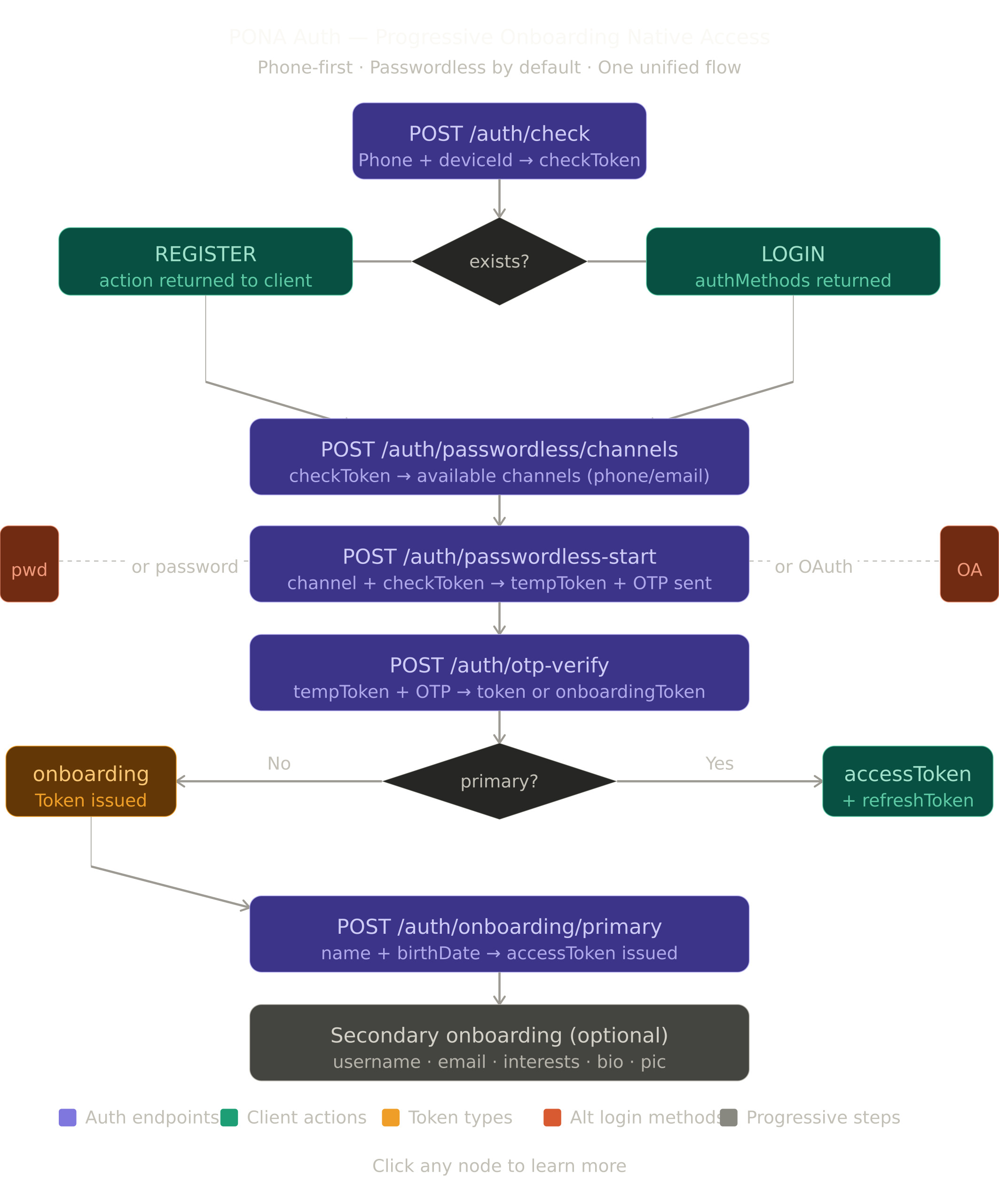
Token Types
| Token | Lifespan | Purpose | Issued At |
|---|---|---|---|
checkToken |
5 mins | Signed phone carrier — binds all auth actions to one account | /auth/check |
tempToken |
10 mins | OTP handshake only | /auth/start, /onboarding/email/initiate |
onboardingToken |
7 days | Primary flow only — unlocks name and age steps only | After OTP verified, primary incomplete |
accessToken |
1hr (no password) / 7 days (with password) | Full session, carries onboarding flags | After primary complete |
refreshToken |
30 days | Silent refresh, password users only, rotated on use | After password login |
What "Primary Complete" Means
Three requirements. All three done before access token is issued. No skip. No cancel.
✅ Phone verified via OTP
✅ First name + Last name set
✅ Date of birth set (age calculated → account tier assigned)
Account Tiers — Set at Age Step
| Age | Tier | What It Means |
|---|---|---|
| Under 13 | Blocked | Account deleted. Phone blocklisted. Cannot return until 13th birthday. |
| 13 — 17 | Restricted | Age-restricted content hidden. Some commerce limited. |
| 18+ | Full | No restrictions. |
Onboarding Flags (Inside Access Token)
Derived from actual account data. No separate database column needed.
| Flag | Means |
|---|---|
primaryComplete |
Phone verified + name set + date of birth set |
username |
Real username chosen — not a system temp one |
email |
Email submitted AND verified via OTP |
profilePic |
At least one profile picture uploaded |
interests |
At least 3 interests selected |
bio |
Bio text written |
Access Token Shape
{
"sub": "su_uuid",
"flags": {
"primaryComplete": true,
"username": false,
"email": false,
"profilePic": false,
"interests": false,
"bio": false
},
"exp": "2026-04-01T12:00:00Z"
}
Resource Permission Matrix
| Feature | Needs Primary | Needs Secondary |
|---|---|---|
| Browse events / listings | ❌ No auth | — |
| React / like | ✅ | nothing extra |
| Buy ticket or product | ✅ | nothing extra |
| Share listing | ✅ | nothing extra |
| Comment publicly | ✅ | username |
| Follow someone | ✅ | username |
| Send a message | ✅ | username |
| Create an event | ✅ | username + email |
| Open a shop | ✅ | username + email |
| Sell a product | ✅ | username + email |
| Withdraw money | ✅ | username + email + profilePic |
| Age-restricted content | ✅ must be 18+ | nothing extra |
Secondary Field Priority Order
Backend returns missing fields one at a time in this order. User never sees all missing fields at once.
1 — username (needed for almost all social features)
2 — email (needed for commerce and trust)
3 — profilePic (needed for high-trust actions)
4 — bio (rarely hard-required)
5 — interests (feed personalization, almost never hard-required)
Auth Method Validation
Every auth endpoint validates the user has the method they are trying to use.
| Endpoint | Validation |
|---|---|
/auth/login/password |
Account must have password set |
/auth/login/oauth Google |
Google must be linked to this account |
/auth/login/oauth Apple |
Apple must be linked to this account |
/auth/password/forgot/initiate |
Account must have password set |
/auth/passwordless/channels |
Always allowed |
/auth/start OTP |
Always allowed — passwordless available to everyone |
OTP Channel Selection
Passwordless users with email set can choose where to receive their OTP. Frontend never passes the raw email or phone — only the channel type enum.
Channel Availability Rules
| Channel | Available When |
|---|---|
PHONE |
Always — phone is primary, always verified |
EMAIL |
Only when email is set AND verified on the account |
Action Codes — Complete Reference
| Action Code | What Frontend Does |
|---|---|
REGISTER |
New user — show registration intro |
CONTINUE_ONBOARDING |
Returning user, primary incomplete — resume |
LOGIN |
Account ready — show auth method options |
RESTART_AUTH |
Token expired — back to phone entry |
SELECT_CHANNEL |
Multiple OTP channels — show picker |
PROCEED_TO_OTP |
Single channel only — skip picker, go straight to OTP |
USE_OTP |
Wrong auth method chosen — switch to OTP |
RETRY_OTP |
Wrong OTP — error on same screen |
RESEND_OTP |
OTP expired — activate resend |
WAIT |
Rate limited — show countdown |
ACCOUNT_BLOCKED |
Under 13 — show blocked screen |
COLLECT_USERNAME |
Username needed |
COLLECT_EMAIL |
Email needed — submit then OTP verify |
COLLECT_PROFILE_PIC |
Profile picture needed |
COLLECT_INTERESTS |
Interests needed |
COLLECT_BIO |
Bio needed |
PROCEED |
All steps done — retry original action |
Response Shapes
Success
{
"success": true,
"message": "Human readable message",
"action": "NEXT_ACTION_OR_NULL",
"data": { }
}
Error — HTTP 422
{
"success": false,
"message": "Human readable message",
"action": "NEXT_ACTION_CODE",
"context": "what_user_was_trying_to_do",
"data": { }
}
Response Examples
/auth/check — New User
{
"success": true,
"message": "Phone number not registered",
"action": "REGISTER",
"data": { "exists": false, "checkToken": null }
}
/auth/check — Existing User Ready
{
"success": true,
"message": "Welcome back",
"action": "LOGIN",
"data": {
"exists": true,
"checkToken": "eyJ...",
"primaryComplete": true,
"maskedPhone": "••• ••• ••78",
"authMethods": {
"passwordless": true,
"password": true,
"google": true,
"apple": false
}
}
}
/auth/check — Primary Incomplete
{
"success": true,
"message": "Continue setting up your account",
"action": "CONTINUE_ONBOARDING",
"data": {
"exists": true,
"checkToken": "eyJ...",
"primaryComplete": false,
"maskedPhone": "••• ••• ••78"
}
}
/auth/passwordless/channels — Multiple Channels
{
"success": true,
"message": "Choose where to receive your code",
"action": "SELECT_CHANNEL",
"data": {
"channels": [
{ "type": "PHONE", "masked": "••• ••• ••78", "isPrimary": true },
{ "type": "EMAIL", "masked": "j••••@g••••.com", "isPrimary": false }
]
}
}
/auth/passwordless/channels — Single Channel Only
{
"success": true,
"message": "Sending code to your phone",
"action": "PROCEED_TO_OTP",
"data": {
"channels": [
{ "type": "PHONE", "masked": "••• ••• ••78", "isPrimary": true }
]
}
}
/auth/start — OTP Sent
{
"success": true,
"message": "Verification code sent",
"action": null,
"data": {
"tempToken": "eyJ...",
"maskedDestination": "••• ••• ••78",
"channel": "PHONE",
"expiresInSeconds": 120,
"resendAvailableAfterSeconds": 60
}
}
/auth/verify — Primary Incomplete
{
"success": true,
"message": "Phone verified. Let us set up your account.",
"action": "COLLECT_PRIMARY",
"data": {
"onboardingToken": "eyJ...",
"nextStep": "name"
}
}
/auth/verify — Primary Already Complete
{
"success": true,
"message": "Welcome back!",
"action": null,
"data": {
"accessToken": "eyJ...",
"onboarding": {
"primaryComplete": true,
"username": true,
"email": false,
"profilePic": false,
"interests": false,
"bio": false
}
}
}
/auth/onboarding/age — Blocked Underage
{
"success": false,
"message": "You must be at least 13 years old to use NextGate",
"action": "ACCOUNT_BLOCKED",
"context": "underage",
"data": { "unblockDate": "2027-06-15" }
}
/auth/onboarding/age — Primary Complete
{
"success": true,
"message": "Welcome to NextGate!",
"action": null,
"data": {
"accessToken": "eyJ...",
"accountTier": "FULL",
"onboarding": {
"primaryComplete": true,
"username": false,
"email": false,
"profilePic": false,
"interests": false,
"bio": false
}
}
}
OTP Wrong
{
"success": false,
"message": "Incorrect OTP code",
"action": "RETRY_OTP",
"context": "otp_verify",
"data": { "attemptsRemaining": 2 }
}
OTP Expired
{
"success": false,
"message": "OTP has expired",
"action": "RESEND_OTP",
"context": "otp_expired",
"data": { "resendAvailable": true, "resendCooldownSeconds": 0 }
}
Rate Limited
{
"success": false,
"message": "Too many attempts. Please wait.",
"action": "WAIT",
"context": "rate_limited",
"data": { "retryAfterSeconds": 120 }
}
Wrong Auth Method
{
"success": false,
"message": "This account does not use password login",
"action": "USE_OTP",
"context": "password_login",
"data": { "availableMethods": ["passwordless", "google"] }
}
Secondary Gate — Multiple Missing
{
"success": false,
"message": "A couple of things needed before you can create events",
"action": "COLLECT_USERNAME",
"context": "create_event",
"data": {
"currentMissing": "username",
"allMissing": ["username", "email"],
"stepsRemaining": 2
}
}
Secondary Step Done — Next Signalled
{
"success": true,
"message": "Username set. One more step.",
"action": "COLLECT_EMAIL",
"context": "create_event",
"data": {
"accessToken": "eyJ...",
"nextMissing": "email",
"stepsRemaining": 1,
"onboarding": {
"primaryComplete": true,
"username": true,
"email": false,
"profilePic": false,
"interests": false,
"bio": false
}
}
}
All Secondary Done — Proceed
{
"success": true,
"message": "All done. Creating your event now.",
"action": "PROCEED",
"context": "create_event",
"data": {
"accessToken": "eyJ...",
"stepsRemaining": 0,
"onboarding": {
"primaryComplete": true,
"username": true,
"email": true,
"profilePic": false,
"interests": false,
"bio": false
}
}
}
Forgot Password — Reset Complete
{
"success": true,
"message": "Password updated. All other sessions signed out.",
"action": null,
"data": { "accessToken": "eyJ..." }
}
Flow Diagrams
FLOW 1 — App Open with Stored Accounts
┌─────────────────────────────────────────────────────┐
│ App opens │
└──────────────────────┬──────────────────────────────┘
│
▼
Read device secure storage
for stored accounts list
│
┌──────────┴──────────┐
│ │
NO ACCOUNTS ACCOUNTS FOUND
│ │
▼ ▼
Show clean phone Count stored accounts
entry screen │
┌────────┴────────┐
ONE MULTIPLE
│ │
▼ ▼
Auto-call Show account
/auth/check picker screen
in background User taps one
│ │
└────────┬────────┘
▼
/auth/check called
for that identifier
│
▼
Show personalized
welcome screen with
auth method buttons
FLOW 2 — Auth Check (Entry Point)
┌─────────────────────────────────────────────────────┐
│ POST /auth/check │
│ { "identifier": "+255712345678" } │
└──────────────────────┬──────────────────────────────┘
│
▼
Valid phone format?
│
┌──────────┴──────────┐
NO YES
│ │
▼ ▼
422 Look up in database
Invalid │
phone ┌────────┴────────┐
│ │
NOT FOUND FOUND
│ │
▼ ▼
action: REGISTER Phone verified?
checkToken: null ┌──────┴──────┐
NO YES
│ │
▼ ▼
Release phone Primary complete?
from orphan ┌──────┴──────┐
action: REGISTER NO YES
│ │
▼ ▼
action: action: LOGIN
CONTINUE_ authMethods
ONBOARDING returned
│ │
└──────┬───────┘
▼
checkToken issued
containing { identifier }
stored to device on success
FLOW 3 — New User Registration
action: REGISTER from /auth/check
............................................
┌─────────────────────────────────────────────────────┐
│ POST /auth/start │
│ { "checkToken": "eyJ...", "channel": "PHONE" } │
└──────────────────────┬──────────────────────────────┘
│
▼
Phone extracted from checkToken
Partial account created
OTP sent via SMS
tempToken issued
│
▼
┌─────────────────────────────────────────────────────┐
│ POST /auth/verify │
│ { "tempToken": "eyJ...", "otp": "123456" } │
└──────────────────────┬──────────────────────────────┘
│
▼
Phone verified
Primary incomplete
ONBOARDING TOKEN issued
App locked to primary screens
│
┌──────────┴──────────┐
▼ ▼
POST /auth/ POST /auth/
onboarding/name onboarding/age
{ firstName, { birthDate }
lastName } │
│ ▼
▼ Under 13? → BLOCKED
New onboarding 13-17 → RESTRICTED
token returned 18+ → FULL
Continue to age │
▼
PRIMARY COMPLETE
ACCESS TOKEN issued
Identifier + name + avatar
saved to device storage
User lands on feed ✓
FLOW 4 — Existing User, Passwordless Login
action: LOGIN, authMethods.passwordless: true
User picks OTP option
............................................
┌─────────────────────────────────────────────────────┐
│ POST /auth/passwordless/channels │
│ { "checkToken": "eyJ..." } │
└──────────────────────┬──────────────────────────────┘
│
▼
Backend checks account channels
│
┌──────────┴──────────┐
│ │
ONE CHANNEL MULTIPLE CHANNELS
(phone only) (phone + email)
│ │
▼ ▼
action: action: SELECT_CHANNEL
PROCEED_TO_OTP Show channel picker
Skip picker User picks PHONE or EMAIL
│ │
└──────────┬──────────┘
▼
┌─────────────────────────────────────────────────────┐
│ POST /auth/start │
│ { "checkToken": "eyJ...", "channel": "PHONE" } │
│ or { "checkToken": "eyJ...", "channel": "EMAIL" } │
└──────────────────────┬──────────────────────────────┘
│
▼
Backend extracts actual phone or email
internally from account
Sends OTP to chosen channel
tempToken issued
│
▼
POST /auth/verify { tempToken, otp }
│
▼
OTP valid. Primary complete.
ACCESS TOKEN issued.
Device storage entry updated.
User lands on feed ✓
FLOW 5 — Existing User, Password Login
action: LOGIN, authMethods.password: true
User picks password option
............................................
┌─────────────────────────────────────────────────────┐
│ POST /auth/login/password │
│ { "checkToken": "eyJ...", "password": "..." } │
└──────────────────────┬──────────────────────────────┘
│
▼
Account found from checkToken
│
┌──────────┴──────────┐
NO PASSWORD HAS PASSWORD
│ │
▼ ▼
422 Password verified
action: USE_OTP Risk assessed
availableMethods │
returned ┌───────┴───────┐
│ │
KNOWN DEVICE UNKNOWN DEVICE
│ │
▼ ▼
ACCESS TOKEN Device OTP sent
issued Verify device
directly ACCESS TOKEN issued
FLOW 6 — OAuth Login
action: LOGIN, authMethods.google: true
User picks Google
............................................
┌─────────────────────────────────────────────────────┐
│ POST /auth/login/oauth │
│ { "checkToken": "eyJ...", │
│ "provider": "GOOGLE", "code": "..." } │
└──────────────────────┬──────────────────────────────┘
│
▼
Account found from checkToken
Google linked to account?
│
┌──────────┴──────────┐
NO YES
│ │
▼ ▼
422 Google identity confirmed
action: USE_OTP Profile data pre-filled
availableMethods from Google
returned │
Primary complete?
┌────────┴────────┐
NO YES
│ │
▼ ▼
ONBOARDING TOKEN ACCESS TOKEN
collect age issued ✓
FLOW 7 — Forgot Password
Only shown when authMethods.password: true
............................................
┌─────────────────────────────────────────────────────┐
│ POST /auth/password/forgot/initiate │
│ { "checkToken": "eyJ..." } │
└──────────────────────┬──────────────────────────────┘
│
▼
Account has password?
│
┌──────────┴──────────┐
NO YES
│ │
▼ ▼
422 OTP sent to phone
action: USE_OTP tempToken issued
│
▼
POST /auth/password/forgot/verify-otp
{ tempToken, otp }
│
▼
OTP verified
resetToken issued (10 mins, single use)
│
▼
POST /auth/password/forgot/reset
{ resetToken, newPassword, confirmPassword }
│
▼
Password updated
All other sessions revoked
ACCESS TOKEN issued
User logged in ✓
FLOW 8 — Secondary Onboarding (Progressive)
User tries to create an event
Needs: username + email
username: false ← first missing
email: false
............................................
422 from resource guard
action: COLLECT_USERNAME
allMissing: ["username", "email"]
stepsRemaining: 2
............................................
Frontend: "2 steps — Step 1 of 2"
POST /onboarding/username
Bearer <accessToken>
{ "username": "joshsakweli" }
│
▼
Username saved
New accessToken issued
action: COLLECT_EMAIL
stepsRemaining: 1
............................................
Frontend: "Step 2 of 2 — Add email"
POST /onboarding/email/initiate
Bearer <accessToken>
{ "email": "josh@qbitspark.com" }
│
▼
OTP sent to email
tempToken returned
nextAction: VERIFY_EMAIL
│
▼
POST /onboarding/email/verify
Bearer <accessToken>
{ "tempToken": "eyJ...", "otp": "123456" }
│
▼
Email verified
New accessToken issued
action: PROCEED
stepsRemaining: 0
│
▼
Frontend retries create event
Passes ✓
FLOW 9 — Wrong Number, Changing During Registration
User typed wrong number
OTP sent. User clicks "Change number"
Before OTP verified — just restart
............................................
POST /auth/check { correct number }
│
┌──────┴──────────────────┐
│ │
NOT IN DB ALREADY IN DB
│ │
▼ ▼
Fresh Phone verified?
registration ┌──────┴──────┐
continues NO YES
│ │
▼ ▼
Release phone Primary complete?
from orphan ┌──────┴──────┐
New user NO YES
flow │ │
CONTINUE_ "Number has account.
ONBOARDING Login instead?"
│
┌────────┴────────┐
LOGIN DIFFERENT
│ NUMBER
▼ ▼
Login flow /auth/check
again
FLOW 10 — Returning User, Token Expired
App opened. Access token expired.
............................................
│
┌──────────┴──────────┐
│ │
HAS PASSWORD NO PASSWORD
│ │
▼ ▼
Has refresh token? /auth/check auto-called
┌───────┴───────┐ from stored identifier
YES NO │
│ │ ▼
▼ ▼ Passwordless channel check
Silent Show OTP sent to chosen channel
refresh login /auth/verify
ACCESS screen Primary complete → ACCESS TOKEN
TOKEN directly, no onboarding shown ✓
issued ✓
Client-Side Persistent Identity
This is a frontend-only feature. Zero backend changes required.
What Gets Stored on Device
┌────────────────────────────────────────────────────┐
│ Stored after every successful login │
│ │
│ identifier → "+255712345678" │
│ maskedPhone → "••• ••• ••78" │
│ displayName → "Joshua Sakweli" │
│ avatarUrl → "https://..." │
│ lastLoginAt → "2026-04-01T10:00:00Z" │
└────────────────────────────────────────────────────┘
NEVER store:
✗ Access tokens
✗ Refresh tokens
✗ Passwords or OTPs
✗ Full unmasked phone number in plain text
Storage Location by Platform
| Platform | Storage Method |
|---|---|
| Android | EncryptedSharedPreferences — hardware-backed encryption |
| iOS | Keychain — secure enclave |
| Web | localStorage — for non-sensitive display data only, never tokens |
Stored Accounts List Rules
Maximum 5 accounts stored per device
Sorted by lastLoginAt — most recently used first
Updated after every successful login (name, avatar may change)
If 6th account added → prompt user to remove one first
UI Screens (Dotted)
Screen 1 — App Open, One Stored Account
┌ ─ ─ ─ ─ ─ ─ ─ ─ ─ ─ ─ ─ ─ ─ ─ ┐
[NextGate Logo]
┌─────────────────────┐
│ [ Avatar ] │
│ Joshua Sakweli │
│ ••• ••• ••78 │
└─────────────────────┘
┌─────────────────────┐
│ Continue with OTP │ ← primary option
└─────────────────────┘
┌─────────────────────┐
│ Use Password │ ← only if password set
└─────────────────────┘
┌─────────────────────┐
│ G Continue with │ ← only if google linked
│ Google │
└─────────────────────┘
Not you? Sign in with a different account
└ ─ ─ ─ ─ ─ ─ ─ ─ ─ ─ ─ ─ ─ ─ ─ ┘
Screen 2 — Account Picker (Multiple Stored Accounts)
┌ ─ ─ ─ ─ ─ ─ ─ ─ ─ ─ ─ ─ ─ ─ ─ ┐
[NextGate Logo]
Choose an account
┌─────────────────────────┐
│ [Av] Joshua Sakweli →│ ← tap to login
│ ••• ••• ••78 │
│ 2 mins ago │
├─────────────────────────┤
│ [Av] QBIT SPARK →│
│ ••• ••• ••32 │
│ 3 days ago │
├─────────────────────────┤
│ + Add another account│
└─────────────────────────┘
Long press an account to remove it
└ ─ ─ ─ ─ ─ ─ ─ ─ ─ ─ ─ ─ ─ ─ ─ ┘
Screen 3 — Remove Account Confirmation
┌ ─ ─ ─ ─ ─ ─ ─ ─ ─ ─ ─ ─ ─ ─ ─ ┐
Remove account from
this device?
┌─────────────────────┐
│ [Av] Joshua Sakweli│
│ ••• ••• ••78 │
└─────────────────────┘
This only removes the account
from this device. Your NextGate
account will not be deleted.
┌─────────────────────┐
│ Remove │
└─────────────────────┘
┌─────────────────────┐
│ Cancel │
└─────────────────────┘
└ ─ ─ ─ ─ ─ ─ ─ ─ ─ ─ ─ ─ ─ ─ ─ ┘
Screen 4 — Fresh Phone Entry (No Stored Account)
┌ ─ ─ ─ ─ ─ ─ ─ ─ ─ ─ ─ ─ ─ ─ ─ ┐
[NextGate Logo]
Enter your phone number
to get started
┌──────┐ ┌───────────────┐
│ +255 │ │ 7XX XXX XXX │
└──────┘ └───────────────┘
┌─────────────────────┐
│ Continue │
└─────────────────────┘
By continuing you agree to our
Terms of Service and Privacy Policy
└ ─ ─ ─ ─ ─ ─ ─ ─ ─ ─ ─ ─ ─ ─ ─ ┘
Screen 5 — OTP Channel Picker
┌ ─ ─ ─ ─ ─ ─ ─ ─ ─ ─ ─ ─ ─ ─ ─ ┐
Where should we send
your code?
┌─────────────────────────┐
│ 📱 SMS to │
│ ••• ••• ••78 │ ← tap to choose
└─────────────────────────┘
┌─────────────────────────┐
│ ✉️ Email to │
│ j••••@g••••.com │ ← tap to choose
└─────────────────────────┘
└ ─ ─ ─ ─ ─ ─ ─ ─ ─ ─ ─ ─ ─ ─ ─ ┘
Screen 6 — OTP Entry
┌ ─ ─ ─ ─ ─ ─ ─ ─ ─ ─ ─ ─ ─ ─ ─ ┐
Enter the 6-digit code
sent to ••• ••• ••78
┌───┐ ┌───┐ ┌───┐ ┌───┐ ┌───┐ ┌───┐
│ 1 │ │ 2 │ │ 3 │ │ │ │ │ │ │
└───┘ └───┘ └───┘ └───┘ └───┘ └───┘
Code expires in 01:47
Resend code (available in 0:13)
Wrong number? Change it
└ ─ ─ ─ ─ ─ ─ ─ ─ ─ ─ ─ ─ ─ ─ ─ ┘
Screen 7 — Primary Onboarding, Name Step
┌ ─ ─ ─ ─ ─ ─ ─ ─ ─ ─ ─ ─ ─ ─ ─ ┐
● ○ Step 1 of 2
What is your name?
┌─────────────────────────┐
│ First name │
└─────────────────────────┘
┌─────────────────────────┐
│ Last name │
└─────────────────────────┘
┌─────────────────────┐
│ Continue │
└─────────────────────┘
This is how you will appear
on NextGate
└ ─ ─ ─ ─ ─ ─ ─ ─ ─ ─ ─ ─ ─ ─ ─ ┘
Screen 8 — Primary Onboarding, Age Step
┌ ─ ─ ─ ─ ─ ─ ─ ─ ─ ─ ─ ─ ─ ─ ─ ┐
● ● Step 2 of 2
When were you born?
┌──────────────────────────┐
│ DD / MM / YYYY │
└──────────────────────────┘
┌─────────────────────┐
│ Continue │
└─────────────────────┘
Your age helps us show you
the right content.
We never share your birthday.
└ ─ ─ ─ ─ ─ ─ ─ ─ ─ ─ ─ ─ ─ ─ ─ ┘
Screen 9 — Secondary Onboarding Gate (Inline, Not Full Screen)
┌ ─ ─ ─ ─ ─ ─ ─ ─ ─ ─ ─ ─ ─ ─ ─ ┐
╔═════════════════════════╗
║ Choose a username ║
║ to create events ║
║ ║
║ Step 1 of 2 ║
║ ────────────── ║
║ ║
║ ┌─────────────────┐ ║
║ │ @username │ ║
║ └─────────────────┘ ║
║ ║
║ ┌─────────────────┐ ║
║ │ Continue │ ║
║ └─────────────────┘ ║
║ ║
║ Maybe later ║ ← dismisses modal
╚═════════════════════════╝ user stays on feed
└ ─ ─ ─ ─ ─ ─ ─ ─ ─ ─ ─ ─ ─ ─ ─ ┘
Secondary onboarding appears as a bottom sheet or modal, not a full page. User can dismiss it and continue browsing. They will be prompted again when they try the same action.
Screen 10 — Forgot Password
┌ ─ ─ ─ ─ ─ ─ ─ ─ ─ ─ ─ ─ ─ ─ ─ ┐
Forgot your password?
We will send a reset code to
your phone number.
┌─────────────────────┐
│ Send reset code │
└─────────────────────┘
┌─────────────────────┐
│ Login with OTP │ ← always available
└─────────────────────┘
Code will be sent to
••• ••• ••78
└ ─ ─ ─ ─ ─ ─ ─ ─ ─ ─ ─ ─ ─ ─ ─ ┘
Endpoint Reference
Public — No Auth Required
| Method | Endpoint | Send | Receive |
|---|---|---|---|
| POST | /auth/check |
{ identifier } |
checkToken + exists + authMethods |
| POST | /auth/passwordless/channels |
{ checkToken } |
available channels masked |
| POST | /auth/start |
{ checkToken, channel } |
tempToken |
| POST | /auth/verify |
{ tempToken, otp } |
onboardingToken or accessToken |
| POST | /auth/login/password |
{ checkToken, password } |
accessToken or device flow |
| POST | /auth/login/oauth |
{ checkToken, provider, code } |
accessToken or onboardingToken |
| POST | /auth/resend-otp |
{ tempToken } |
new tempToken |
| POST | /auth/device/verify |
{ deviceVerificationToken, otp } |
accessToken |
| POST | /auth/password/forgot/initiate |
{ checkToken } |
tempToken |
| POST | /auth/password/forgot/verify-otp |
{ tempToken, otp } |
resetToken |
| POST | /auth/password/forgot/reset |
{ resetToken, newPassword, confirmPassword } |
accessToken |
Primary Onboarding — Onboarding Token Required
| Method | Endpoint | Send | Receive |
|---|---|---|---|
| POST | /auth/onboarding/name |
{ onboardingToken, firstName, lastName } |
new onboardingToken |
| POST | /auth/onboarding/age |
{ onboardingToken, birthDate } |
accessToken |
Secondary Onboarding — Access Token Required
| Method | Endpoint | Send | Receive |
|---|---|---|---|
| POST | /onboarding/username |
{ username } |
new accessToken + next action |
| POST | /onboarding/bio |
{ bio } |
new accessToken + next action |
| POST | /onboarding/interests |
{ interestIds[] } |
new accessToken + next action |
| POST | /onboarding/profile-pic |
multipart image | new accessToken + next action |
| POST | /onboarding/email/initiate |
{ email } |
tempToken + nextAction |
| POST | /onboarding/email/verify |
{ tempToken, otp } |
new accessToken + next action |
Session Management — Access Token Required
| Method | Endpoint | Send | Receive |
|---|---|---|---|
| POST | /auth/token/refresh |
{ refreshToken } |
new accessToken + refreshToken |
| POST | /auth/token/revoke |
{ refreshToken } |
success |
| POST | /auth/sessions/sign-out |
— | success |
| GET | /auth/sessions |
— | active sessions list |
| DELETE | /auth/sessions/{id} |
— | success |
Client-Side Storage Specification
Storage Keys
ng_stored_accounts → JSON array of stored account objects
ng_active_identifier → identifier of currently active session
Stored Account Object
{
"identifier": "+255712345678",
"maskedPhone": "••• ••• ••78",
"displayName": "Joshua Sakweli",
"avatarUrl": "https://cdn.nextgate.app/avatars/...",
"lastLoginAt": "2026-04-01T10:00:00Z"
}
Account Management Rules
| Action | What Happens |
|---|---|
| Successful login | Add or update entry in stored list. Update lastLoginAt, name, avatar. |
| Normal logout | Keep entry in stored list. User sees welcome back on next visit. |
| "Forget this device" logout | Remove entry from stored list. Clean phone entry shown next visit. |
| Remove from picker | Remove entry from stored list. Account still exists on server. |
| Add another account | Login flow, auto-added to list on success. |
| 6th account added | Prompt user to remove one existing entry first. |
| Account deleted on server | Remove entry from stored list automatically after next failed check. |
What to Update After Successful Login
After ACCESS TOKEN received:
→ Update displayName from onboarding flags if changed
→ Update avatarUrl if changed
→ Update lastLoginAt to now
→ Sort stored list by lastLoginAt descending
What Changes vs What Stays
Being Removed
- Single linear
OnboardingSteptracking → replaced by independent flags onboardingStepdatabase column → database migration requiredisOnboardingComplete()→ replaced byisPrimaryComplete()- Onboarding token for secondary steps → access token handles all of that now
refreshOnboardingTokenendpoint → no longer needed- Email and username as login identifiers → phone only from now on
- Raw identifier passed to
/auth/start→ replaced bycheckToken+channel
Being Added
POST /auth/check— new entry pointPOST /auth/passwordless/channels— new channel check endpointOnboardingFlagResolver— derives all flags from existing account data- Resource guard — checks flags, returns next action automatically
checkTokengeneration in JWT systemchannelfield on/auth/start- All secondary onboarding endpoints
actionandcontexton all responses- Client-side persistent identity (frontend only, zero backend changes)
Staying Exactly as They Are
- All OTP generation, validation, and rate limiting
- Session creation and management
- Device trust and registration
- Risk assessment and scoring
- Account blocking for underage users and fraud
- Password change and management
- Email and phone account linking (post-login)
- JWT signing infrastructure
- Security filter chain — minor flag reading addition only
Security Notes
/auth/checkrate limited — max 10 per IP per minute, max 3 per phone per hourcheckTokensingle-use — consumed the moment any auth action is takencheckTokencryptographically binds the phone to every action — identifier cannot be swapped mid-flow- Frontend never passes raw email or phone after
/auth/check— channel type enum only - Orphaned partial accounts cleaned up automatically every night
- Phone collision with verified account — redirected to login, cannot overwrite
- Phone collision with unverified account — released and reassigned via OTP proof
- Primary onboarding — no cancel, no skip, app stays locked until all three steps done
- Underage — account deleted immediately, phone blocklisted, cannot return until 13th birthday
- Forgot password link — never shown unless
authMethods.password: true - Wrong auth method — backend validates before doing anything, 422 returned immediately
- Stored accounts on device — only display data stored, never tokens or passwords
- "Forget this device" — clears stored identifier, forces fresh phone entry next visit
NextGate PONA Auth — EndPoint Doc (ACTIVE)
For more details on the full flow design: PONA Auth v3 Design Doc
What is PONA Auth?
Progressive · Onboarding · Native · Access
PONA Auth is NextGate's unified, phone-first authentication system. It replaces all legacy auth flows with a single coherent pipeline. Core philosophy:
- Phone is the primary identifier — always. Every account starts with a verified phone number. No exceptions.
- Passwordless by default — users authenticate via OTP. Password and OAuth are optional enhancements added post-registration.
- Progressive onboarding — only the bare minimum is collected upfront (phone + name + birthdate). Everything else (username, email, bio, interests, profile pic) is collected lazily when the feature needs it.
- One flow, two outcomes — the same endpoints serve both new and returning users. The server decides what happens based on account state.
Token types at a glance
| Token | Expiry | Purpose |
|---|---|---|
checkToken |
10 min | Proves a phone check was made. Single-use. |
tempToken |
15 min | Carries the OTP session. Single-use after verify. |
onboardingToken |
1 hour | Issued after OTP verify for new users. Unlocks primary onboarding. |
accessToken |
1 hour | Standard bearer token. Attached to every protected request. |
refreshToken |
30 days | Rotates on use. Used to get a new accessToken silently. |
Secure storage — frontend requirements
Store tokens incorrectly and the whole auth system is compromised.
| Token | Where to store | Why |
|---|---|---|
accessToken |
In-memory only (React state, Zustand, etc.) | Never localStorage — XSS can steal it |
refreshToken |
HttpOnly cookie (web) / Secure Keychain (mobile) | Never localStorage or AsyncStorage directly |
onboardingToken |
In-memory only | Short-lived, no need to persist |
checkToken |
In-memory only | Single-use, discard after consuming |
tempToken |
In-memory only | Single-use, discard after OTP verify |
Standard Response Format
Success response
{
"success": true,
"httpStatus": "OK",
"message": "Human-readable message",
"action": "ACTION_CODE",
"action_time": "2026-04-03T10:30:45",
"data": {}
}
Error response
{
"success": false,
"httpStatus": "BAD_REQUEST",
"message": "Error description",
"action_time": "2026-04-03T10:30:45",
"data": "Error description"
}
Action codes
| Code | Meaning | Next step |
|---|---|---|
REGISTER |
Phone not found — new user | Show registration UI, proceed to channels |
LOGIN |
Phone found — existing user | Show login UI, proceed to channels |
CONTINUE_ONBOARDING |
Phone found but primary incomplete | Proceed to channels → onboarding |
PROCEED_TO_OTP |
Only one channel available | Skip channel picker, send OTP automatically |
SELECT_CHANNEL |
Multiple channels available | Show channel picker to user |
COLLECT_PRIMARY |
OTP verified, primary data needed | Show name + birthdate form |
ACCOUNT_BLOCKED |
User is underage or blocked | Show blocked message with unblock date |
VERIFY_DEVICE |
Unknown device on password login | Show device OTP verification |
OTP Channels
OTP can be delivered via the following channels. Not all channels are available in every situation — the server enforces the rules.
Available channel values
| Value | Description | User selectable |
|---|---|---|
SMS |
OTP delivered via SMS | ✅ |
WHATSAPP |
OTP delivered via WhatsApp | ✅ |
SMS_AND_WHATSAPP |
OTP sent to both SMS and WhatsApp simultaneously | ✅ |
EMAIL |
OTP delivered via email | ✅ |
SMS_AND_WHATSAPPfires both sends in parallel on the server. The user gets the OTP on both channels at the same time. If one channel fails, the other still delivers.
EMAIL_AND_WHATSAPP,EMAIL_AND_SMS,ALL_CHANNELSare internal server-side values. Never send these from the client — they will be rejected.
Channel rules by purpose
| Channel | New user (registration) | Existing user (login) |
|---|---|---|
SMS |
✅ | ✅ |
WHATSAPP |
✅ | ✅ |
SMS_AND_WHATSAPP |
✅ | ✅ |
EMAIL |
❌ not allowed | ✅ only if account has a verified email |
Channel request examples
Send via SMS only:
{ "channel": "SMS" }
Send via WhatsApp only:
{ "channel": "WHATSAPP" }
Send via both SMS and WhatsApp at the same time:
{ "channel": "SMS_AND_WHATSAPP" }
Send via email (login only, verified email required):
{ "channel": "EMAIL" }
Shared Objects
UserInfo
Returned by /auth/verify-otp and /auth/onboarding/primary once the user is identified. Frontend devs should persist this in local storage for display use (profile header, greetings, etc.).
{
"displayName": "Joshua Sakweli",
"phone": "+255745051250",
"maskedPhone": "••• ••• ••50",
"avatarUrl": "https://cdn.example.com/avatars/uuid.jpg"
}
| Field | Type | Description |
|---|---|---|
displayName |
string | null | First + last name. Null until primary onboarding is complete. |
phone |
string | Full unmasked phone in international format. Always present. Safe to store — it is the user's own number, just verified via OTP. |
maskedPhone |
string | Masked phone for visible UI display (e.g. "••• ••• ••50"). Always present. |
avatarUrl |
string | null | URL of the user's profile picture. Null until a profile picture is uploaded. |
Storage guidance:
phone,maskedPhone,displayName, andavatarUrlare display data — localStorage is fine. Do not store tokens in localStorage.
HTTP Method Badges
- GET — Read only
- POST — Create / action
- DELETE — Remove
Endpoints
1. Check Phone
Purpose: Entry point for every auth flow. Checks if a phone number is registered and returns a checkToken plus available auth methods.
Endpoint: POST {base_url}/auth/check
Access Level: 🌐 Public
Authentication: None
Request:
{
"identifier": "+255745051250",
"deviceId": "android-uuid-abc123"
}
Request Parameters:
| Parameter | Type | Required | Description | Validation |
|---|---|---|---|---|
identifier |
string | Yes | Phone number in international format | Must match ^\+[1-9]\d{6,14}$ |
deviceId |
string | Yes | Unique device identifier from the client | Non-empty |
Response — New User:
{
"success": true,
"httpStatus": "OK",
"message": "Phone number not registered",
"action": "REGISTER",
"action_time": "2026-04-03T10:30:45",
"data": {
"exists": false,
"checkToken": "eyJhbGciOiJIUzI1NiJ9...",
"primaryComplete": false,
"maskedPhone": null,
"authMethods": null
}
}
Response — Existing User:
{
"success": true,
"httpStatus": "OK",
"message": "Welcome back",
"action": "LOGIN",
"action_time": "2026-04-03T10:30:45",
"data": {
"exists": true,
"checkToken": "eyJhbGciOiJIUzI1NiJ9...",
"primaryComplete": true,
"maskedPhone": "••• ••• ••50",
"authMethods": {
"passwordless": true,
"password": false,
"google": true,
"apple": false
}
}
}
Response — Existing User, Primary Incomplete:
{
"success": true,
"httpStatus": "OK",
"message": "Continue setting up your account",
"action": "CONTINUE_ONBOARDING",
"action_time": "2026-04-03T10:30:45",
"data": {
"exists": true,
"checkToken": "eyJhbGciOiJIUzI1NiJ9...",
"primaryComplete": false,
"maskedPhone": "••• ••• ••50",
"authMethods": {
"passwordless": true,
"password": false,
"google": false,
"apple": false
}
}
}
Response Fields:
| Field | Description |
|---|---|
exists |
Whether the phone is registered |
checkToken |
Short-lived token to proceed. Always present. |
primaryComplete |
Whether the user has completed name + birthdate setup |
maskedPhone |
Masked phone for display. Null for new users. |
authMethods.passwordless |
Always true |
authMethods.password |
True if user has set a password |
authMethods.google |
True if Google is linked |
authMethods.apple |
True if Apple is linked |
Frontend handling:
action = REGISTER
→ store checkToken in memory
→ do NOT show password field
→ do NOT show Google/Apple buttons
→ proceed to channel picker
action = LOGIN
→ store checkToken in memory
→ show Google button ONLY if authMethods.google = true
→ show Password button ONLY if authMethods.password = true
→ always show OTP button
→ proceed to channel picker
action = CONTINUE_ONBOARDING
→ same as LOGIN
→ user will be redirected to primary onboarding after OTP verify
Errors:
422 UNPROCESSABLE_ENTITY— invalid phone format or missing deviceId
2. Get Passwordless Channels
Purpose: Returns the available OTP delivery channels for the user. Always returns SMS and WHATSAPP. EMAIL is returned only if the user has a verified email.
Endpoint: POST {base_url}/auth/passwordless/channels
Access Level: 🌐 Public
Authentication: None
This endpoint does NOT consume the checkToken.
Request:
{
"checkToken": "eyJhbGciOiJIUzI1NiJ9...",
"deviceId": "android-uuid-abc123"
}
Request Parameters:
| Parameter | Type | Required | Description |
|---|---|---|---|
checkToken |
string | Yes | Token from /auth/check |
deviceId |
string | Yes | Must match the deviceId used in /auth/check |
Response — Phone only:
{
"success": true,
"httpStatus": "OK",
"message": "Choose where to receive your code",
"action": "SELECT_CHANNEL",
"action_time": "2026-04-16T10:30:45",
"data": {
"channels": [
{ "channel": "SMS", "masked": "••• ••• ••50", "isPrimary": true },
{ "channel": "WHATSAPP", "masked": "••• ••• ••50", "isPrimary": false }
]
}
}
Response — Phone + verified email:
{
"success": true,
"httpStatus": "OK",
"message": "Choose where to receive your code",
"action": "SELECT_CHANNEL",
"action_time": "2026-04-16T10:30:45",
"data": {
"channels": [
{ "channel": "SMS", "masked": "••• ••• ••50", "isPrimary": true },
{ "channel": "WHATSAPP", "masked": "••• ••• ••50", "isPrimary": false },
{ "channel": "EMAIL", "masked": "j••••••@g••••.com", "isPrimary": false }
]
}
}
This endpoint returns individual primitive channels only (
SMS,SMS_AND_WHATSAPPcompound value is not returned here — the frontend constructs it when the user wants both.
Frontend handling:
Always show at least SMS and WHATSAPP.
If EMAIL is present, show it too.
Suggested UI:
SMS → "Text message to ••• ••• ••50"
WHATSAPP → "WhatsApp to ••• ••• ••50"
EMAIL → "Email to j••••••@g••••.com"
You can also show a "Send to both SMS and WhatsApp" option —
send SMS_AND_WHATSAPP as the channel value in /auth/passwordless-start.
User taps their choice, then call /auth/passwordless-start with that channel value.
Errors:
403 FORBIDDEN— invalid, expired, or already-used checkToken403 FORBIDDEN— deviceId mismatch
3. Start Passwordless OTP
Purpose: Sends an OTP to the chosen channel and returns a tempToken for the verify step. Consumes the checkToken.
Endpoint: POST {base_url}/auth/passwordless-start
Access Level: 🌐 Public
Authentication: None
Request — SMS only:
{
"checkToken": "eyJhbGciOiJIUzI1NiJ9...",
"channel": "SMS",
"deviceId": "android-uuid-abc123"
}
Request — WhatsApp only:
{
"checkToken": "eyJhbGciOiJIUzI1NiJ9...",
"channel": "WHATSAPP",
"deviceId": "android-uuid-abc123"
}
Request — Both SMS and WhatsApp simultaneously:
{
"checkToken": "eyJhbGciOiJIUzI1NiJ9...",
"channel": "SMS_AND_WHATSAPP",
"deviceId": "android-uuid-abc123"
}
Request — Email (login only, verified email required):
{
"checkToken": "eyJhbGciOiJIUzI1NiJ9...",
"channel": "EMAIL",
"deviceId": "android-uuid-abc123"
}
Request Parameters:
| Parameter | Type | Required | Description | Validation |
|---|---|---|---|---|
checkToken |
string | Yes | Token from /auth/check |
Non-empty |
channel |
enum | Yes | Where to send OTP | SMS, WHATSAPP, SMS_AND_WHATSAPP, EMAIL |
deviceId |
string | Yes | Must match deviceId from /auth/check |
Non-empty |
Channel rules:
| Channel | New user (registration) | Existing user (login) |
|---|---|---|
SMS |
✅ | ✅ |
WHATSAPP |
✅ | ✅ |
SMS_AND_WHATSAPP |
✅ | ✅ |
EMAIL |
❌ | ✅ only if verified email exists |
Response:
{
"success": true,
"httpStatus": "OK",
"message": "Verification code sent",
"action_time": "2026-04-16T10:30:45",
"data": {
"tempToken": "eyJhbGciOiJIUzI1NiJ9...",
"maskedDestination": "••• ••• ••50",
"channel": "SMS_AND_WHATSAPP",
"expiresInSeconds": 120,
"resendAvailableAfterSeconds": 60
}
}
Response Fields:
| Field | Description |
|---|---|
tempToken |
Carry this to /auth/verify-otp. Store in memory only. |
maskedDestination |
Show to the user so they know where OTP was sent |
channel |
The channel used — display appropriate message |
expiresInSeconds |
OTP valid for this many seconds |
resendAvailableAfterSeconds |
Wait this long before enabling resend |
Frontend handling:
On success:
→ store tempToken in memory
→ show OTP input screen
→ display message based on channel:
SMS → "Code sent to ••• ••• ••50 via SMS"
WHATSAPP → "Code sent to ••• ••• ••50 via WhatsApp"
SMS_AND_WHATSAPP → "Code sent to ••• ••• ••50 via SMS and WhatsApp"
EMAIL → "Code sent to j••••••@g••••.com"
→ start countdown timer using resendAvailableAfterSeconds
→ enable resend button when timer hits 0
On resend:
→ channel is locked to the original choice
→ resend always goes to the same channel(s)
→ to switch channel, go back to the channel picker and restart the flow
Errors:
403 FORBIDDEN— checkToken invalid, expired, or already consumed400 BAD_REQUEST— EMAIL chosen but account has no verified email400 BAD_REQUEST— EMAIL chosen for registration400 BAD_REQUEST— non-user-selectable channel sent (e.g. ALL_CHANNELS)422 UNPROCESSABLE_ENTITY— invalid channel value
4. Verify OTP
Purpose: Validates the OTP and returns either an accessToken (returning user, primary complete) or an onboardingToken (new or incomplete user).
Endpoint: POST {base_url}/auth/verify-otp
Access Level: 🌐 Public
Authentication: None
Request:
{
"tempToken": "eyJhbGciOiJIUzI1NiJ9...",
"otp": "482910",
"deviceName": "Josh's Pixel 4a",
"platform": "ANDROID"
}
Request Parameters:
| Parameter | Type | Required | Description | Validation |
|---|---|---|---|---|
tempToken |
string | Yes | Token from /auth/passwordless-start |
Non-empty |
otp |
string | Yes | 6-digit code | Exactly 6 numeric digits |
deviceName |
string | No | Human-readable device name | Optional |
platform |
string | No | Client platform | ANDROID, IOS, WEB |
Response — Primary Complete:
{
"success": true,
"httpStatus": "OK",
"message": "Welcome back",
"action": null,
"action_time": "2026-04-03T10:30:45",
"data": {
"accessToken": "eyJhbGciOiJIUzI1NiJ9...",
"refreshToken": "eyJhbGciOiJIUzI1NiJ9...",
"onboardingToken": null,
"primaryComplete": true,
"onboarding": {
"primaryComplete": true,
"username": true,
"email": false,
"profilePic": false,
"interests": false,
"bio": false
},
"user": {
"displayName": "Joshua Sakweli",
"phone": "+255745051250",
"maskedPhone": "••• ••• ••50",
"avatarUrl": null
}
}
}
Response — Primary Incomplete:
{
"success": true,
"httpStatus": "OK",
"message": "Phone verified. Let us set up your account.",
"action": "COLLECT_PRIMARY",
"action_time": "2026-04-03T10:30:45",
"data": {
"accessToken": null,
"refreshToken": null,
"onboardingToken": "eyJhbGciOiJIUzI1NiJ9...",
"primaryComplete": false,
"onboarding": {
"primaryComplete": false,
"username": false,
"email": false,
"profilePic": false,
"interests": false,
"bio": false
},
"user": {
"displayName": null,
"phone": "+255745051250",
"maskedPhone": "••• ••• ••50",
"avatarUrl": null
}
}
}
Frontend handling:
primaryComplete = true:
→ store accessToken in memory
→ store refreshToken in HttpOnly cookie (web) or Keychain (mobile)
→ discard tempToken
→ navigate to home
→ check onboarding flags for secondary prompts
primaryComplete = false:
→ store onboardingToken in memory
→ discard tempToken
→ navigate to primary onboarding screen
Errors:
403 FORBIDDEN— wrong OTP403 FORBIDDEN— OTP expired403 FORBIDDEN— max attempts exceeded (3 wrong OTPs)403 FORBIDDEN— tempToken already used
5. Resend OTP
Purpose: Resends the OTP to the same channel and destination as the original send. Channel cannot be changed on resend. Rate limited to 5 attempts per session with a 60-second cooldown.
Endpoint: POST {base_url}/auth/resend-otp
Access Level: 🌐 Public
Authentication: None
Request:
{
"tempToken": "eyJhbGciOiJIUzI1NiJ9..."
}
Response:
{
"success": true,
"httpStatus": "OK",
"message": "OTP resent successfully",
"action_time": "2026-04-03T10:30:45",
"data": {
"tempToken": "eyJhbGciOiJIUzI1NiJ9...",
"maskedIdentifier": "••• ••• ••50",
"remainingAttempts": 4,
"expiresIn": 900
}
}
Frontend handling:
On success:
→ replace tempToken in memory with the new one from response
→ show "Code resent" confirmation
→ reset the countdown timer to resendAvailableAfterSeconds
→ disable resend button again
On 400 — cooldown active:
→ show "Please wait X seconds"
→ do not clear the OTP input
On 400 — max attempts:
→ show "Too many attempts. Please start over."
→ clear tempToken from memory
→ navigate back to channel picker
Channel switching:
→ NOT possible via resend
→ user must go back to channel picker and call /auth/passwordless-start again
Errors:
400 BAD_REQUEST— cooldown period not yet elapsed400 BAD_REQUEST— max resend attempts (5) reached400 BAD_REQUEST— tempToken expired or invalid
6. Primary Onboarding
Purpose: Collects name and date of birth. Completes primary onboarding and issues the first accessToken.
Endpoint: POST {base_url}/auth/onboarding/primary
Access Level: 🌐 Public
Authentication: None (uses onboardingToken in body)
Request:
{
"onboardingToken": "eyJhbGciOiJIUzI1NiJ9...",
"firstName": "Joshua",
"lastName": "Sakweli",
"birthDate": "1995-06-15"
}
Request Parameters:
| Parameter | Type | Required | Description | Validation |
|---|---|---|---|---|
onboardingToken |
string | Yes | Token from /auth/verify-otp |
Non-empty |
firstName |
string | Yes | User's first name | 1–50 characters |
lastName |
string | Yes | User's last name | 1–50 characters |
birthDate |
string | Yes | Date of birth | YYYY-MM-DD, must be in the past |
Response — Normal User:
{
"success": true,
"httpStatus": "OK",
"message": "Welcome to NextGate!",
"action_time": "2026-04-03T10:30:45",
"data": {
"accessToken": "eyJhbGciOiJIUzI1NiJ9...",
"refreshToken": "eyJhbGciOiJIUzI1NiJ9...",
"accountTier": "FULL",
"onboarding": {
"primaryComplete": true,
"username": false,
"email": false,
"profilePic": false,
"interests": false,
"bio": false
},
"blocked": false,
"unblockDate": null,
"user": {
"displayName": "Joshua Sakweli",
"phone": "+255745051250",
"maskedPhone": "••• ••• ••50",
"avatarUrl": null
}
}
}
Response — Underage User:
{
"success": true,
"httpStatus": "OK",
"message": "Account blocked",
"action": "ACCOUNT_BLOCKED",
"action_time": "2026-04-03T10:30:45",
"data": {
"accessToken": null,
"refreshToken": null,
"accountTier": null,
"onboarding": null,
"blocked": true,
"unblockDate": "2026-09-15"
}
}
Response Fields:
| Field | Description |
|---|---|
accessToken |
Bearer token. Store in memory. Null if blocked. |
refreshToken |
Rotation token. Store securely. Null if blocked. |
accountTier |
FULL (18+), RESTRICTED (13–17), MINOR (under 13 — blocked) |
blocked |
True if user is underage |
unblockDate |
Date when user turns 13. Show to user. |
Frontend handling:
blocked = false:
→ store accessToken in memory
→ store refreshToken securely
→ discard onboardingToken
→ navigate to home
→ check onboarding flags for secondary prompts
blocked = true:
→ do NOT store any tokens
→ show age restriction screen with unblockDate
→ do NOT allow navigation into the app
accountTier = RESTRICTED:
→ user is 13–17
→ restrict features per your tier config
Errors:
403 FORBIDDEN— onboardingToken invalid or expired403 FORBIDDEN— primary onboarding already completed422 UNPROCESSABLE_ENTITY— validation errors on name or birthDate
7. Password Login
Purpose: Authenticates a user with phone + password. May require device verification if the device is unknown or risk is high.
Endpoint: POST {base_url}/auth/login/password
Access Level: 🌐 Public
Authentication: None
Request:
{
"checkToken": "eyJhbGciOiJIUzI1NiJ9...",
"password": "MySecurePassword123",
"deviceId": "android-uuid-abc123",
"deviceName": "Josh's Pixel 4a",
"platform": "ANDROID"
}
Request Parameters:
| Parameter | Type | Required | Description | Validation |
|---|---|---|---|---|
checkToken |
string | Yes | Token from /auth/check |
Non-empty |
password |
string | Yes | User's password | Non-empty |
deviceId |
string | Yes | Device identifier | Non-empty |
deviceName |
string | No | Human-readable device name | Optional |
platform |
string | No | Client platform | ANDROID, IOS, WEB |
Response — Known Device:
{
"success": true,
"httpStatus": "OK",
"message": "Login successful",
"action_time": "2026-04-03T10:30:45",
"data": {
"accessToken": "eyJhbGciOiJIUzI1NiJ9...",
"refreshToken": "eyJhbGciOiJIUzI1NiJ9...",
"onboarding": {
"primaryComplete": true,
"username": true,
"email": false,
"profilePic": false,
"interests": true,
"bio": false
},
"requiresDeviceVerification": false,
"deviceVerificationToken": null,
"maskedDestination": null
}
}
Response — Unknown / High Risk Device:
{
"success": true,
"httpStatus": "OK",
"message": "Device verification required",
"action": "VERIFY_DEVICE",
"action_time": "2026-04-03T10:30:45",
"data": {
"accessToken": null,
"refreshToken": null,
"requiresDeviceVerification": true,
"deviceVerificationToken": "eyJhbGciOiJIUzI1NiJ9...",
"maskedDestination": "••• ••• ••50"
}
}
Frontend handling:
requiresDeviceVerification = false:
→ store accessToken in memory
→ store refreshToken securely
→ navigate to home
requiresDeviceVerification = true:
→ store deviceVerificationToken in memory
→ show OTP input with maskedDestination
→ call POST /api/v1/account/device/verify with the OTP
→ on success you get accessToken + refreshToken
Errors:
403 FORBIDDEN— wrong password403 FORBIDDEN— checkToken invalid or expired403 FORBIDDEN— too many failed attempts403 FORBIDDEN— password not set on this account
8. OAuth Login
Purpose: Authenticates a user via Google or Apple. Only available if the provider was previously linked to the account.
Endpoint: POST {base_url}/auth/login/oauth
Access Level: 🌐 Public
Authentication: None
Request:
{
"checkToken": "eyJhbGciOiJIUzI1NiJ9...",
"provider": "GOOGLE",
"idToken": "google-id-token-from-client-sdk",
"deviceId": "android-uuid-abc123",
"deviceName": "Josh's Pixel 4a",
"platform": "ANDROID",
"state": "optional-state-string"
}
Request Parameters:
| Parameter | Type | Required | Description | Validation |
|---|---|---|---|---|
checkToken |
string | Yes | Token from /auth/check |
Non-empty |
provider |
string | Yes | OAuth provider | GOOGLE, APPLE |
idToken |
string | Yes | ID token from Google/Apple client SDK | Non-empty |
deviceId |
string | Yes | Device identifier | Non-empty |
deviceName |
string | No | Human-readable device name | Optional |
platform |
string | No | Client platform | ANDROID, IOS, WEB |
state |
string | No | Opaque state value passed back in response | Optional |
Response:
{
"success": true,
"httpStatus": "OK",
"message": "Login successful",
"action_time": "2026-04-03T10:30:45",
"data": {
"accessToken": "eyJhbGciOiJIUzI1NiJ9...",
"refreshToken": "eyJhbGciOiJIUzI1NiJ9...",
"onboarding": {
"primaryComplete": true,
"username": true,
"email": true,
"profilePic": false,
"interests": true,
"bio": false
},
"state": "optional-state-string"
}
}
Frontend handling:
Before calling this endpoint:
→ check authMethods.google from /auth/check response
→ ONLY show Google button if google = true
→ ONLY show Apple button if apple = true
On success:
→ store accessToken in memory
→ store refreshToken securely
→ navigate to home
Errors:
403 FORBIDDEN— provider not linked (OAUTH_NOT_LINKED)403 FORBIDDEN— idToken invalid or expired403 FORBIDDEN— idToken email does not match linked provider403 FORBIDDEN— checkToken invalid or expired
9. Forgot Password — Initiate
Purpose: Starts the forgot password flow. Sends an OTP to the user's phone via SMS. Does NOT consume the checkToken.
Endpoint: POST {base_url}/auth/password/forgot/initiate
Access Level: 🌐 Public
Authentication: None
Request:
{
"checkToken": "eyJhbGciOiJIUzI1NiJ9...",
"deviceId": "android-uuid-abc123"
}
Response:
{
"success": true,
"httpStatus": "OK",
"message": "Password reset code sent to your phone",
"action_time": "2026-04-03T10:30:45",
"data": {
"tempToken": "eyJhbGciOiJIUzI1NiJ9...",
"resetToken": null,
"maskedPhone": "••• ••• ••50",
"accessToken": null,
"expiresInSeconds": 120
}
}
Frontend handling:
→ store tempToken in memory
→ show OTP input screen
→ display maskedPhone
→ proceed to /auth/password/forgot/verify-otp
Errors:
403 FORBIDDEN— checkToken invalid or expired403 FORBIDDEN— account has no password set404 NOT_FOUND— account not found
10. Forgot Password — Verify OTP
Purpose: Verifies the OTP and issues a short-lived resetToken.
Endpoint: POST {base_url}/auth/password/forgot/verify-otp
Access Level: 🌐 Public
Authentication: None
Request:
{
"tempToken": "eyJhbGciOiJIUzI1NiJ9...",
"otp": "482910"
}
Response:
{
"success": true,
"httpStatus": "OK",
"message": "Identity confirmed. Set your new password.",
"action_time": "2026-04-03T10:30:45",
"data": {
"tempToken": null,
"resetToken": "eyJhbGciOiJIUzI1NiJ9...",
"maskedPhone": null,
"accessToken": null,
"expiresInSeconds": 0
}
}
Frontend handling:
→ discard tempToken from memory
→ store resetToken in memory
→ navigate to new password input screen
Errors:
403 FORBIDDEN— wrong OTP403 FORBIDDEN— OTP expired403 FORBIDDEN— max OTP attempts exceeded
11. Forgot Password — Reset
Purpose: Sets the new password. Revokes all existing sessions and issues a fresh accessToken.
Endpoint: POST {base_url}/auth/password/forgot/reset
Access Level: 🌐 Public
Authentication: None
Request:
{
"resetToken": "eyJhbGciOiJIUzI1NiJ9...",
"newPassword": "MyNewSecurePassword456",
"confirmPassword": "MyNewSecurePassword456"
}
Request Parameters:
| Parameter | Type | Required | Description | Validation |
|---|---|---|---|---|
resetToken |
string | Yes | Token from verify OTP step | Non-empty |
newPassword |
string | Yes | New password | Min 8 characters |
confirmPassword |
string | Yes | Must match newPassword | Non-empty |
Response:
{
"success": true,
"httpStatus": "OK",
"message": "Password updated. All other sessions signed out.",
"action_time": "2026-04-03T10:30:45",
"data": {
"accessToken": "eyJhbGciOiJIUzI1NiJ9...",
"resetToken": null,
"maskedPhone": null,
"expiresInSeconds": 0
}
}
Frontend handling:
→ discard resetToken from memory
→ store accessToken in memory
→ clear any existing refreshToken from storage
→ navigate to home
→ show "Password updated successfully"
Errors:
400 BAD_REQUEST— passwords do not match403 FORBIDDEN— resetToken invalid or expired422 UNPROCESSABLE_ENTITY— password too short
12. Refresh Token
Purpose: Exchanges a refresh token for a new access + refresh token pair. Old refresh token is invalidated immediately (rotation).
Endpoint: POST {base_url}/auth/token/refresh
Access Level: 🌐 Public
Authentication: None
Request:
{
"refreshToken": "eyJhbGciOiJIUzI1NiJ9..."
}
Response:
{
"success": true,
"httpStatus": "OK",
"message": "Token refreshed",
"action_time": "2026-04-03T10:30:45",
"data": {
"accessToken": "eyJhbGciOiJIUzI1NiJ9...",
"refreshToken": "eyJhbGciOiJIUzI1NiJ9...",
"expiresIn": 3600
}
}
Frontend handling:
Call this when:
→ accessToken is expired (401 on a protected request)
→ proactively before expiry (check exp claim in JWT)
On success:
→ replace accessToken in memory
→ replace refreshToken in secure storage
→ retry the original failed request
On 401:
→ clear all tokens
→ redirect to login
Errors:
13. Revoke Token
Purpose: Logs out the user by revoking their refresh token.
Endpoint: POST {base_url}/auth/token/revoke
Access Level: 🌐 Public
Authentication: None
Request:
{
"refreshToken": "eyJhbGciOiJIUzI1NiJ9..."
}
Response:
{
"success": true,
"httpStatus": "OK",
"message": "Token revoked successfully",
"action_time": "2026-04-03T10:30:45",
"data": null
}
Frontend handling:
On logout:
→ call this endpoint with the stored refreshToken
→ clear accessToken from memory
→ clear refreshToken from secure storage
→ redirect to login
If call fails (network error):
→ still clear tokens locally
→ user is effectively logged out on the client
Quick Reference — Full Auth Flow
1. POST /auth/check
→ phone + deviceId → checkToken + action
2. POST /auth/passwordless/channels (does not consume checkToken)
→ returns available channels: SMS, WHATSAPP, and optionally EMAIL
3. POST /auth/passwordless-start (consumes checkToken)
→ channel (SMS | WHATSAPP | SMS_AND_WHATSAPP | EMAIL) → tempToken + OTP sent
4. POST /auth/verify-otp (consumes tempToken)
→ otp → accessToken (returning user) or onboardingToken (new user)
5. POST /auth/onboarding/primary (if onboardingToken received)
→ name + birthDate → accessToken issued
─── User is now logged in ───
6. Secondary onboarding (optional, progressive)
→ username, email, interests, bio, profile pic
→ each step returns new accessToken with updated onboarding flags
─── Token management ───
7. POST /auth/token/refresh → rotate tokens silently
8. POST /auth/token/revoke → logout
Error Handling Summary
| HTTP Status | When it happens | What to do |
|---|---|---|
400 BAD_REQUEST |
Invalid input, item exists, rate limit | Show error message to user |
401 UNAUTHORIZED |
Token expired or invalid | Refresh token or redirect to login |
403 FORBIDDEN |
Wrong OTP, wrong password, token mismatch | Show specific error, let user retry |
404 NOT_FOUND |
Account not found | Show "Account not found" |
422 UNPROCESSABLE_ENTITY |
Validation failed | Show field-level errors |
500 INTERNAL_SERVER_ERROR |
Server error | Show generic error, retry |
PONA Auth Secondary Onboarding
Base URL: https://api.nexgate.co/api/v1/onboarding/secondary
Short Description: Secondary onboarding completes a user's profile after the primary onboarding step (name, phone, birth date). It is a step-machine — each endpoint returns the next missing step and a refreshed access token. The flow is complete when stepsRemaining reaches 0 and nextMissing is null.
Hints:
- All endpoints require a valid
Beareraccess token issued after primary onboarding or login. - Every response includes a fresh
accessTokenwith updated onboarding flags embedded in the JWT claims — replace the stored token after each step. - Steps can be completed in any order. The
nextMissingfield signals the next recommended step; it does not enforce ordering. - Email linking has two independent paths: custom (user-provided email + OTP) and Google (Google ID token). Only one path needs to be completed.
- Profile picture upload expects
multipart/form-data, not JSON.
Standard Response Format
All API responses follow a consistent structure using our Globe Response Builder pattern:
Success Response Structure
{
"success": true,
"httpStatus": "OK",
"message": "Operation completed successfully",
"action_time": "2025-09-23T10:30:45",
"action": "COLLECT_EMAIL",
"data": {}
}
Error Response Structure
{
"success": false,
"httpStatus": "BAD_REQUEST",
"message": "Error description",
"action_time": "2025-09-23T10:30:45",
"data": "Error description"
}
Standard Response Fields
| Field | Type | Description |
|---|---|---|
success |
boolean | true for successful operations, false for errors |
httpStatus |
string | HTTP status name (OK, BAD_REQUEST, etc.) |
message |
string | Human-readable result description |
action_time |
string | ISO 8601 timestamp of the response |
action |
string | Next frontend action to perform (see action codes below) |
data |
object/string | Response payload or error detail |
Action Codes
| Code | Meaning |
|---|---|
COLLECT_USERNAME |
Username step is next |
COLLECT_EMAIL |
Email step is next |
COLLECT_PROFILE_PIC |
Profile picture step is next |
COLLECT_INTERESTS |
Interests step is next |
COLLECT_BIO |
Bio step is next |
PROCEED |
All steps complete — onboarding is done |
Standard Secondary Onboarding Response Fields
Most endpoints return a SecondaryOnboardingResponse. Its fields are:
| Field | Type | Description |
|---|---|---|
accessToken |
string | Fresh JWT — store and use this for all subsequent requests |
onboarding |
object | Current completion state of all onboarding steps (see below) |
nextMissing |
string | Key name of the next incomplete step, or null if all done |
stepsRemaining |
integer | Number of steps still pending |
onboarding Object Fields
| Field | Type | Description |
|---|---|---|
primaryComplete |
boolean | Primary onboarding (name/phone/DOB) is done |
username |
boolean | Username has been set |
email |
boolean | Email has been linked and verified |
profilePic |
boolean | Profile picture has been uploaded |
interests |
boolean | Interests have been selected |
bio |
boolean | Bio has been written |
Endpoints
1. Get Username Suggestions
Purpose: Returns up to 5 AI-generated username suggestions based on the user's first name, last name, and birth date.
Endpoint: GET {base_url}/username/suggestions
Access Level: 🔒 Protected (Authenticated user)
Authentication: Bearer Token
Request Headers:
| Header | Type | Required | Description |
|---|---|---|---|
Authorization |
string | Yes | Bearer <access_token> |
Success Response JSON Sample:
{
"success": true,
"httpStatus": "OK",
"message": "Username suggestions",
"action_time": "2026-04-27T10:30:45",
"data": {
"suggestions": [
"john_sakweli",
"johnsakweli99",
"j_sakweli",
"johnsak2004",
"jsakweli_"
]
}
}
Success Response Fields:
| Field | Description |
|---|---|
suggestions |
Array of up to 5 available username strings |
Error Response JSON Sample:
{
"success": false,
"httpStatus": "NOT_FOUND",
"message": "Account not found",
"action_time": "2026-04-27T10:30:45",
"data": "Account not found"
}
2. Set Username
Purpose: Sets a unique username for the account.
Endpoint: POST {base_url}/username
Access Level: 🔒 Protected (Authenticated user)
Authentication: Bearer Token
Request Headers:
| Header | Type | Required | Description |
|---|---|---|---|
Authorization |
string | Yes | Bearer <access_token> |
Content-Type |
string | Yes | application/json |
Request JSON Sample:
{
"username": "john_sakweli"
}
Request Body Parameters:
| Parameter | Type | Required | Description | Validation |
|---|---|---|---|---|
username |
string | Yes | Desired username | Min: 3, Max: 30 characters. Must start with a letter. Only letters, numbers, and underscores allowed. |
Success Response JSON Sample:
{
"success": true,
"httpStatus": "OK",
"message": "Username set successfully",
"action_time": "2026-04-27T10:30:45",
"action": "COLLECT_EMAIL",
"data": {
"accessToken": "eyJhbGciOiJSUzI1NiJ9...",
"onboarding": {
"primaryComplete": true,
"username": true,
"email": false,
"profilePic": false,
"interests": false,
"bio": false
},
"nextMissing": "email",
"stepsRemaining": 4
}
}
Success Response Fields:
| Field | Description |
|---|---|
accessToken |
Fresh JWT with updated onboarding claims — replace stored token |
onboarding.username |
Now true |
nextMissing |
Next recommended step key |
stepsRemaining |
Steps left to complete |
Error Response JSON Sample:
{
"success": false,
"httpStatus": "BAD_REQUEST",
"message": "Username is already taken",
"action_time": "2026-04-27T10:30:45",
"data": "Username is already taken"
}
Standard Error Types:
400 BAD_REQUEST: Username already taken or invalid format401 UNAUTHORIZED: Missing or invalid token422 UNPROCESSABLE_ENTITY: Validation failure (length, pattern)
3. Set Bio
Purpose: Saves a short bio to the user's profile.
Endpoint: POST {base_url}/bio
Access Level: 🔒 Protected (Authenticated user)
Authentication: Bearer Token
Request Headers:
| Header | Type | Required | Description |
|---|---|---|---|
Authorization |
string | Yes | Bearer <access_token> |
Content-Type |
string | Yes | application/json |
Request JSON Sample:
{
"bio": "Event enthusiast, live music lover, always at the front row."
}
Request Body Parameters:
| Parameter | Type | Required | Description | Validation |
|---|---|---|---|---|
bio |
string | Yes | User's short profile bio | Max: 160 characters. Cannot be blank. |
Success Response JSON Sample:
{
"success": true,
"httpStatus": "OK",
"message": "Bio saved",
"action_time": "2026-04-27T10:30:45",
"action": "PROCEED",
"data": {
"accessToken": "eyJhbGciOiJSUzI1NiJ9...",
"onboarding": {
"primaryComplete": true,
"username": true,
"email": true,
"profilePic": true,
"interests": true,
"bio": true
},
"nextMissing": null,
"stepsRemaining": 0
}
}
Standard Error Types:
400 BAD_REQUEST: Bio is blank401 UNAUTHORIZED: Missing or invalid token422 UNPROCESSABLE_ENTITY: Exceeds 160 characters
4. Set Interests
Purpose: Saves the user's selected interest categories (minimum 3 required).
Endpoint: POST {base_url}/interests
Access Level: 🔒 Protected (Authenticated user)
Authentication: Bearer Token
Request Headers:
| Header | Type | Required | Description |
|---|---|---|---|
Authorization |
string | Yes | Bearer <access_token> |
Content-Type |
string | Yes | application/json |
Request JSON Sample:
{
"interestIds": [
"3fa85f64-5717-4562-b3fc-2c963f66afa6",
"7a1234bc-1234-4321-abcd-1234567890ab",
"9c87654d-4321-1234-dcba-0987654321cd"
]
}
Request Body Parameters:
| Parameter | Type | Required | Description | Validation |
|---|---|---|---|---|
interestIds |
array of UUID | Yes | IDs of selected interest categories | Min: 3 items. Must not be empty. Use the interests listing endpoint to get valid IDs. |
Success Response JSON Sample:
{
"success": true,
"httpStatus": "OK",
"message": "Interests saved",
"action_time": "2026-04-27T10:30:45",
"action": "COLLECT_BIO",
"data": {
"accessToken": "eyJhbGciOiJSUzI1NiJ9...",
"onboarding": {
"primaryComplete": true,
"username": true,
"email": true,
"profilePic": true,
"interests": true,
"bio": false
},
"nextMissing": "bio",
"stepsRemaining": 1
}
}
Standard Error Types:
400 BAD_REQUEST: Interest IDs not found401 UNAUTHORIZED: Missing or invalid token422 UNPROCESSABLE_ENTITY: Fewer than 3 interests selected
5. Upload Profile Picture
Purpose: Uploads and stores the user's profile picture.
Endpoint: POST {base_url}/profile-pic
Access Level: 🔒 Protected (Authenticated user)
Authentication: Bearer Token
Request Headers:
| Header | Type | Required | Description |
|---|---|---|---|
Authorization |
string | Yes | Bearer <access_token> |
Content-Type |
string | Yes | multipart/form-data |
Query Parameters:
| Parameter | Type | Required | Description | Validation | Default |
|---|---|---|---|---|---|
file |
file (form field) | Yes | Image file to upload | Image formats: JPEG, PNG, WEBP | — |
Success Response JSON Sample:
{
"success": true,
"httpStatus": "OK",
"message": "Profile picture uploaded",
"action_time": "2026-04-27T10:30:45",
"action": "COLLECT_INTERESTS",
"data": {
"accessToken": "eyJhbGciOiJSUzI1NiJ9...",
"onboarding": {
"primaryComplete": true,
"username": true,
"email": true,
"profilePic": true,
"interests": false,
"bio": false
},
"nextMissing": "interests",
"stepsRemaining": 2
}
}
Standard Error Types:
400 BAD_REQUEST: File is missing, empty, or unsupported format401 UNAUTHORIZED: Missing or invalid token500 INTERNAL_SERVER_ERROR: Storage failure
6. Initiate Email Linking (Custom)
Purpose: Sends a 6-digit OTP to the provided email address and returns a tempToken required for the verify step.
Endpoint: POST {base_url}/email/custom/initiate
Access Level: 🔒 Protected (Authenticated user)
Authentication: Bearer Token
Request Headers:
| Header | Type | Required | Description |
|---|---|---|---|
Authorization |
string | Yes | Bearer <access_token> |
Content-Type |
string | Yes | application/json |
Request JSON Sample:
{
"email": "john@example.com"
}
Request Body Parameters:
| Parameter | Type | Required | Description | Validation |
|---|---|---|---|---|
email |
string | Yes | Email address to link | Must be a valid email format. Cannot be blank. |
Success Response JSON Sample:
{
"success": true,
"httpStatus": "OK",
"message": "Verification code sent to your email",
"action_time": "2026-04-27T10:30:45",
"data": {
"tempToken": "eyJhbGciOiJSUzI1NiJ9.temp...",
"nextAction": "VERIFY_EMAIL"
}
}
Success Response Fields:
| Field | Description |
|---|---|
tempToken |
Short-lived token required as input to the verify step. Store this until OTP is submitted. |
nextAction |
Always VERIFY_EMAIL — signals frontend to show OTP input screen |
Standard Error Types:
400 BAD_REQUEST: Email already in use by another account401 UNAUTHORIZED: Missing or invalid token422 UNPROCESSABLE_ENTITY: Invalid email format
7. Verify Email (Custom)
Purpose: Confirms the OTP sent to the user's email and marks the email step as complete.
Endpoint: POST {base_url}/email/custom/verify
Access Level: 🔒 Protected (Authenticated user)
Authentication: Bearer Token
Request Headers:
| Header | Type | Required | Description |
|---|---|---|---|
Authorization |
string | Yes | Bearer <access_token> |
Content-Type |
string | Yes | application/json |
Request JSON Sample:
{
"tempToken": "eyJhbGciOiJSUzI1NiJ9.temp...",
"otp": "847291"
}
Request Body Parameters:
| Parameter | Type | Required | Description | Validation |
|---|---|---|---|---|
tempToken |
string | Yes | Token received from the initiate step | Cannot be blank |
otp |
string | Yes | 6-digit code sent to the user's email | Exactly 6 digits, numeric only |
Success Response JSON Sample:
{
"success": true,
"httpStatus": "OK",
"message": "Email verified",
"action_time": "2026-04-27T10:30:45",
"action": "COLLECT_PROFILE_PIC",
"data": {
"accessToken": "eyJhbGciOiJSUzI1NiJ9...",
"onboarding": {
"primaryComplete": true,
"username": true,
"email": true,
"profilePic": false,
"interests": false,
"bio": false
},
"nextMissing": "profilePic",
"stepsRemaining": 3
}
}
Standard Error Types:
400 BAD_REQUEST: OTP is incorrect or expired401 UNAUTHORIZED:tempTokenis invalid or expired422 UNPROCESSABLE_ENTITY: OTP is not 6 numeric digits
8. Link Email via Google
Purpose: Links and verifies a Google-backed email using a Google ID token — skips the OTP step entirely.
Endpoint: POST {base_url}/email/google
Access Level: 🔒 Protected (Authenticated user)
Authentication: Bearer Token
Request Headers:
| Header | Type | Required | Description |
|---|---|---|---|
Authorization |
string | Yes | Bearer <access_token> |
Content-Type |
string | Yes | application/json |
Request JSON Sample:
{
"idToken": "eyJhbGciOiJSUzI1NiIsImtpZCI6..."
}
Request Body Parameters:
| Parameter | Type | Required | Description | Validation |
|---|---|---|---|---|
idToken |
string | Yes | Google ID token from the Google Sign-In SDK | Cannot be blank. Must be a valid Google-issued token. |
Success Response JSON Sample:
{
"success": true,
"httpStatus": "OK",
"message": "Email linked via Google",
"action_time": "2026-04-27T10:30:45",
"action": "COLLECT_PROFILE_PIC",
"data": {
"accessToken": "eyJhbGciOiJSUzI1NiJ9...",
"onboarding": {
"primaryComplete": true,
"username": true,
"email": true,
"profilePic": false,
"interests": false,
"bio": false
},
"nextMissing": "profilePic",
"stepsRemaining": 3
}
}
Standard Error Types:
400 BAD_REQUEST: Google token is invalid, expired, or email already linked to another account401 UNAUTHORIZED: Missing or invalid Bearer token422 UNPROCESSABLE_ENTITY:idTokenis blank
Flow Overview
Primary Onboarding Complete
│
▼
┌───────────────┐
│ Set Username │ POST /username
└───────┬───────┘
│
▼
┌───────────────┐ ┌──────────────────────┐
│ Link Email │─────────│ Option A: Custom │ POST /email/custom/initiate
└───────┬───────┘ │ → POST /email/custom/verify
│ ├──────────────────────┤
│ │ Option B: Google │ POST /email/google
│ └──────────────────────┘
▼
┌───────────────┐
│ Profile Pic │ POST /profile-pic
└───────┬───────┘
│
▼
┌───────────────┐
│ Interests │ POST /interests (min. 3)
└───────┬───────┘
│
▼
┌───────────────┐
│ Bio │ POST /bio
└───────┬───────┘
│
▼
action: PROCEED
(onboarding done)
Steps can be completed out of order. The
nextMissingfield in each response always signals the next recommended incomplete step.
Quick Reference
| # | Endpoint | Method | Auth | Purpose |
|---|---|---|---|---|
| 1 | /username/suggestions |
GET | Bearer | Get suggested usernames |
| 2 | /username |
POST | Bearer | Set username |
| 3 | /bio |
POST | Bearer | Set bio |
| 4 | /interests |
POST | Bearer | Set interests |
| 5 | /profile-pic |
POST | Bearer | Upload profile picture |
| 6 | /email/custom/initiate |
POST | Bearer | Send OTP to email |
| 7 | /email/custom/verify |
POST | Bearer | Verify email with OTP |
| 8 | /email/google |
POST | Bearer | Link email via Google token |